未安裝 Dell Networking OS10 路由
摘要: 此問題是關於 Dell S5248F 交換器上的 Broadcom 硬體中未安裝新路由。OS10 可以學習新路由,但無法將其安裝在 Broadcom 硬體表格中。此問題會影響所有平台和所有 OS10 版本,但可使用交換器組態或表格大於 S5200 的不同平台來緩解。
本文章適用於
本文章不適用於
本文無關於任何特定產品。
本文未識別所有產品版本。
症狀
- 收集資訊:
- 使用
sosreport命令以收集系統日誌和硬體表資訊。 - 收集拓撲圖和配置詳細資訊。
hshell -c "l3 info"命令顯示表空間是否已用盡。
- 使用
- 識別問題:
- 檢查哪些路由不起作用,設備是否無法通信。
- 使用
OS10 show命令,您可以在路由表中查看路由。 - 從 OS10 核心,
ping在源和目標之間工作。 - 在以下位置無法看到路由:
defip表使用hshell命令為貴組織設定主要和次要 IT 連絡人。- 對於IPv4,
hshell -c "´l3 defip show"可用於檢查路由條目。 - 若為 IPv6,
hshell -c "l3 ip6route show"可用於檢查路由條目。 - 檢查目前表的使用方式
hshell -c "l3 info"命令為貴組織設定主要和次要 IT 連絡人。
- 對於IPv4,
- 您也可以拉取
journalctl輸出查找以下條目。
//========

[ROUTE:HAL-RT-DR], Error: hal_fib_route_add vrf_id: 8, prefix: 201.54.14.249, prefix_len: 32, hal_err: -1 (Failure)
base_nas[err]:  [ev_log_t_SAI_ROUTE:Switch Id: 0], Failed to add route in Unit 0. Err: Table full.
base_nas[err]:  [ev_log_t_SAI_ROUTE:Switch Id: 0], Route Add failed

//========
- 表使用方式計算如下:
Example:

ip6 routes – 12 (show ipv6 route summary including all VRF)
ipv4 routes - 12 (show ip route summary including all VRF)
total routes = 36 = ip6-routes*2 + ip4-routes  <------ Note: IPv6 takes two entries.

l3 info shows the number of used/total-entries hosts/route entries.

//=======
OS10#system "sudo hshell -c 'l3 info'"
 hosts            :     12 / 147456
routes           :     31 /  32768
nexthops         :      9 /  65536
ecmp_groups      :      0 /   4096
overlay_ecmp_defrag  :      0
underlay_ecmp_defrag :      0
//=======
原因
- 根本原因:
- 任何 OS10 版本都可能會發生此問題。
- 此問題是因為 Broadcom 硬體表已滿,導致無法新增新路由。
- 支援檔案:
- 請參閱最新的 Dell SmartFabric OS10 使用者指南,以瞭解詳細的命令使用方式和硬體限制。
- S5200 平台的硬體限制:
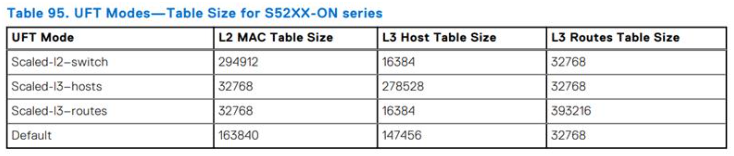
解析度
- 不打算在 OS10 程式碼中修正此問題,因為這是硬體限制。使用以下某些選項來解決此限制
- 使用以下命令檢查目前的硬體設定檔,並在限制範圍內提供足夠的路由和主機。
Note: The command was taken from s5248f.
OS10# show hardware forwarding-table mode all

 Mode             default scaled-l2  scaled-l3-routes scaled-l3-hosts
 L2 MAC Entries   163840   294912     32768            98304
 L3 Host Entries  147456   16384      16384            212992
 L3 Route Entries 32768    32768      131072           98304
- 使用命令監視表空間
"l3 info"在hshell功能表。 - 使用不同的組態隱藏安裝在交換器中的不必要的路由或主機項目。
受影響的產品
S Series, SmartFabric OS10 Software文章屬性
文章編號: 000322394
文章類型: Solution
上次修改時間: 28 1月 2026
版本: 3
向其他 Dell 使用者尋求您問題的答案
支援服務
檢查您的裝置是否在支援服務的涵蓋範圍內。