PowerFlex 4.X: Configuring SNMP on the resources for webhook
摘要: For the SNMP alerts to be forwarded to a site like BigPanda, the load balancer IP address of the management virtual machine is configured on each of the resources individually.
本文章適用於
本文章不適用於
本文無關於任何特定產品。
本文未識別所有產品版本。
說明
Configuring SNMP on the resources for webhook
For the SNMP alerts to be forwarded to a site like BigPanda, the load balancer IP address of the management virtual machine is configured on each of the resources individually.
The resources like CloudLink, IDRAC, and the switches should be discovered and managed in PowerFlex Manager.
Note: For a webhook destination, SNMPv3 is supported for iDRAC.
SNMPv2c is supported for all resource types like CloudLink, iDRAC, and switches.
Identify the SNMP load balancer IP address.
Use this procedure to identify the SNMP load balancer IP address on the management virtual machines.
Steps
To identify the load balancer IP address on the management virtual machine, type:
#kubectl get svc -A |grep -i LoadBalancerExample output:
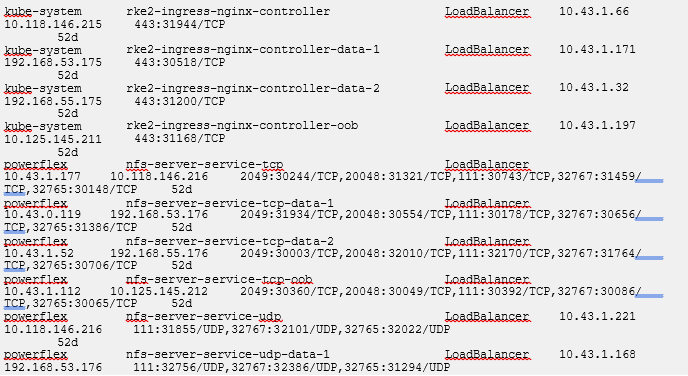
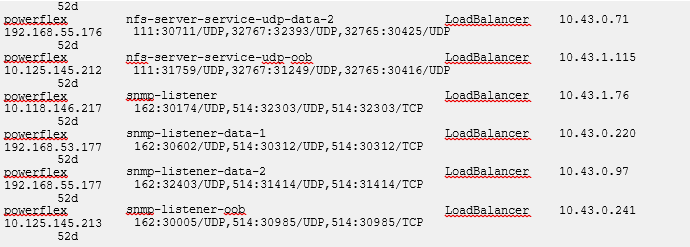
If an OOB SNMP load balancer IP address is not listed, see article PowerFlex 4.0.1 SNMP or syslog alerts not working due to missing OOB load balancer IP
其他資訊
受影響的產品
ScaleIO文章屬性
文章編號: 000324459
文章類型: How To
上次修改時間: 28 7月 2026
版本: 5
向其他 Dell 使用者尋求您問題的答案
支援服務
檢查您的裝置是否在支援服務的涵蓋範圍內。