Warning Message to Connect Battery and AC Adapter Before Updating Dock Firmware
摘要: During a dock firmware update, a message occurs stating "Warning: The AC adapter and battery must be plugged in before the Dock Firmware can be updated. Press OK when they are both plugged in or CANCEL to quit". ...
本文章適用於
本文章不適用於
本文無關於任何特定產品。
本文未識別所有產品版本。
症狀
"Warning: The AC adapter and battery must be plugged in before the Dock Firmware can be updated. Press OK when they are both plugged in or CANCEL to quit" occurs during a dock firmware update.
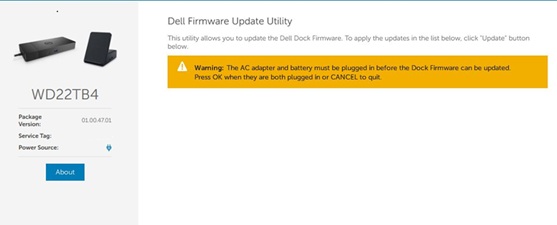
Affected Platforms:
- Dell Thunderbolt Dock - WD19TBS
- Dell Thunderbolt Dock - WD22TB4
- OptiPlex 3090 Ultra
- OptiPlex 7090 Ultra
原因
Dell Firmware Update (DFU) version 5 removed support for System Management BIOS (SMBIOS). As a result, computers without a battery installed may be incorrectly detected, because the firmware can no longer read accurate hardware information from SMBIOS.
解析度
Note: Before starting the update, perform the following:
- Back up all personal data. For more information, refer to Back Up and Recovery.
- Connect the AC adapter.
Updating the Dell Dock WD19/WD22TB4 Firmware Update Utility to version 01.01.01.01,01.01.11.01 or later on the dock resolves the issue. To download and install the firmware, refer to the Driver Update Guide.
受影響的產品
Dell Thunderbolt Dock – WD19TBS, OptiPlex 3090 Ultra, OptiPlex 7090 Ultra, Dell Thunderbolt Dock – WD22TB4文章屬性
文章編號: 000330971
文章類型: Solution
上次修改時間: 16 7月 2026
版本: 6
向其他 Dell 使用者尋求您問題的答案
支援服務
檢查您的裝置是否在支援服務的涵蓋範圍內。