Intel Unison End of Service Announcement
摘要: This article provides information about the discontinuation of the Intel Unison software and provides information about uninstalling the software.
本文章適用於
本文章不適用於
本文無關於任何特定產品。
本文未識別所有產品版本。
說明
Affected Platforms:
- Inspiron 14 5430
- Inspiron 16 5630
- Inspiron 16 7630 2-in-1
- Inspiron 14 Plus 7430
- Inspiron 16 Plus 7630
- Inspiron 13 5330
- Latitude 9440 2-in-1
- Latitude 7440
- Latitude 7340
- Latitude 7350 Detachable
- Precision 5480
- XPS 15 9530
- XPS 13 Plus 9320
- XPS 17 9730
The Intel Unison application is being discontinued and will no longer function correctly or be available for download after June 30, 2025.
| Country or region | Application unavailable for download | Application discontinued |
|---|---|---|
| All Countries | June 30, 2025 | June 30, 2025 |
Intel Unison software is available on eligible Dell Windows-based computers with 13th Gen Intel and newer CPUs. This software allows users to connect their smart phone or tablet to a computer for a focused unified work and communication experience.
Dell Technologies recommends uninstalling Intel Unison from your Dell computer before the end of service date. This frees up storage space and ensures optimum device experience.
To Uninstall the Application:
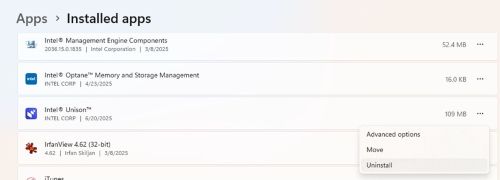
- Select Start, then select Settings > Apps > Installed Apps
- Select Intel Unison, then select Uninstall
受影響的產品
Inspiron 13 5330, Inspiron 14 5430, Inspiron 14 Plus 7430, Inspiron 16 5630, Inspiron 16 7630 2-in-1, Inspiron 16 Plus 7630, Latitude 7340, Latitude 7350 Detachable, Latitude 7440, Latitude 9440 2-in-1, Precision 5480, XPS 13 Plus 9320, XPS 15 9530
, XPS 17 9730
...
文章屬性
文章編號: 000337603
文章類型: How To
上次修改時間: 27 7月 2026
版本: 3
向其他 Dell 使用者尋求您問題的答案
支援服務
檢查您的裝置是否在支援服務的涵蓋範圍內。