PowerFlex:當密碼不是 Base64 編碼時,從備份還原 PFMP 失敗
摘要: 在 PowerFlex Manager 平台 (PFMP) 還原期間,程序會中止,因為指令檔需要 base64 編碼形式的 CIFS 和加密密碼;提供純密碼會導致失敗。
本文章適用於
本文章不適用於
本文無關於任何特定產品。
本文未識別所有產品版本。
症狀
從備份還原 PowerFlex Manager 時,密碼必須為 base64 編碼 格式。
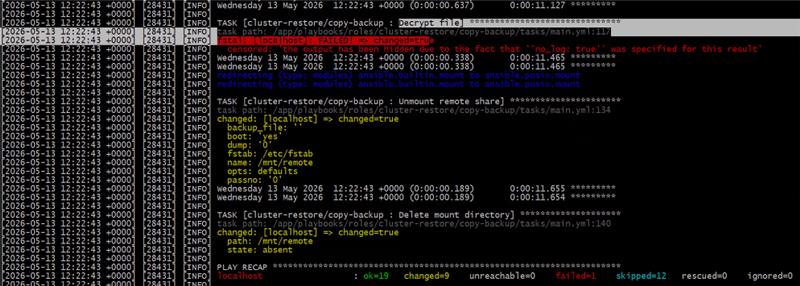
加密密碼錯誤或未正確編碼時的錯誤範例
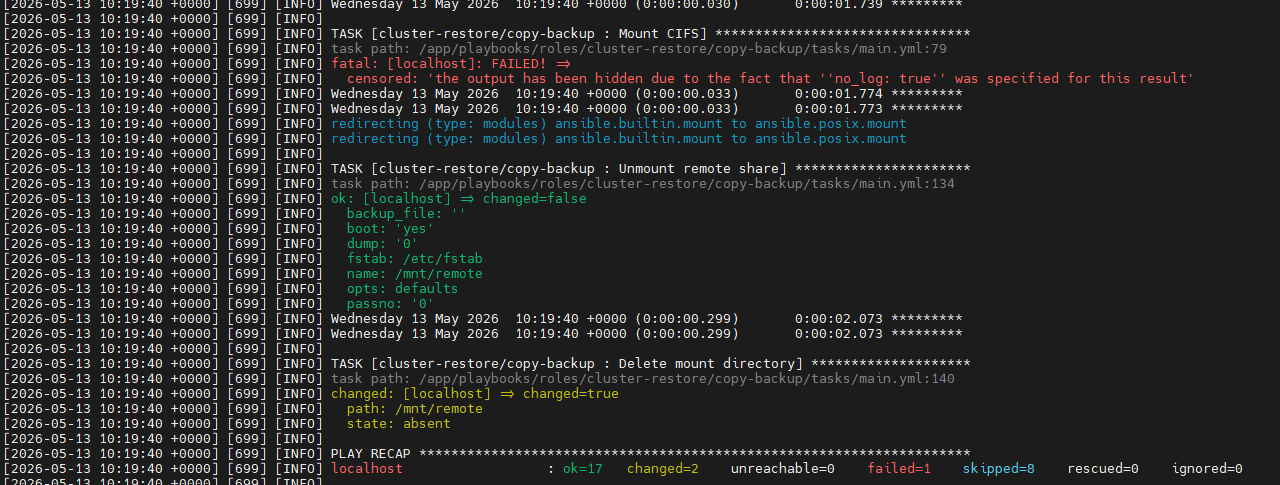
CIFS 密碼錯誤或編碼不正確時的錯誤範例
原因
使用者在下列步驟中輸入 的純 密碼 未編碼 密碼
Please enter CIFS password(base64 encoded). Press enter to skip if username is not required:

Please enter encryption password for backup file (base64 encoded):
解析度
執行下列命令,將密碼編碼為 base64 編碼格式。
echo -n 'MyPassword' | base64更換要編碼的密碼 Mypassword
請務必:
- 將密碼放在 2 個單引號 之間' '
- 在 echo 命令中使用參數 -n 以避免尾隨換行符
範例:

在此範例中, 密碼 被編碼為 cGFzc3dvcmQ=
重新運行還原文稿,並確保在詢問時使用 新的編碼密碼, 而不是您的純密碼
Please enter CIFS password(base64 encoded). Press enter to skip if username is not required: cGFzc3dvcmQ=

Please enter encryption password for backup file (base64 encoded): cGFzc3dvcmQ=
其他資訊
如需還原 PowerFlex Manager 的完整步驟,請參閱下列指南 Dell PowerFlex Manager 4.8.x 使用者指南 ,下方也會列出一份複本。
- 還原 PowerFlex Manager
還原 PowerFlex Manager 會將使用者建立的資料還原至先前儲存在備份檔案中的組態。若要從備份還原,您必須在 PowerFlex Manager 之外執行指令檔。使用者介面不支援從備份還原的功能。
先決條件
在開始還原過程之前,必須滿足以下先決條件:
- 還原叢集必須為完全相同的 PowerFlex 版本和 Kubernetes 版本。
- 還原群集必須具有完全相同的IP位址和配置。
叢集組態必須與進行備份的叢集組態相同。
- 所有 Kubernetes 節點必須具有相同的 IP 位址。
- 所有 Kubernetes 節點必須具有相同的名稱。
- 所有負載均衡器IP位址必須相同。
關於此工作
警示:還原較早的組態會重新啟動 PowerFlex Manager,並刪除在您要復原的備份檔案後建立的資料。任何執行中的工作也可能被終止。
步驟
- 登入最初執行 PowerFlex Manager 平台安裝程式的節點。
- 執行安裝程式套裝隨附的還原指令檔:
./restore_backup.sh- 根據需要提供完成腳本執行的詳細資訊。
系統將提示您提供 SSH 使用者名稱和密碼。此外,系統將要求您指定所有節點的密碼是否相同,並提供備份檔的位置和檔的加密密碼。也可能要求您提供 CIFS 使用者名稱和密碼。允許匿名存取的 CIFS 共用可能不需要 CIFS 登入資料。注意:密碼必須採用base64編碼格式。
若要將密碼編碼為base64,請使用下列命令:
echo -n 'MyPassword' | base64更換要編碼的密碼Mypassword,確保將密碼放在2個qoutes之間' '
範例:
echo -n 'example' | base64
ZXhhbXBsZQ==
若要完成還原腳本的執行,必須指定是在現有群集還是新群集上執行還原操作。
下面是一個代碼片段,其中顯示了還原文稿的範例運行:
[root@sheetal-installer scripts]# ./restore_backup.sh

/usr/local/lib/python3.8/site-packages/paramiko/transport.py:236: CryptographyDeprecationWarning: Blowfish has been deprecated "class": algorithms.Blowfish, Installation logs are available at <Bundle root>/PFMP_Installer/logs/ directory. More detailed logs are available at <Bundle root>/atlantic/logs/ directory. PFMP Installer is about to reset a PFMP cluster based on the configuration specified in the PFMP_Config.json.

Please enter the ssh username for the nodes specified in the PFMP_Config.json[root]:root

Are passwords the same for all the cluster nodes[Y]?:Y

Please enter the ssh password for the nodes specified in the PFMP_Config.json. Password:

Please enter backup file location - Example CIFS: \\1.2.3.4\Lab\backup\file.tgz

Please enter CIFS username. Press enter to skip if username is not required:administrator

Please enter CIFS password(base64 encoded). Press enter to skip if username is not required: UmFpZDR1cyE=

Please enter encryption password for backup file (base64 encoded): UmFpZDR1cyE=

Perform restore on existing cluster? Please enter yes/y or no/n :
結果
還原程序會列印狀態資訊,直到還原完成為止。
受影響的產品
PowerFlex rack, ScaleIO文章屬性
文章編號: 000464562
文章類型: Solution
上次修改時間: 18 5月 2026
版本: 3
向其他 Dell 使用者尋求您問題的答案
支援服務
檢查您的裝置是否在支援服務的涵蓋範圍內。