NVP-vProxy: NMC Virtual Machine Group Preview Fails "Cannot invoke "COM.legato.gst.GtValueList.Iterator()" because "children" is null"
摘要: The NetWorker VMware Protection (NVP) solution is configured for Virtual Machine (VM) backups. The NetWorker server is configured with Dynamic Association (DA) rules to identify VMs at the time of backup. The NetWorker Management Console (NMC) group properties "Preview All Virtual Machines" returns the following error for one or more groups "Cannot invoke "COM.legato.gst.GtValueList.Iterator()" because "children" is null" ...
本文章適用於
本文章不適用於
本文無關於任何特定產品。
本文未識別所有產品版本。
症狀
Dynamic Rules are configured for NetWorker VMware Protection (NVP): NetWorker: vProxy: How to enable a VMware group with Dynamic Association and Rules
The NetWorker Management Console (NMC) group properties window includes a "Preview All Virtual Machines" option.
Using this option for one or more groups produces the following error in the NMC:
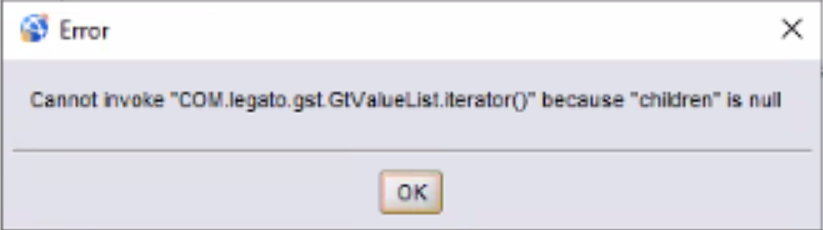
Error: Cannot invoke "COM.legato.gst.GtValueList.Iterator()" because "children" is null
This is observed on large protection groups, spanning hundreds (500+) to thousands of Virtual Machines (VM) in a single group.
Only the NMC preview function is impacted:
- Backup operations on the group succeed.
- The NetWorker Web User Interface (NWUI) "Preview" option lists the Virtual Machines.
原因
This issue was raised to NetWorker engineering.
This is an architectural limitation with the legacy NetWorker Management Console (NMC) which has been improved in the NetWorker Web User Interface (NWUI). These components use two different data collectors:
- NWUI: Uses REST-based communication:
previewWorkItemSelection→VCenterDataAdapter.getMergedWorkitems→VimWrapper.getMergedWorkItemsWithJsonRequest→vproxyInfrastructure.previewVMs
This workflow returns JSON over HTTP and can handle large payloads efficiently, which is well-suited for large-scale VMware environments. - NMC: Uses the legacy GSTD protocol rather than REST. While it leverages the same underlying VM data, it is processed through the legacy GST Java object model (
GtValue,GtValueList), or An intermediate "job as JSON" representation. The observed error occurs within this handling path (COM.legato.gst.GtValueList.Iterator), indicating a limitation in how large datasets are processed.
NetWorker is working as designed.
解析度
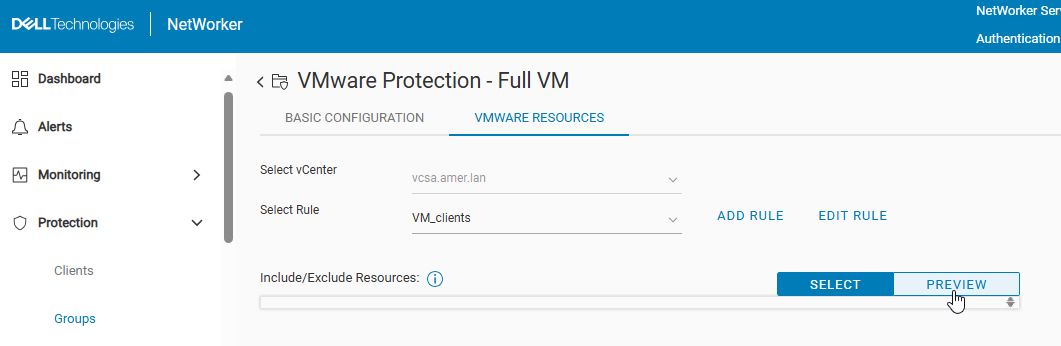
Use the NetWorker Web User Interface (NWUI) "preview" option in the group settings:
- Go to
https://<NetWorker_Server_Address>:9090/nwui - Log in with your NetWorker account. (For example, default Administrator account)
- Go to Protection → Groups.
- Select a VMware protection group, then click Edit,
- Click the VMware Resources tab.
- Click Preview.
其他資訊
The NetWorker VMware Integration Guide states the following:
- Ensure that you do not exceed more than 10 properties or conditions inside a rule definition. There is no limit on the number of rules that can be created in a given NetWorker server, the mentioned limit here applies only to the number of properties or conditions in a single rule definition. Ensure that you do not combine multiple vCenters into the same rule, that is, using one single rule for all the vCenters in your environment is not recommended. We recommend you to have a separate rule created for each vCenter in your environment.
- Total number of virtual machines in a single NetWorker policy:
- Maximum: 2000
- Recommended: 1000
- You can run multiple vProxy policies concurrently if the total number of concurrent backup streams does not exceed the vCenter limits (100 concurrent sessions). For a single vCenter, stagger the schedules for policies to ensure that all the backups for a policy are complete before the backups of the next policy begin.
NetWorker documentation is available through: Support for NetWorker | Manuals & Documents (You must sign i with your Dell support account).
NOTE: The NWUI may also produce preview errors (the page becomes unresponsive) in scenarios where rule definitions exceed the defined limit. Also, errors may appear if the VMs identified by single rule exceed policy limits. For example, the recommended value of 1000 VMs is per-policy; however, a single policy may include multiple workflows. A policy protecting 1000 VMs may consist of 10 workflows with 100 VMs each. This is an example to illustrate VM placement within the NetWorker Policy/Workflow structure.
受影響的產品
NetWorker, NetWorker Management Console產品
NetWorker Family文章屬性
文章編號: 000464593
文章類型: Solution
上次修改時間: 13 5月 2026
版本: 1
向其他 Dell 使用者尋求您問題的答案
支援服務
檢查您的裝置是否在支援服務的涵蓋範圍內。