PowerScale: o sistema de auditoria está inativo
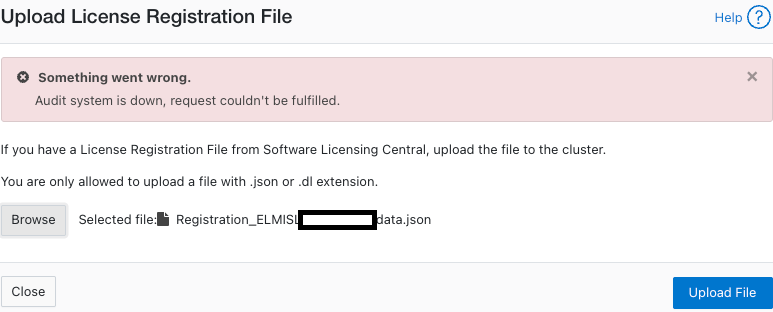
摘要: Uma mensagem de erro "O sistema de auditoria está inativo, a solicitação não pôde ser atendida" é exibida ao tentar ativar uma licença (no modo off-line ou legado).
本文章適用於
本文章不適用於
本文無關於任何特定產品。
本文未識別所有產品版本。
症狀
Erro nas mensagens:
powerscale-3:  2026-06-03T15:34:28.375440-07:00 <3.3> powerscale3(id20) isi_papi_d[64129]: Cannot deliver audit event to the audit daemon. Event payload size (72521) + format length is greater than allowed size (65525)
powerscale-3:  2026-06-03T15:37:33.008372-07:00 <3.3> powerscale-3(id20) isi_papi_d[65089]: Cannot deliver audit event to the audit daemon. Event payload size (72521) + format length is greater than allowed size (65525)
powerscale-3:  2026-06-03T16:18:41.035297-07:00 <3.3> powerscale-3(id20)  isi_papi_d[50492]: STACK Audit system is down, request couldn't be fulfilled.     from --- (---:0):      isi_exception::isi_exception(int, char const*, __va_list_tag*) (OFFSET:134)     api_exception::api_exception(api_error_code, char const*, ...) (OFFSET:146)     uri_manager::execute_request(request&, response&, bool, bool, bool, bool, bool, bool) (OFFSET:2181)
Na interface do usuário:
原因
Um defeito no código em que o tamanho da carga útil excede o limite.
解析度
A engenharia está ciente do problema e está trabalhando em uma correção.
Solução temporária:
- Verifique se a auditoria de configuração está ativada:
powerscale-3# isi audit settings global view
     Protocol Auditing Enabled: Yes
                 Audited Zones: -
               CEE Server URIs:
                      Hostname:
       Config Auditing Enabled: Yes  <<<<<<<<<<<<<<<<<<<<<<<<<<<
         Config Syslog Enabled: No
         Config Syslog Servers: -
     Config Syslog TLS Enabled: No
  Config Syslog Certificate ID:
       Protocol Syslog Servers: -
   Protocol Syslog TLS Enabled: No
Protocol Syslog Certificate ID:
         System Syslog Enabled: No
         System Syslog Servers: -
     System Syslog TLS Enabled: No
  System Syslog Certificate ID:
          Auto Purging Enabled: No
              Retention Period: 180
       System Auditing Enabled: No
powerscale-3#
Nota: Se isso estiver definido como Não, há um problema diferente envolvido. Entre em contato com o suporte da Dell Technologies.
- Defina a auditoria de configuração como desabilitada temporariamente:
powerscale-3# isi audit settings global modify --config-auditing-enabled=false
- Reaplique a licença e, em seguida, habilite-a:
powerscale-3# isi audit settings global modify --config-auditing-enabled=true
文章屬性
文章編號: 000486487
文章類型: Solution
上次修改時間: 08 7月 2026
版本: 1
向其他 Dell 使用者尋求您問題的答案
支援服務
檢查您的裝置是否在支援服務的涵蓋範圍內。