

Unsolved
1 Rookie
•
57 Posts
1
23525
September 11th, 2021 09:00
Aurora R10, BIOS 2.2.1 update, AGESA 1.0.0.6
Good afternoon everyone,
Just noticed the new 2.2.1 BIOS update for the Aurora R10.
This is the list of fixes :
------------------------------------
Fixes & Enhancements
Fixes:
- Fixed the issue where the BIOS cannot be updated using Dell SupportAssist.
Enhancements:
- Added Dell SupportAssist | Pre-Boot System Performance Check warning message that is displayed while booting after Real Time Clock (RTC) reset.
- Enhanced the stability of the system after installing an XMP device. It is applicable on systems with BIOS versions earlier than 2.2.1.
- Reduced the fan noise when the system is idle.
- Fixed the issue where the BIOS cannot be updated using Dell SupportAssist.
Enhancements:
- Added Dell SupportAssist | Pre-Boot System Performance Check warning message that is displayed while booting after Real Time Clock (RTC) reset.
- Enhanced the stability of the system after installing an XMP device. It is applicable on systems with BIOS versions earlier than 2.2.1.
- Reduced the fan noise when the system is idle.
----------------------------------------
So nothing really interesting, I guess the motherboard will still report itself wrongly to cpuz as a x570. I'll eat the bullet and update it to check the AGESA (we can always dream). Same AGESA, my hopes are down again.
Before :
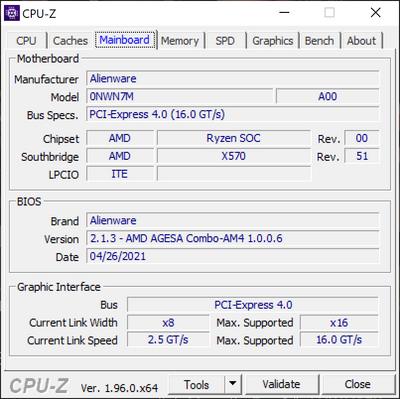
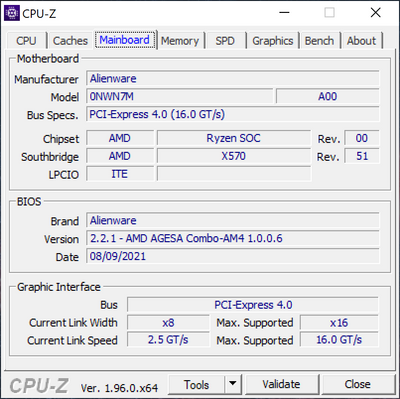
I ll update my post with the new version.
After update:
No Events found!
Vanadiel
8 Professor
•
7.1K Posts
•
29.7K Points
0
September 27th, 2021 09:00
1. Bios should only be updated if any improvements that are included with the BIOS are required. Basically if it works, no need to update the BIOS unless you require a specific feature.
2. The BIOS flash process will show a progress bar from 0 to 100%, and when finished will reboot once. It will warn you not to turn off the computer during this process.
3. The black screen can happen when the memory has to be reconfigured. It could take a few minutes for the boot process to complete in those cases.
4. It's very odd the CPU was found to be defective. I have never heard of that happening...
5. You should only update the BIOS if the system is stable and performs without any errors or issues. Otherwise you might end up with a bad BIOS flash, which usually means a bricked motherboard unless there's a recovery option you can access.
Greg100
2 Intern
•
135 Posts
•
20 Points
0
September 27th, 2021 12:00
Did unplugging the PC resolve the reboot issue once and for all or if the PC is rebooted again does it return to black screen? For me unplugging often allowed a normal boot into Windows but not always. But the next reboot after a successful reboot would result in black screen hang. I forgot to mention that if I rebooted and tried to enter the bios, it was never successful. All of this is what made the Tech arrange for return of my unit.
rj2438
5 Posts
0
September 27th, 2021 12:00
I have encountered the same issue, the reboot after 2.2.1 bios upgrade never ends, I had to shutdown the PC after 10mn. And then I've got a black screen at reboot? i think that the PC is booting but the screen remains black. I have noticed that if I unplug the power cord for few seconds, the PC boots normally
rj2438
5 Posts
0
September 28th, 2021 03:00
The unplugging is just a workaround to continue using the PC. I have open a case to DELL support, they have remotely updated everything ( as all support do ;)) but obviously it doesn't solve the problem. Issue has been escalated to engineering to request a new 2.2.1 bios version otherwise it should be a MB replacement
PCRead
1 Rookie
•
132 Posts
0
September 28th, 2021 04:00
Well, my R10 only half-boots since an upgrade last week. It's a 5900 and 3080 on BIOS 2.2.1
After all the jumping though hoops with Support, the verdict is; engineer with motherboard replacement.
So that's pencilled in for the 11th, as I'll be away next week.
I'm honestly at the point where I'm sorely tempted to do a transplant of the GPU/CPU/RAM etc into a bigger, better breathing case with a proper mobo with proper Gen 4 PCIe.
tc5
2 Intern
•
54 Posts
0
September 29th, 2021 07:00
Thanks again for sharing this update. I also got this message from Dell support, but haven't had time in my schedule to revisit this thread for the past several days.
I haven't heard of this software package either, but I also don't know what firmware / software / code AMD provides to board partners—e.g., Dell—as part of the Board Support Package (BSP) for Ryzen CPUs. "Dominator" could be an internal code-name for a software feature that AMD packages as part of BSP releases—e.g., AGESA, AMD Chipset drivers, or optional AMD software like Ryzen Master. Unfortunately, I doubt we (the end-users) will get any more insight.
If anything, I'm dissapointed that this bug wasn't caught by the engineering group's internal testing before getting released to the Alienware R10 community.
Anyways, I'm just happy that the Alienware Engineering team has acknowledged there's a bug in firmware v2.2.1 and is working on a fix.
tc5
2 Intern
•
54 Posts
1
September 29th, 2021 08:00
Just got a support ticket update:
Looks like the engineering team is planning to fix the, "disappearance of Ryzen CPU performance info in AWCC after upgrading to firmware v2.2.1," issue for R10 systems in a future release of AWCC.
speedstep
11 Legend
•
47K Posts
0
September 29th, 2021 22:00
@Vanadiel
There are other issues with the B550A chipset and the Agesa code.
AGESA 1.2.0.2 is designed to address the CONNECT DISCONNECT USB issues on AM4 platform.
My Asrock B450M Pro 4 board still has those issues so now there is AGESA 1.2.0.3b (Beta) If you tell your system to use PCI-E 4 it still has issues. If you tell your system to use PCI-E 3 its fine.
AGESA for support for AMD Zen 3 CPUs will be Combo AM4 v2 1.x.x instead of AGESA 1.0.0.6 which is confusing by itself.
This can be particularly annoying when playing a game where the keyboard and mouse lockup and stop responding. My work around for this was to use the combo PS2 port which doesn't work when you dont use a PS2 Splitter.
PS/2 Keyboard Mouse Splitter Cable CN-0D4002-12802-818-02G7
This ancient device is from my Dell C610 laptop from 1998.
rj2438
5 Posts
0
October 1st, 2021 13:00
Last update from support, ( no screen display at boot except when unplugging the pc for 30s before strting up). The issue is known by engineering and seems to be located on the graphic card ( rtx30xx), a new vbios version should be available in the coming weeks to fix the problem. wait and see...I'll keep you updated
Greg100
2 Intern
•
135 Posts
•
20 Points
0
October 2nd, 2021 10:00
Interesting. As I mentioned above, I have the AMD 5900X and 3090 with essentially the same problem, after BIOS update and they replaced the CPU, kept the same BIOS 2.2.1, and it works fine. The only difference was that I was also having fatal hardware errors from time to time. So maybe my situation was different. Repair made no mention that the problem could be with the graphics card. I will be curious to see what happens in your case.
deadlyblaze
2 Posts
0
October 2nd, 2021 19:00
Although this is not covered by Dell or your purchased warranty...you could always flash the vbios yourself (be careful or you can end up with a brick). Get GPU-Z and make sure you are downloading the correct vbios.
GPU-Z
https://www.techpowerup.com/download/techpowerup-gpu-z/
RTX 3080 vbios (I'm using version 94.02.59.00.A2). This is how you can also turn on REBAR since DELL didn't push the vbios update.
https://www.techpowerup.com/vgabios/?architecture=&manufacturer=Dell&model=RTX+3080&version=&interface=&memType=&memSize=&since=
Makaniche
9 Posts
0
October 7th, 2021 10:00
I have same machine and I have same problem as you exactly... Can't switch the OC, and when I go to the Bios the options are greyed out and I can't do anything there... have you had any resolve?
heauxingpains
5 Posts
0
October 7th, 2021 11:00
@Makaniche Set your BIOS settings to optimized defaults first, then it will let you change the OC settings within BIOS. There should be an "Optimized Defaults" button on the right hand side of the BIOS.
I used the "Auto" OC setting for both RAM and CPU, and both are operating and running the OC correctly despite AWCC now showing OC settings are turned off.
DELL-Chris M
Community Manager
•
56.9K Posts
•
232.1K Points
0
October 11th, 2021 05:00
Problem = System information is not showing correctly in AWCC (Alienware Command Center)
Solution = An update to AWCC is being created to fix this. Keep checking the PC model driver page for the new version of AWCC. For now, use HWiNFO or other 3rd party apps to monitor CPU usage.
Audal
3 Posts
0
October 13th, 2021 01:00
Hello,
My system is: R10 AMD 5900x with an RTX3080.
I have the same issue as previously described by some other users.
Basically, after upgrading to Bios 2.2.1 , the PC does not reboot.... it will go to a black screen. To make it boot I need to unplug it for some time and then plug it back.
I understand that this is due to a bug in Bios 2.2.1.
I noticed that Bios 2.2.2 has been released on Oct-12....
Would Bios 2.2.2 address the reboot issue?
If yes, how should I proceed to update the Bios? This is not clear to me since the PC does not reboot from Windows... Hence, if I run the Bios 2.2.2. executable, will it install and reboot correctly? or will I get a black screen with a half installed Bios?
Thanks in advance.