

Unsolved
1 Rookie
•
57 Posts
1
23546
September 11th, 2021 09:00
Aurora R10, BIOS 2.2.1 update, AGESA 1.0.0.6
Good afternoon everyone,
Just noticed the new 2.2.1 BIOS update for the Aurora R10.
This is the list of fixes :
------------------------------------
Fixes & Enhancements
Fixes:
- Fixed the issue where the BIOS cannot be updated using Dell SupportAssist.
Enhancements:
- Added Dell SupportAssist | Pre-Boot System Performance Check warning message that is displayed while booting after Real Time Clock (RTC) reset.
- Enhanced the stability of the system after installing an XMP device. It is applicable on systems with BIOS versions earlier than 2.2.1.
- Reduced the fan noise when the system is idle.
- Fixed the issue where the BIOS cannot be updated using Dell SupportAssist.
Enhancements:
- Added Dell SupportAssist | Pre-Boot System Performance Check warning message that is displayed while booting after Real Time Clock (RTC) reset.
- Enhanced the stability of the system after installing an XMP device. It is applicable on systems with BIOS versions earlier than 2.2.1.
- Reduced the fan noise when the system is idle.
----------------------------------------
So nothing really interesting, I guess the motherboard will still report itself wrongly to cpuz as a x570. I'll eat the bullet and update it to check the AGESA (we can always dream). Same AGESA, my hopes are down again.
Before :
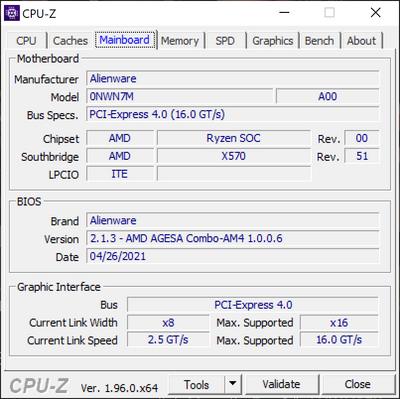
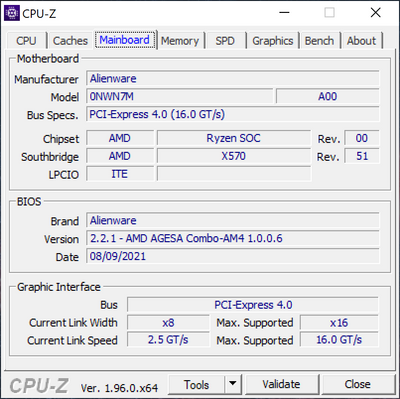
I ll update my post with the new version.
After update:
No Events found!
Vanadiel
8 Professor
•
7.1K Posts
•
29.7K Points
0
October 13th, 2021 05:00
If you can boot into windows, you can use the windows bios update file for your R10.
You can get it the DELL driver site: Dell Drivers
How to update BIOS on an Alienware system: How to update BIOS on an Alienware computer
Greg100
2 Intern
•
136 Posts
•
23 Points
0
October 13th, 2021 10:00
And I might add that if I go to DELL.COM product support and choose search automatically for these updates neither show up and tell me that my system is up to date. If I search manually for BIOS updates these two I mentioned Urgent updates show up. So that confuses me more about whether they should be installed, and why for urgent updates one method shows I need updates and another says I don't. Not sure what to trust anymore.
Greg100
2 Intern
•
136 Posts
•
23 Points
0
October 13th, 2021 10:00
I see today that there are two Urgent driver updates one for 3000 series VBIOS and one for R10 5900X BIOS. There is absolutely no information that I can see that says what these two urgent updates address, whereas in the past they will usually would make some specific statement. My Aurora R10 had the same issue with rebooting after installing 2.2.1 BIOS and had to have the CPU replaced and then it functioned fine. So I am reluctant to apply these urgent updates without knowing more about what they address. Also do these updates address the inability to see CPU temparature in AWCC after BIOS update? Some threads above indicate that Dell says this is a graphics card problem, others a BIOS issue, others say it will be fixed with AWCC update. So some clarity would be appreciated on all of this.
Vanadiel
8 Professor
•
7.1K Posts
•
29.7K Points
0
October 13th, 2021 14:00
The latest updates are always available at the official DELL drivers web site, for your model: Dell drivers
You can sort by date for the latest available updates for your machine. Ensure to slip the slider over to the right, so "show downloads for this PC only" is turned on.
Change log for version 2.2.2 R10 Bios:
Fixes & Enhancements
Fixes & Enhancements
Vanadiel
8 Professor
•
7.1K Posts
•
29.7K Points
0
October 13th, 2021 16:00
I personally prefer my drivers directly from Nvidia. Not that the DELL version is not good, but I prefer to be on the latest drivers whenever possible, and for that the Nvidia game ready drivers are the ones to go for.
If you prefer stability over game support, the Studio drivers are considered the most stable. They are a different branch than the game ready drivers.
Jaxsonnz
62 Posts
0
October 13th, 2021 16:00
I see there are a few graphics driver updates there. Wouldn't one be better to use the NVIDIA GeForce Experience program for this?
Audal
3 Posts
0
October 14th, 2021 01:00
I am getting confused with the purpose of the updates and what they are meant to fix.
My R10 / AMD 9500x AMD / RTX3080 stopped rebooting correctly right after the update to BIOS v2.2.1: Black Screen after reboot... need to unplug power cord and boot again.
This obviously causes issues when we need to run an update (Windows,Bios?,VBIOS?) that requires to reboot the PC, since the PC won't reboot...
Which of the two recent updates should fix this issue?
Any advice on the order they should be installed to get the reboot issue fixed?
and..
Would the VBIOS and BIOS install work correctly knowing that in the current state the PC won't reboot? I want to avoid a half way BIOS update that could prevent the PC from booting at all...
Thanks in advance for the advice!
Vanadiel
8 Professor
•
7.1K Posts
•
29.7K Points
0
October 14th, 2021 05:00
Motherboard BIOS would be the one to update if you are affected by the CMOS issue.
Now if the issue started after you updated the video card bios, and you are connected to a high refresh rate monitor, than it would be the VBIOS update instead.
Audal
3 Posts
0
October 14th, 2021 06:00
Thanks for response...
The issue with the black screen after reboot started right after upgrading to the BIOS v2.2.1 (I did not upgrade the VBIOS).
That said, I am connected to a 144hz monitor...
Should I maybe update both? BIOS and VBIOS? In this case, which one should I update first? and do you foresee any issue during the update process given the fact that the PC cannot reboot on its current state?
This is really my greatest concern... that I go for a BIOS update and it cannot complete as the system is not able to reboot. Hence, not being able to boot at all after the half way BIOS update.
Thanks again!
Greg100
2 Intern
•
136 Posts
•
23 Points
0
October 14th, 2021 20:00
From above
Fixes & Enhancements
Reony
3 Posts
0
October 22nd, 2021 09:00
Oh, nice! So I guess we should uninstall the versions we have now?
tc5
2 Intern
•
54 Posts
0
October 22nd, 2021 09:00
I installed the new software over the older versions—so an uninstall of the old software prior to installing the AWCC and OCC updates is not required.
tc5
2 Intern
•
54 Posts
1
October 22nd, 2021 09:00
Hi everyone—
Updates to the AlienWare Command Center (AWCC) are now available via the Microsoft Store. After launching the new AWCC version, you'll also be prompted to download & update the Alienware OverClocking Controls (OCC).
I can confirm that the software updates in AWCC v5.4.7.0 and OCC v1.3.50.1360 restore CPU performance measurements to the Fusion tab in AWCC.
fbm482
4 Posts
0
October 22nd, 2021 09:00
Funny, I don't see AWCC or OCC on the Microsoft Store.
But found the download.
<ADMIN NOTE: Broken link has been removed from this post by Dell>
Looks like is not finding as this version is for 32bit
Compatible systems does not include Alienware R10 : (
This driver is not compatible
This driver is not applicable for Alienware Aurora Ryzen Edition R10 with Not Applicable. Choose another product to re-enter your product details for this driver or visit the Product Support page to view all drivers for a different product.
Vanadiel
8 Professor
•
7.1K Posts
•
29.7K Points
0
October 22nd, 2021 10:00
If your system is currently working fine, there's no need to update the bios.
I myself am not sure what exactly that change log message means either... I guess it only applies if you cleared the CMOS and experienced system instability afterwards.
Since yours works ok, I would skip this update.