Yes I am following the format you mentioned. In the NaviSphere Console we are seeing the 4 connection as logged in and registered as shown in the image attached.
This would appear on the Storage Adapter screen in the vSphere client. On the other host in the cluster they appeared after performing a ReScan on all HBAs.
Per the Storage Admin at the customer I am working he says it looks the same as the existing ESXi Host that has been discovered. The initial attached image show what he gave to me. All I have access to is the naviseccli command interface I am using in the automation steps.
if you look at storage_img_02.jpg I have attached you will see the results of the port -list -gname for the new host. It matches the other host expect for values in the HBA Devicename and other fields that should be specific to this host and HBAs values.
I've had the exact same issues with needing to upgrade code before a lun would show up. Are you behind HP Flex?
dynamox wrote:
a couple of week ago i had an issue with HP C-class blade that exhibited something similar to your problem, i asked them to flash firmware on the mezzanine card (on-board HBA), bounced the box and it was fine. I know it's a long shot but i wanted to share anyway.
Per the VMWare Admin not to my knowledge. We autodeployed the other server in the cluster and it worked fine. The difference is the Storage Admin added the storage through a GUI.



dynamox
9 Legend
•
20.4K Posts
0
March 6th, 2013 16:00
oh yeah ..make sure to register in nodeWWN:portWWN format.
FWALL-WINDWARD
11 Posts
0
March 6th, 2013 16:00
I am trying to see the Devices and Paths show up as they do on the existing ESXi Host in the cluster.
dynamox
9 Legend
•
20.4K Posts
0
March 6th, 2013 16:00
what do you expect to see ?
FWALL-WINDWARD
11 Posts
0
March 6th, 2013 16:00
Yes I am following the format you mentioned. In the NaviSphere Console we are seeing the 4 connection as logged in and registered as shown in the image attached.
dynamox
9 Legend
•
20.4K Posts
0
March 6th, 2013 17:00
devices and paths of ESX host in Unisphere ?
FWALL-WINDWARD
11 Posts
0
March 6th, 2013 17:00
This would appear on the Storage Adapter screen in the vSphere client. On the other host in the cluster they appeared after performing a ReScan on all HBAs.
FWALL-WINDWARD
11 Posts
0
March 6th, 2013 18:00
Per the Storage Admin at the customer I am working he says it looks the same as the existing ESXi Host that has been discovered. The initial attached image show what he gave to me. All I have access to is the naviseccli command interface I am using in the automation steps.
if you look at storage_img_02.jpg I have attached you will see the results of the port -list -gname for the new host. It matches the other host expect for values in the HBA Devicename and other fields that should be specific to this host and HBAs values.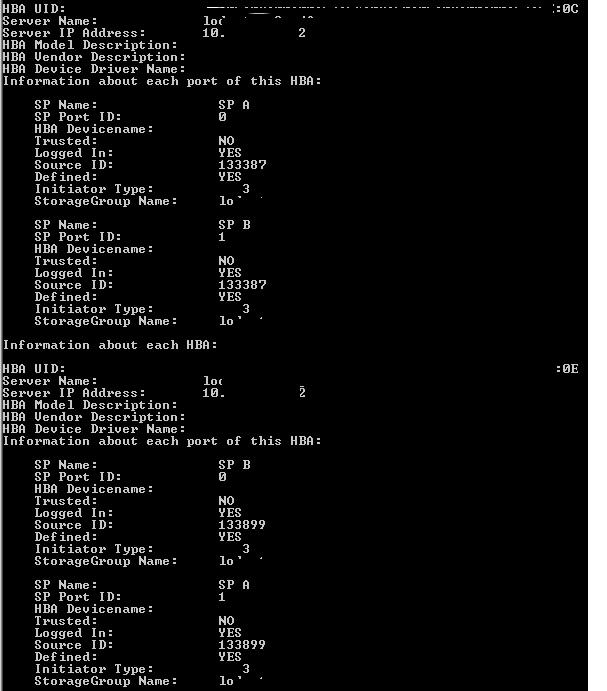
1 Attachment
storage_img_02.jpg
dynamox
9 Legend
•
20.4K Posts
0
March 6th, 2013 18:00
when you select Connectivity Details in Unisphere, things look ok ?
dynamox
9 Legend
•
20.4K Posts
0
March 6th, 2013 18:00
interesting, this is adding new host to an existing storage group? Do you know if he/she select both options when rescanning ?
dynamox
9 Legend
•
20.4K Posts
0
March 6th, 2013 19:00
nope, MDS 9124e in NPV mode
cincystorage
2 Intern
•
467 Posts
0
March 6th, 2013 19:00
I've had the exact same issues with needing to upgrade code before a lun would show up. Are you behind HP Flex?
dynamox
9 Legend
•
20.4K Posts
0
March 6th, 2013 19:00
can you re-register and in addition to failover mode, initiator type also use "-unitserialnumber array"
dynamox
9 Legend
•
20.4K Posts
0
March 6th, 2013 19:00
have not used it, anything specific in host profiles ?
dynamox
9 Legend
•
20.4K Posts
0
March 6th, 2013 19:00
PXE boot ?
FWALL-WINDWARD
11 Posts
0
March 6th, 2013 19:00
Per the VMWare Admin not to my knowledge. We autodeployed the other server in the cluster and it worked fine. The difference is the Storage Admin added the storage through a GUI.