Double click the Offline brings "Device is not ready"
And here are few Tab info from Properties:
1.
2.
3.
4.
The first time or after deletion when I assign the virtual disk and start Disk management in Windows, the pop up asks to initiliaze disk 5 but its fails whth error "Device not ready".



jimmsk
4 Posts
1
November 8th, 2013 04:00
The problem is resolved.
- I have deleted all vNICs and their settings and recreated them again.
- Assigned VLAN ID.
- Reconfigure iSCSI/MPIO
- Reconnected to Clarian storage (I did not unassign Server, nor the Virtual Disk)
- Back to Windows Disk Management !!!
- The disk was GPT protected.
- Moved to CMD with diskpart
- CMD diskpart clean successful
The disk is there online.
Created partition and formatted the disks.
Thank you for your time.
Jimm
Vipin VK
2 Intern
•
812 Posts
0
November 7th, 2013 17:00
Consider moving this discussion to Clariion Support Forum ( Actions > Move ).
What is the status of Virtual Disk in Navisphere ? Is it still initializing ?
jimmsk
4 Posts
0
November 8th, 2013 00:00
Hi,
The status of Virtual Disk in Navisphere is normal as you see below.
Here on Navisphere:
I did destroy and recreate it twice and every time the initialization completed successfully.
Here on Windows 2012 Disk Management:
Vipin VK
2 Intern
•
812 Posts
0
November 8th, 2013 00:00
Can you try initializing ( from disk management ) Disk 5 now ( i.e, after the completion of initialization of the virtual disk).
jimmsk
4 Posts
0
November 8th, 2013 00:00
I cannot. It is greyed out.
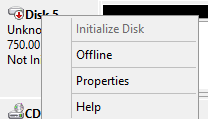
Double click the Offline brings "Device is not ready"
And here are few Tab info from Properties:
1.
2.
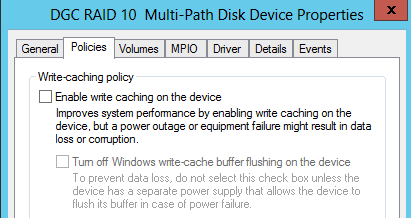
3.
4.
The first time or after deletion when I assign the virtual disk and start Disk management in Windows, the pop up asks to initiliaze disk 5 but its fails whth error "Device not ready".
Thanks.