

Unsolved
This post is more than 5 years old
1 Rookie
•
5 Posts
0
7807
May 10th, 2014 17:00
How to Identify the Hardware installed in your computer to find its driver
If you have a custom designed computer or its an old computer or you reinstalled the operating system not from system recovery ( or PCRestore), You might not be able to install the drivers for all the hardware installed on your computer.If you go to device manager it would be listed under other device as Unknown Device.
So after windows installation you could get into trouble if the device driver is not found or can not be installed automatically because that device would stop working.So here are the steps to get that issue fixed.
Option 1
Step 1. Open device manager by typing Devmgmt.msc at run.
Step 2. Right mouse click on the unknown device and select properties.
Step 3. On the device properties window click on the Details tab and select Hardware Ids.
 |
| Pic-18(a) |
Step 4. Here you only need to note down these two information highlighted in the rectangle shown in the above picture-18(a).So as shown in the picture above note down VEN( Vendor ID) -168C ( as shown in the above picture) and DEV ( Part/Device ID )- 0032 as per the above picture.
Step 5. Go to website http://www.pcidatabase.com/ and then under vendor search Type the Vendor ID as 168C or whatever it shows in your device properties windows for that unknown hardware, and then hit search.
 |
| Pic-18(b) |
Step 6. Now you will see the result on a different page with the name of the Vendor so Click on the Vendor name as shown in the picture -18(c) and then it will show you the list of all the device available from that vendor.
 |
| Pic-18(d) |
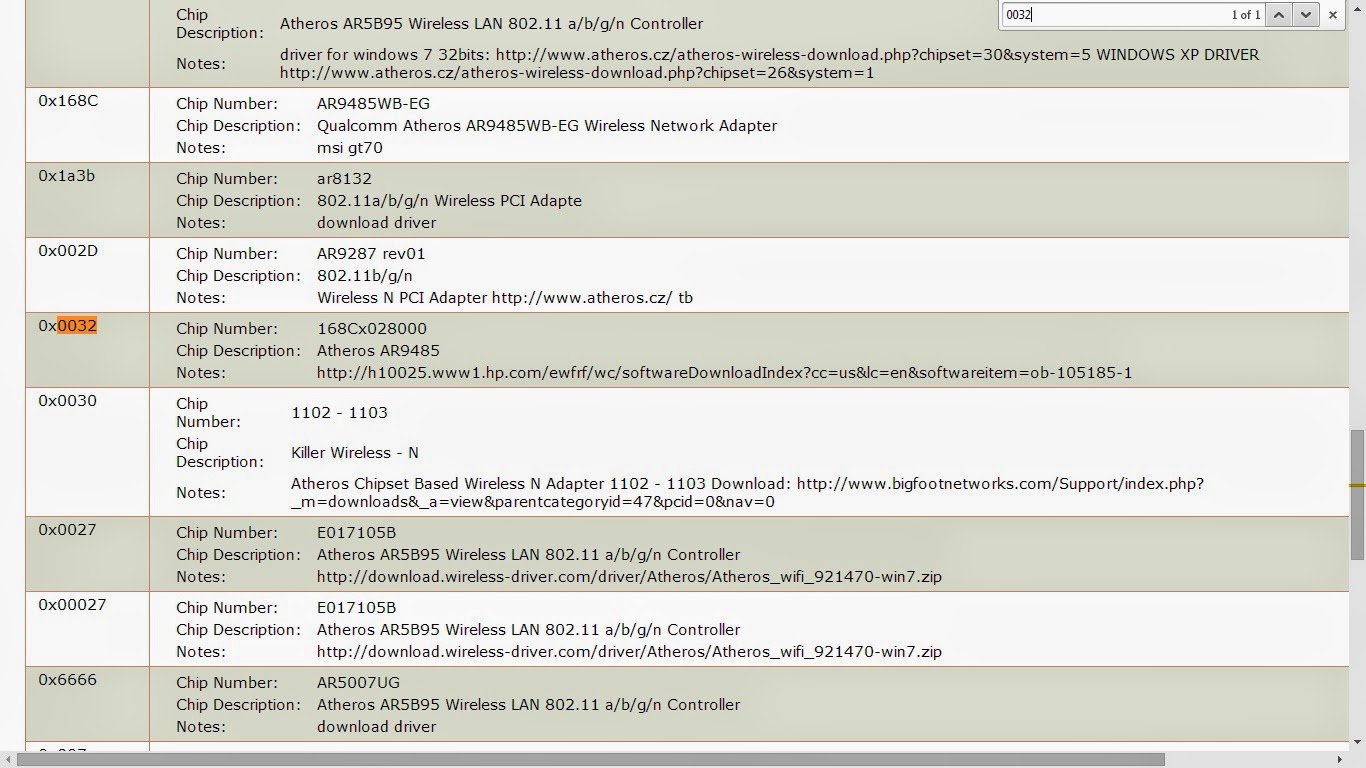
Step 7. so you will need to find the device with code mentioned in the Hardware Ids as DEV which is 0032 in my case.
 |
| Pic-18(e) |
Step 8. Now here it clearly shows you the name and model of the device we were looking for with the link to find the driver of this device under Notes so you can probably go to that vendors website to download the driver for that particular Device Model which is installed in yourPC.
For more detailed information please visit this post http://bookingtohosting.blogspot.in/2014/05/identify-hardware-installed-in-your.html