

Unsolved
This post is more than 5 years old
10 Posts
0
2233
October 3rd, 2018 17:00
R410 HD bay cover
Have a R410 server without the hot swap drives. Two of the HD bays are empty and I wanted to put an HD into one of them. For the life of me, however, I cannot figure out how to get the bay covers off. I even tried wedging it off with a screwdriver, but was careful not to break anything. Nonetheless, nothing moved. There are no buttons to push on the bay covers. Any insight on how to get these off would be helpful.
Thanks!
No Events found!
DELL-Chris H
7 Practitioner
•
9.7K Posts
•
48K Points
0
October 4th, 2018 07:00
Cavkirov,
Would you clarify the chassis you have, as there are several, or send me a private message with the svc tag. I assume that you are seeing something along the lines of this;
If that is the case then they should just be a blank insert as seen below;
Can you confirm internally if that is what you see? If so then it should just be pulling it straight out, or pushing out from the inside at the same time.
If the configuration is different it may have a tab like this to remove;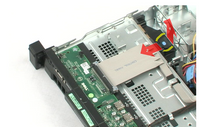
Lastly, verify from the inside if there are retention screws holding the cover in.
Let me know what you see.
cavkirov
10 Posts
0
October 4th, 2018 13:00
Chris, Thanks for the reply. I don't know how to private message you. Regardless, give me some time as the server is at a separate business location and I'll have to access it after work hours. As soon as I get the information, I'll let you know. I can say that the front of the server is all covers like the 2 on the left of the server picture. None of them are hot swapable.
DELL-Chris H
7 Practitioner
•
9.7K Posts
•
48K Points
0
October 5th, 2018 10:00
The ones you are pointing out look to be hotswap drives, do your covers have a red circle on them, if so then hit the red button and then pull the lighter grey part out
If you can would you provide a picture of what specifically you are seeing and wanting to remove?
cavkirov
10 Posts
0
October 5th, 2018 10:00
Sorry, I misspoke there. I meant the 2 on the right side. I'll get a picture but it won't be soon.
cavkirov
10 Posts
0
November 2nd, 2018 15:00
Here's a photo of the front.
DELL-Chris H
7 Practitioner
•
9.7K Posts
•
48K Points
0
November 8th, 2018 05:00
Thank you for the picture and I apologize for the delay.
If you open the server cover, you should see a light blue dot on the back of it (as seen on the back of the picture below) you will need to lift that and then slide it out.
Let me know if this isn't the case.
cavkirov
10 Posts
0
November 20th, 2018 11:00
Thank you! As soon as I've tried, I'll let you know!
cavkirov
10 Posts
0
February 8th, 2019 12:00
Finally, got around to it and it worked like a charm!! Thanks!
Now I have a bigger problem.
So I put the new HD in the server. It has 2 HD's in Raid 1. I had to go into the PERC (whatever it's called) controller where I could see the new HD, but there was no way to make it an independent drive. It could only be a Hot Swap which is pointless in this case.
What's worse.... I decided to try to get into something called the Server Service, something like that. But the server gets to a screen where it saying that it was initializing UEFI and would just sit there and never do anything. In the end I tried rebooting. But since I had already tried going into the Server Service, it kept returning to the UEFI thing.
Looking up on the internet I saw a Dell tech support article where a Dell tech told an individual that he would need to enter Ctrl+E during boot which takes you to some special thing, I forget what it's called. Anyhow, there I had no idea what to do. Again forums. Dell tech support told one guy to just reset it. Bad idea! and I did it.
Now the server wouldn't boot. It doesn't see a boot sector. I finally figured out that if I went past that it would ask me what I wanted to boot up from, I told it to boot from the C: drive and it worked. But now I have to figure out also how to get the server to boot without any prompts. etc.
savvy2
4 Apprentice
•
2.5K Posts
0
February 8th, 2019 13:00
just set mine up 2 days ago.
the first thing to get is the free manual, on this server, and see all those bios hot keys.
+ the manual on your raid card, matched.
page 9 in the users manual covers the control keys, E, R, F1, etc.
go into F1 bios and turn off PXE option first. (Lan boot server ,)
then set boot order, as you want, the raid boot drive, on mine is SSD 256GB, in bay 0, a single drive.
And 3 drive array 10k SAS. raid 5. (later I will try to get my SSD in the DVD slot and make home made power adapter for that, and run 4 drive raid 6. (cross fingers)
but set boot order after creating the RAID array;s' or it is invisible.(behind the PERC)
you now know how to remove dummy drive slot covers. good. (the lever trick)
the inside your server can have 1 of 6 MODEL raid cards, one is in the rise slot on mine called PERC 6/i
it can do RAID 6. others can only do RAID 0 or 1. so this is the first thing to learn and tell use end goal.
running windows server 2012R2 or>? what?
and what kind of raid mode do you want, then next is the how.
Control +R sets up Raid on mine. (works like most raid cards in the world even LSI, and clones)
Control +E sets up iDrac enterprise. mine allows seeing remove logs and has remote GUI virtual desktop.
I set up my idrac to share the NIC 0 port, top rear center, and to a fixed IP there. so I have hosts file remote
that is " r410A.local ======= 10.10.1.190" (and setup in my router too , for reserved IP just for this R410
so my browers lets me use that URL: https://r410a.local/ to reach my R410 IDRAC port. and even turn on the R410 and see the screens in the view remotely. ( just like HP iLo3 here but Dells works far better !)
I also have remote PC with Anydesk, program that works same way, (remote viewer)
some raid cards can not be set as single raid 0 but mine does.
the other odd thing is my RAid card has no name, I stared at it for long time only codes there.
but is a R6/I card. this card has small wire cable to hidden battery up front, if you see that it the good RAID.
the riser card has 2 slots, one long and black (Pci-express real) mine is here. raid 6/i/ IIRC.
and short white slot (dell adapter slot) only works on dell cards.
the PERC H700 ( one fine card this (fast) can be put in the black riser long slot. with longer cable.
The thing to watch out for ,is Some raid cards can not do single drive or JBOD. (as a gen.rule )
the spec sheet shows on 410, options as....
PERC H200 (6Gb/s)
PERC H700 (6Gb/s) with 512MB battery-backed cache; 512MB, 1GB Non-Volatile battery-backed cache
SAS 6/iR (the one not to have does RAID 0 and 1 only.) but the SAS 6/iR also supports non-RAID/JBOD when drives are not configured in a VD,
PERC 6/i with 256MB battery-backed cache (mine)
PERC S100 (software based)
PERC S300 (software base
good luck, with your build out.
theflash1932
11 Legend
•
16.3K Posts
0
February 8th, 2019 13:00
"I had to go into the PERC (whatever it's called) controller where I could see the new HD, but there was no way to make it an independent drive"
PERC is the name of the RAID controller, CTRL-R takes you to its configuration utility. Your controller does not support non-RAID (independent non-RAID drives passed through to the OS), so for a single drive, you would need to set it up as a RAID 0.
cavkirov
10 Posts
0
February 8th, 2019 18:00
I have RAID1 with two 256(?) GB drives. The server has Windows 2008 R2 on it. I cannot reinstall as there are too many things configured on this server. I have a new 500 GB drive. Could I convert to RAID5 with the new drive without losing anything?
Otherwise I still have the problem of getting the server to boot right.
cavkirov
10 Posts
0
February 8th, 2019 18:00
Great! But breaking the RAID would mean breaking the OS. And reinstalling is not an option.
theflash1932
11 Legend
•
16.3K Posts
0
February 8th, 2019 20:00
If you have two 256GB drives, I'm assuming they are SSD's ... 500GB I would assume is an HDD. You cannot mix SSD/HDD in an array, so the answer, with given assumptions, is no, you cannot convert this setup to RAID 5. However, if your drives are all the same type, AND you are using an H700 or PERC 6, you CAN convert it to a RAID 5. If you are using an H200 or SAS 6, they are not capable of RAID 5. If you are using an S100 or S300, then, well, they are garbage ... don't ever use RAID 5 on them, in fact don't ever use them at all.
I may have missed it, but why are you talking about breaking the RAID? I didn't notice anywhere recent where that was suggested.
I didn't understand your boot issue. Is your boot mode set to UEFI and it is only able to boot when you select that legacy boot option from the UEFI boot menu? If so, just set your boot mode to BIOS ... or you should be able to change the boot order.