

Unsolved
14 Posts
0
1200
August 16th, 2022 11:00
OpenManage login lost
I lost the login. How do I reset login on OpenManage in Server 2012.
I need to initiate replacing the drive as the swap did not initiate the rebuild.
No Events found!
Unsolved
14 Posts
0
1200
August 16th, 2022 11:00
I lost the login. How do I reset login on OpenManage in Server 2012.
I need to initiate replacing the drive as the swap did not initiate the rebuild.
Top
DELL-Young E
Moderator
•
5.4K Posts
•
37 Points
0
August 16th, 2022 20:00
Hi, thanks for choosing Dell. OpenManage login is same as the OS's, shares the same account.
mjsksk
14 Posts
0
August 17th, 2022 10:00
I'm trying to use my domain admin account that I'm currently logged in to. It doesn't work.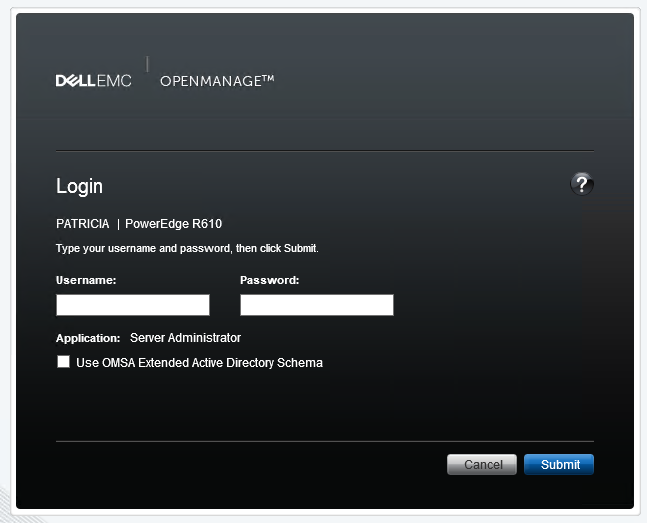
DELL-Chris H
7 Practitioner
•
9.7K Posts
•
48K Points
0
August 17th, 2022 11:00
Mjsksk,
Are you seeing a windows login prior to the OpenManage one? If so you need to cancel that windows login prompt and then use your windows credentials in the OpenManage login page, after cancelling the windows login request.
Also, are you trying from IE or another browser, I would go with IE if not currently.
Let me know what you see.
mjsksk
14 Posts
0
August 17th, 2022 12:00
After I log in with the local admin account or domain admin account I click here.
I get this login where I'm trying to log in via IE.
Still no luck.
mjsksk
14 Posts
0
August 17th, 2022 13:00
It thinks for a second and won't do anything.
mjsksk
14 Posts
0
August 17th, 2022 13:00
Also, I'm not sure where can I locate OMSA version.
DELL-Chris H
7 Practitioner
•
9.7K Posts
•
48K Points
0
August 17th, 2022 13:00
Would you confirm what you see after trying to login, are you seeing a "Login Failed" or does it just not do anything?
Also, what is the specific version of OMSA you are using?
Let me know.
DELL-Young E
Moderator
•
5.4K Posts
•
37 Points
0
August 17th, 2022 23:00
Hi as far as I know, you still can use the local administrator account if your system is tied to the domain controller. Could you try one from another admin group?
mjsksk
14 Posts
0
August 18th, 2022 10:00
Hi. I tried both. The domain admin account and local admin account. Both doing the same thing.
DELL-Chris H
7 Practitioner
•
9.7K Posts
•
48K Points
0
August 18th, 2022 12:00
Mjsksk,
In Windows, you can identify the OMSA version under Programs and Features.
mjsksk
14 Posts
0
August 18th, 2022 14:00
It is 9.1.0
Thanks, Chris.
DELL-Young E
Moderator
•
5.4K Posts
•
37 Points
0
August 18th, 2022 22:00
Hi, as far as I know you can try with the OS admin account or the one with root access.
Or could you try this on OMSA? https://dell.to/3K3zlxU
mjsksk
14 Posts
0
August 19th, 2022 07:00
Hi Chris. The screenshot will tell you many words. There is no _ in a name of the server.
DELL-Chris H
7 Practitioner
•
9.7K Posts
•
48K Points
0
August 19th, 2022 07:00
Mjsksk,
Would you confirm if a _ is in the name of the server. as older OMSA would just not let you login if the name had a _ since it's an invalid DNS name for WIndows. Accessing it via IP:1311 works fine.
Let me know.
mjsksk
14 Posts
0
August 19th, 2022 07:00
I did try the local admin account. The root access you mean local admin? What is OMSA specifically?