

This post is more than 5 years old
2 Intern
•
167 Posts
0
20200
September 10th, 2018 08:00
T3620 power supply adapter for atx standard
Hi all,
Anyone tried to put a standard ATX power supply in a workstation such as the T3620?
It seems that an adapter would be required. It's sad that Dell would sell a Workstation with such a poor power supply. Their cutting corners is rather evident, especially when you see the T58xx and 76xx with such awesome power options.
Check out this ebay auction that is supposedly selling these adapters!
No Events found!
DELL-Alasdair R
6 Operator
•
754 Posts
1
September 11th, 2018 04:00
The biggest Dell PSU for the 3620 is 365W. If that's not big enough, there's a thread here discussing a similar issue:
https://community.spiceworks.com/topic/1650227-precision-3620-power-supply
CharlesIsWorking
2 Intern
•
167 Posts
0
September 10th, 2018 14:00
Any wisdom on this topic, dudes? Anyone know of any Dell adapters? Or even Dell power supplies that can power a big ol' gpu?
CharlesIsWorking
2 Intern
•
167 Posts
0
September 11th, 2018 08:00
Thanks for that response. Looks like there is an amazon adapter that will work, as linked in that thread on spiceworks. It does appear to be the same as the one I linked.
https://www.amazon.com/dp/B01A210HKO
There was one response from a person that did have success using the 365w dell power supply to power an aftermarket gpu, so maybe that's all we needed. Ah well, I ordered one of the adapters and will hopefully post back with results.
TPHK
2 Intern
•
53 Posts
•
235 Points
0
November 5th, 2020 03:00
If it is of any use to any 3620 owner worried about taking the plunge, I just installed an ATX Corsair TX 750M PSU into my 3620 workstation. Dimensions are those of the standard Dell 365w PSU so it was a simple drop in replacement.
The semi modular PSU is perfect. With a full modular you are still going to have to connect the above 2 cables anyway so there would be no gain/advantage but at greater cost.
However, if you don't use a modular or semi modular, you will have a lot of pointless excess cables flapping around inside the chassis interrupting the airflow and looking messy.
Mejnour
1 Rookie
•
3 Posts
•
11 Points
0
July 7th, 2026 18:51
Hi, I am using the adapter but in a different case. Do you know where the power jumper to start the MB is?
bradthetechnut
9 Technologist
•
9.6K Posts
•
40.6K Points
0
July 8th, 2026 02:04
@Mejnour
#19. front power switch connector
(edited)
Mejnour
1 Rookie
•
3 Posts
•
11 Points
0
July 8th, 2026 18:31
Thanks for the reply mate. Do you know if I have to connect a system fan on number 14 for the MB to turn on? Because I use a screwdriver on number 19 and it does not turn on. I also have the open case button on number 12 plugged in. Please advise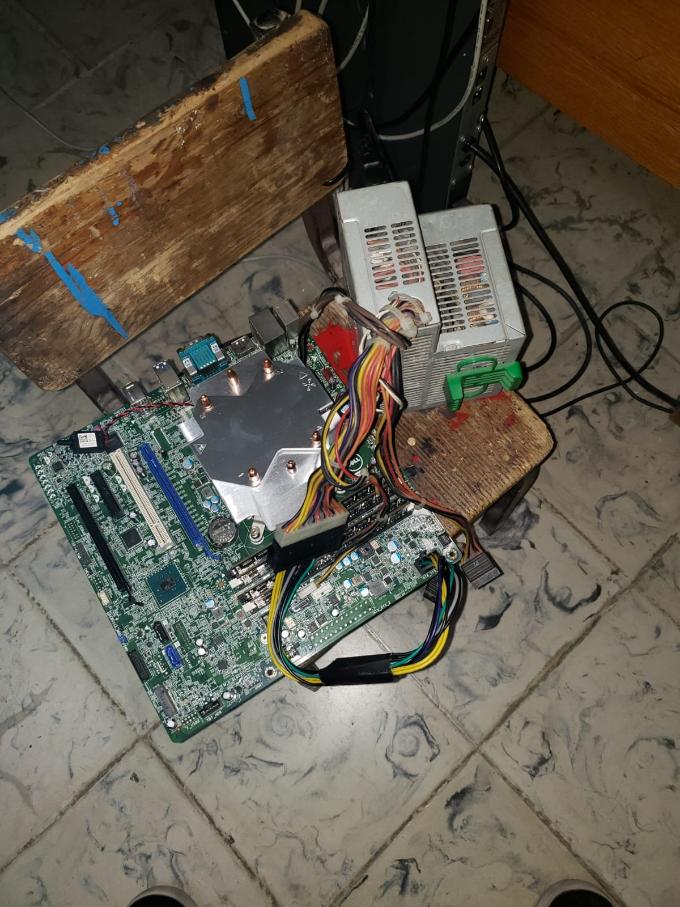
bradthetechnut
9 Technologist
•
9.6K Posts
•
40.6K Points
0
July 9th, 2026 03:05
If you're direct shorting fan headers, MB might not turn on.
If a fan isn't plugged in, MB should still turn and simply give error message. Then it's F1 to continue as normal.
Mejnour
1 Rookie
•
3 Posts
•
11 Points
0
July 13th, 2026 18:00
I appreciate your help mate. Thank you.