I would start with updating the server, as it is currently 4 updates back on BIOS (two of those updates are marked urgent) and 5 updates back on iDrac. You will need to walk the BIOS and iDrac up together, making sure to hit each urgent update, you don't want to jump to the latest as it can damage the server. After those are updated I would run the OS Driver Pack update and then install the OS via the Lifecycle Controller.
Hi Chris, I just tried this but cannot find a way to install the updates without first installing WIndows. The OS Driver Update pack requires Windows. Also, the server does not have the Lifecycle Controller installed only Unified Server Configurator. Thanks
You can update the Driver Pack using Lifecycle Controller. 1. Copy the file to a USB device 2. Plug in the USB device and enter in to Platform Update 3. Select the USB device and navigate through the directory contents to find the executable 4. Launch the executable and follow the instructions provided.
but unfortunately within Unified Server Configurator there is no such option as Platform Update so I am back at square one. The only option available within Unified Server Configurator is OS Deployment, using this option allows me to choose the Depp FTP for the drivers (which does not work for 11G servers), or a USB drive but it then asks for the Catalog Location. I have tried just clicking next at this point but it throws up an error about not finding the catalog file.
Sorry for the delay, the links previously I gave were based on 2008, with 2012 there is updated BIOS, iDrac, and Lifecycle Controller versions. When you update the LCC to 1.7.5 the options should be correct then, but start with the BIOS and iDrac.
THe om_smtd package is iso and I can run it from usb before server installation but the others are EXE. How do I update the lifecycle controll and bios when I have no OS yet?
I'm in the middle of OS deployment in the LC utility and I get message. What does it mean and what file is it looking for? I put the OM_SMTD on a usb and the other two files, but it makes no difference. I can't get past that.
Would you clarify what process you are using and the steps performed?
Also, if you are installing the OS via the Lifecycle Controller, you wouldn't need the SMTD. What you would want to do is download the OS Driver pack, found here. Then run it to extract the file, copy that file to USB, then go to the Lifecycle Controller - Platform Update and select the USB device and navigate through the directory contents to find the executable. Then launch the executable and follow the instructions provided. Once you do that then the driver files needed for the OS install are already present on the Lifecycle Controller so you don't need anything additional to install the OS.



DELL-Chris H
Moderator
•
9.7K Posts
0
April 11th, 2019 10:00
Onyeka-westlondonsecurity.com,
I would start with updating the server, as it is currently 4 updates back on BIOS (two of those updates are marked urgent) and 5 updates back on iDrac. You will need to walk the BIOS and iDrac up together, making sure to hit each urgent update, you don't want to jump to the latest as it can damage the server. After those are updated I would run the OS Driver Pack update and then install the OS via the Lifecycle Controller.
You can find the updates here.
OS Driver Pack
Installing with LCC
Let me know how it goes.
onyeka-westlondonsecurity.com
1 Rookie
•
3 Posts
0
April 12th, 2019 12:00
DELL-Chris H
Moderator
•
9.7K Posts
0
April 12th, 2019 13:00
onyeka-westlondonsecurity.com
1 Rookie
•
3 Posts
0
April 14th, 2019 12:00
Thanks Chris,
but unfortunately within Unified Server Configurator there is no such option as Platform Update so I am back at square one. The only option available within Unified Server Configurator is OS Deployment, using this option allows me to choose the Depp FTP for the drivers (which does not work for 11G servers), or a USB drive but it then asks for the Catalog Location. I have tried just clicking next at this point but it throws up an error about not finding the catalog file.
Regards
DELL-Chris H
Moderator
•
9.7K Posts
0
April 19th, 2019 13:00
Sorry for the delay, the links previously I gave were based on 2008, with 2012 there is updated BIOS, iDrac, and Lifecycle Controller versions. When you update the LCC to 1.7.5 the options should be correct then, but start with the BIOS and iDrac.
bananaleaf
1 Rookie
•
1 Message
0
February 29th, 2024 18:15
@onyeka-westlondonsecurity.com
Did you find out how to install windows server yet?
DELL-Charles R
Moderator
•
4.7K Posts
0
February 29th, 2024 21:38
Hello,
You can use the SMTD tool to install OS. It is a menu driven process and contains the system's drivers for OS .
Dell EMC Systems Management Tools and Documentation (SMTD) DVD ISO, v.9.2.0
https://dell.to/3wIpOtn
ctrobertson
1 Rookie
•
2 Posts
0
November 19th, 2024 15:27
THe om_smtd package is iso and I can run it from usb before server installation but the others are EXE. How do I update the lifecycle controll and bios when I have no OS yet?
ctrobertson
1 Rookie
•
2 Posts
0
November 19th, 2024 15:34
I'm in the middle of OS deployment in the LC utility and I get message. What does it mean and what file is it looking for? I put the OM_SMTD on a usb and the other two files, but it makes no difference. I can't get past that.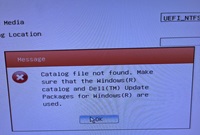
DELL-Chris H
Moderator
•
9.7K Posts
0
November 19th, 2024 20:05
Ctrobertson,
Would you clarify what process you are using and the steps performed?
Also, if you are installing the OS via the Lifecycle Controller, you wouldn't need the SMTD. What you would want to do is download the OS Driver pack, found here. Then run it to extract the file, copy that file to USB, then go to the Lifecycle Controller - Platform Update and select the USB device and navigate through the directory contents to find the executable. Then launch the executable and follow the instructions provided.
Once you do that then the driver files needed for the OS install are already present on the Lifecycle Controller so you don't need anything additional to install the OS.
Let me know if this helps.