
Solved!
Go to SolutionClosed
S
slrogers1970
1 Rookie
•
1 Message
1
395860
August 13th, 2015 17:00
how do I bypass a password window?
I had an issue with a Kaspersky product on my dell 620 / windows 7 computer. Kaspersky Technical Support suggested I reinstall the product. I uninstalled the anti - virus and then clicked restart as prompted.....as soon as it got to the window that asks for my password - before going on to the startup page - my mouse and keyboard froze dead...devices only work the first few moments during startup. How can I bypass the password page so I can fix the problem and get the mouse and keyboard working again.....I'd love to do a total restore on the darn thing..... but I bought it at sam's club and the computer did not come with any windows 7 disks - which tells me it has to be a referbished model. I tried to use the drivers disks, but no go. Hopefully someone here can help...... both Kaspersky and mt internet providers were a bust.
278466
0
Posted August 15th, 2015 18:00
At this stage since you have no Reinstallation Media the best thing for you to do is to Clean Install Windows 10130 and use it as a stepping stone to get Windows 10 Pro:
http://dellwindowsreinstallationguide.com/windows-xpvista-%e2%86%92-windows-10-free-upgrade/
Is this a Dell Latitiude D620? If so what processor do you have as not all processors in this model are 64 Bit capable.
138423
0
Posted February 1st, 2018 18:00
@AmitKr404 wrote:Want to bypass Windows 10 password without changing the current password or resetting password?
In case, if you want to get rid of Windows 10 login screen and log into your user account automatically. then you should perform these steps:
Type netplwiz in the Run dialog box to open User Accounts.
Select the user account whose password you want to remove.
Uncheck “Users must enter a user name and password to use this computer” and then click on Apply.
Enter the username and password on Automatically sign in box and click on OK. That’s it!
This is the most simple Windows 10 password bypass method.
Source: http://www.zerodollartips.com/reset-windows-10-password/
I hope it helps!!
Windows OS has a default administrator account created during Windows installation. By default, the built-in administrator account is named Administrator and has no password in it. But Windows 7 usually has this account disable, you need to enable the account before. If forgot Windows 7 password, try to follow this tip.
Step 1: Start your computer and press "F8" while the computer boots up. The Advanced Boot Options screen appears.
Step 2. Scroll down to "Safe Mode" and press "Enter." Your computer starts in Safe Mode.
Step 3. Click on the "Administrator" account that appears on the Windows logon screen. After entering system, click on "Start" and “Control Panel" to change your other account password.137139
0
Posted February 5th, 2018 19:00
@Jeisolly112 wrote:
@AmitKr404 wrote:Want to bypass password on Windows without changing the current password or resetting password?
In case, if you want to get rid of Windows 10 login screen and log into your user account automatically. then you should perform these steps:
Type netplwiz in the Run dialog box to open User Accounts.
Select the user account whose password you want to remove.
Uncheck “Users must enter a user name and password to use this computer” and then click on Apply.
Enter the username and password on Automatically sign in box and click on OK. That’s it!
This is the most simple Windows 10 password bypass method.
I hope it helps!!
Windows OS has a default administrator account created during Windows installation. By default, the built-in administrator account is named Administrator and has no password in it. But Windows 7 usually has this account disable, you need to enable the account before. If forgot Windows 7 password, try to follow this tip.
Step 1: Start your computer and press "F8" while the computer boots up. The Advanced Boot Options screen appears.
Step 2. Scroll down to "Safe Mode" and press "Enter." Your computer starts in Safe Mode.
Step 3. Click on the "Administrator" account that appears on the Windows logon screen. After entering system, click on "Start" and “Control Panel" to change your other account password.I have seen this video on Youtube ,the iSeepassword and Tunesbro are very helpful for beginners. There are have some detaily steps about how to bypass Windows 10 password ,
137085
0
Posted February 5th, 2018 23:00
@AmitKr404 wrote:Want to bypass Windows 10 password without changing the current password or resetting password?
In case, if you want to get rid of Windows 10 login screen and log into your user account automatically. then you should perform these steps:
Type netplwiz in the Run dialog box to open User Accounts.
Select the user account whose password you want to remove.
Uncheck “Users must enter a user name and password to use this computer” and then click on Apply.
Enter the username and password on Automatically sign in box and click on OK. That’s it!
This is the most simple Windows 10 password bypass method.
I hope it helps!!
Actually, you missed a key point here. For a locked computer, you don't have the priviledge to access such a GUI box unless you boot into safe mode or open command prompt. I have found another trick recently. Once you reset or remove the login password from the computer, the login screen will disappear automatically.
104319
0
Posted June 20th, 2018 01:00
Hi
When I use "netplwiz" in the Run dialogue box, it asks for admin password. The main issue is this that I dont have password. What to do?
Ijaz
31281
0
Posted July 19th, 2018 23:00
@danielalbferto wrote:I think its a very technical task. Try Passfolk Saverwin free, it's totally free and read full guide How to reset a password window step by step guide. I think it will help you. Thanks.
164973
1
Posted August 15th, 2018 03:00
@Baskery wrote:
You are able to get into your dell laptop with other user account , in this way , you can delete the old password and user account ,But if you're not very good at computer skills.You'd better not try it easily, you can try using other methods or tools to bypass password for your Windows.
The Microsoft can help you to create a bootable disc , the old login password can be removed from your laptop with it ,
Or you can do what as they say with these free tools :
https://www.lifewire.com/how-to-remove-passwords-using-offline-nt-password-registry-editor-2626167
30779
0
Posted October 23rd, 2018 17:00
@AmitKr404 wrote:Want to bypass Windows 10 password without changing the current password or resetting password?
In case, if you want to get rid of Windows 10 login screen and log into your user account automatically. then you should perform these steps:
Type netplwiz in the Run dialog box to open User Accounts.
Select the user account whose password you want to remove.
Uncheck “Users must enter a user name and password to use this computer” and then click on Apply.
Enter the username and password on Automatically sign in box and click on OK. That’s it!
This is the most simple Windows 10 password bypass method.
Source: http://www.zerodollartips.com/bypass-windows-10-password/
I hope it helps!!
Great solution! It worked!
164437
0
Posted November 13th, 2018 00:00
@paskeas wrote:
@vomersy wrote:
@Baskery wrote:
You are able to get into your dell laptop with other user account , in this way , you can delete the old password and user account ,But if you're not very good at computer skills.You'd better not try it easily, you can try using other methods or tools to bypass password for your Windows.
The Microsoft can help you to create a bootable disc , the old login password can be removed from your laptop with it ,
Or you can do what as they say with these free tools :
https://www.mobiledic.com/windows-topic/unlock-a-locked-windows-computer.html
https://www.lifewire.com/how-to-remove-passwords-using-offline-nt-password-registry-editor-2626167
This is a very helpful thread about bypassing Windows password, and I can find a lot of helpful solutions here .
If i were you , i won't try more free tools (Such as the Ophcrack,Kon-Boot and NT Password ) ,I'd rather pay a few dollars for it,my friends comment on them -- wasting time .

AmitKr404
2 Posts
278467
0
Posted August 8th, 2017 06:00
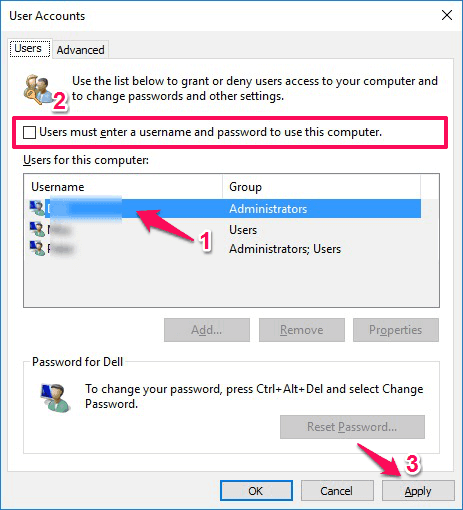
Want to bypass Windows 10 password without changing the current password or resetting password?
In case, if you want to get rid of Windows 10 login screen and log into your user account automatically. then you should perform these steps:
Type netplwiz in the Run dialog box to open User Accounts.
Select the user account whose password you want to remove.
Uncheck “Users must enter a user name and password to use this computer” and then click on Apply.
Enter the username and password on Automatically sign in box and click on OK. That’s it!
This is the most simple Windows 10 password bypass method.
Source: http://www.zerodollartips.com/bypass-windows-10-password/
I hope it helps!!