

Unsolved
1 Rookie
•
42 Posts
0
15596
November 5th, 2021 12:00
XPS 8940, cannot update BIOS 2.2.0, black screen
XPS 8940 (march 2021, the warranty is good). Windows 10 Enterprise. Cannot update BIOS to 2.2.0. Not from Windows (XPS_8940_2.2.0.exe), not from USB stick, BIOS Boot Menu (XPS_8940_2.2.0.exe, nor BIOS_IMG.rcv), not from Dell Update 4.4.0 application, not from Windows Update. It's restarting, after that black screen (power button light is on, solid white) forever, monitor shows "No HDMI signal from your device". When manually start the comp - bios still 2.1.3. Tried to downgrade it to 2.1.1. After that can update to 2.1.3 with no problem. But not to 2.2.0.
No Events found!
AuroraSu
28 Posts
0
November 17th, 2021 11:00
Hi DELL-Cares,
If you have solution you suppose open as public not private. I have on going Service Request for exactly same issue. The support engineer seems not aware about the issue that result they had me replaced motherboard. Of course result are same as not fixed issue. This seems disaster on DELL software quality control, failed on 2.2.0 then 2.3.0 keep same mistake. I really like to take 2.3.0 update since update addresses the Intel Security Advisory INTEL-SA-00562. But I don't want lost PCIe x 4 port.after update.
Vadimnj
1 Rookie
•
42 Posts
0
November 25th, 2021 10:00
Happy Thanksgiving everyone! A bit of humor. That's what I've got from DELL-Cares:
Anyone have an idea how to do this without at least monitor and keyboard?
AuroraSu
28 Posts
0
November 25th, 2021 12:00
The person who wrote that message must have out scaled IQ or from alternate universe.
DELL-Chris M
Community Manager
•
56.9K Posts
•
232.1K Points
0
November 26th, 2021 05:00
Vadimnj,
I think they meant remove all USB Type-A (mouse, keyboard, Logitech webcam, etc.) devices from the S3220DGF USB Type-A downstream ports. Reconnect all USB Type-A devices directly to the XPS 8940 rear USB Type-A ports.
Vadimnj
1 Rookie
•
42 Posts
0
November 26th, 2021 06:00
Yes, Chris. Of course, I knew, what to do. Just laughing. And btw, it didn't work. PCIe x 4 is still lost. Now, I'm waiting for reply from "Level-3 support team". "It would take 2-3 business days to hear from them".
It's a same problem, as a lot of people have with XPS 8940, BIOS versions after 2.1.3. And no matter what kind of PCIe adapter or SSD they're using.
AuroraSu
28 Posts
0
December 3rd, 2021 09:00
Totally agree with you. I had asked them to provide status of producing the issue. The result is, yesterday they sent me similar email like yours "standard troubleshooting instruction". Without answering my request for status of producing the issue. I really wonder if they even tried to reproduce the issue. I will let you know if I get any updates.
Vadimnj
1 Rookie
•
42 Posts
1
December 3rd, 2021 09:00
After a month of talking about nothing, I see they even don't know what it's about at all. The most unprofessional team I've ever seen.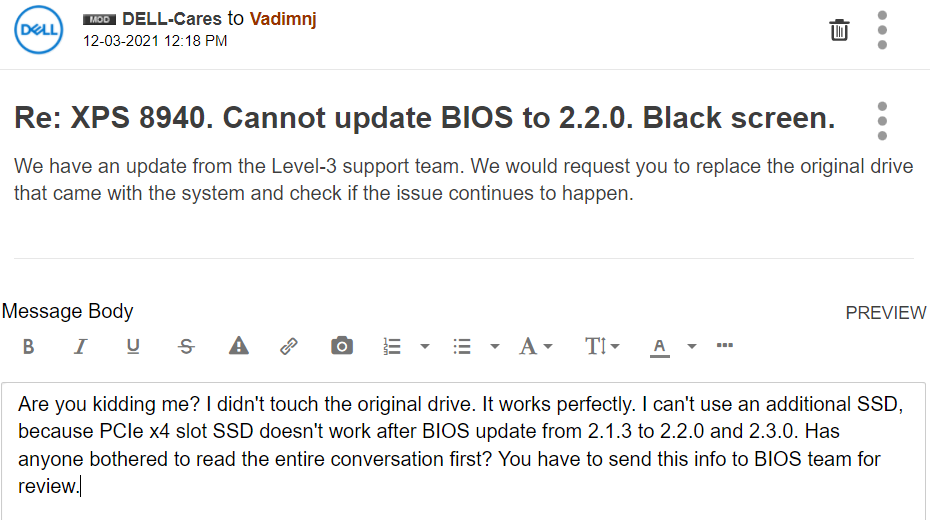
RoHe
12 Elder
•
45.2K Posts
•
172.6K Points
0
December 3rd, 2021 18:00
TwoThreeFour questions from this dummy...Maybe I missed it, but has anyone tried clearing BIOS after this update by removing the motherboard battery and pressing/holding power button on PC for ~30 sec (with adapter+SSD in x4 slot), then reinstalling the battery and seeing if it boots now?
If you installed a driver for the x4 PCI-e adapter, have you tried disabling Secure Boot in BIOS, save the change and seeing if it boots with adapter+SSD in the slot?
Has anyone removed the SSD from the adapter and tried to boot with an "empty" adapter in the x4 slot?
Is Windows Boot Manager still the 1st boot option in BIOS after the update?
EDITED
Vadimnj
1 Rookie
•
42 Posts
0
December 4th, 2021 10:00
1. I've tried clearing BIOS by removing the motherboard battery and pressing/holding power button on PC for ~30 sec (with adapter+SSD in x4 slot), then reinstalling the battery (per your istruction) and it doesn't boot.
2. I didn't install any drivers. Secure Boot was disabled always. I didn't change it.
3. I've removed the SSD from the adapter and tried to boot with an "empty" adapter in the x4 slot and it boots as usual.
4. The Windows Boot Manager still the 1st boot option in BIOS after the update. And keep in mind, it hangs before you can get F2 BIOS Setup, or F12 One time boot menu.
RoHe
12 Elder
•
45.2K Posts
•
172.6K Points
0
December 4th, 2021 18:00
Could it have been set to RAID when you installed Win 10 directly onto the SSD in the M.2 slot? AHCI is the default, but Dell typically ships PCs with it set to RAID.
If the power button blinks when it won't boot with the adapter in the x4 slot. count the blinks (and their color) because that's an error code.
Vadimnj
1 Rookie
•
42 Posts
0
December 4th, 2021 18:00
And the power button isn't blinking. It's solid.
Vadimnj
1 Rookie
•
42 Posts
0
December 4th, 2021 18:00
It hangs before OS start loading. I even can't go into BIOS setup with the adapter in the x4 slot.
Vadimnj
1 Rookie
•
42 Posts
0
December 4th, 2021 18:00
I've removed SSD from x4 slot and checked the BIOS. It's still AHCI. The color is white. Everything as usual, except no more SSD in x4 slot.
Vadimnj
1 Rookie
•
42 Posts
0
December 4th, 2021 18:00
AHCI. I didn’t change it.
RoHe
12 Elder
•
45.2K Posts
•
172.6K Points
0
December 4th, 2021 18:00
@Vadimnj After you reset BIOS by pulling the battery, is SATA Mode set to AHCI or RAID? (Don't change it.)