
Solved!
Go to Solution3
2
Posted April 19th, 2025 15:42
I started receiving the same error message after running SupportAssist on 04/17/25.
1
1
Posted April 19th, 2025 19:06
That's exactly what happened to me. I attempted to open the BIOS to run the troubleshooter but unable with my wireless keyboard. I tried the F12 while starting as well as the Fn but it won't boot into BIOS. Wonder if this is happening to everyone as well.
2
1
Posted May 14th, 2025 03:40
i had and still have the same issue... you guys get blue screen stop codes too? they've replaced my motherboard three times i think it was...
2
0
Posted June 13th, 2025 18:39
@SUB666 Yes, I have all the same issues with my desk top. Blue screen errors and when running support assist get these errors on a consistant basis. Dell support has no resultion for this
PCI Bus : Driver Error
Error code list- PCI Bus - Functional Tests : DW-31
Fan : Driver Error
Error code list- Fans - Functional Tests : DW-31
2
0
Posted September 10th, 2025 21:28
Go to system management
Click down arrow next to dellinstrumentation
Uninstall the outdated driver - It will be the one with an older install date. It will also have next to it a yellow triangle with a "!" in the middle of it. Right-click it and click uninstall.
This helped fix the problem on my Dell XPS13 9210 laptop
(edited)
1
0
Posted June 20th, 2026 05:30
 Hey this problem not solved yet from Dell Date: 20/06/2026
1
0
Posted August 22nd, 2026 23:58
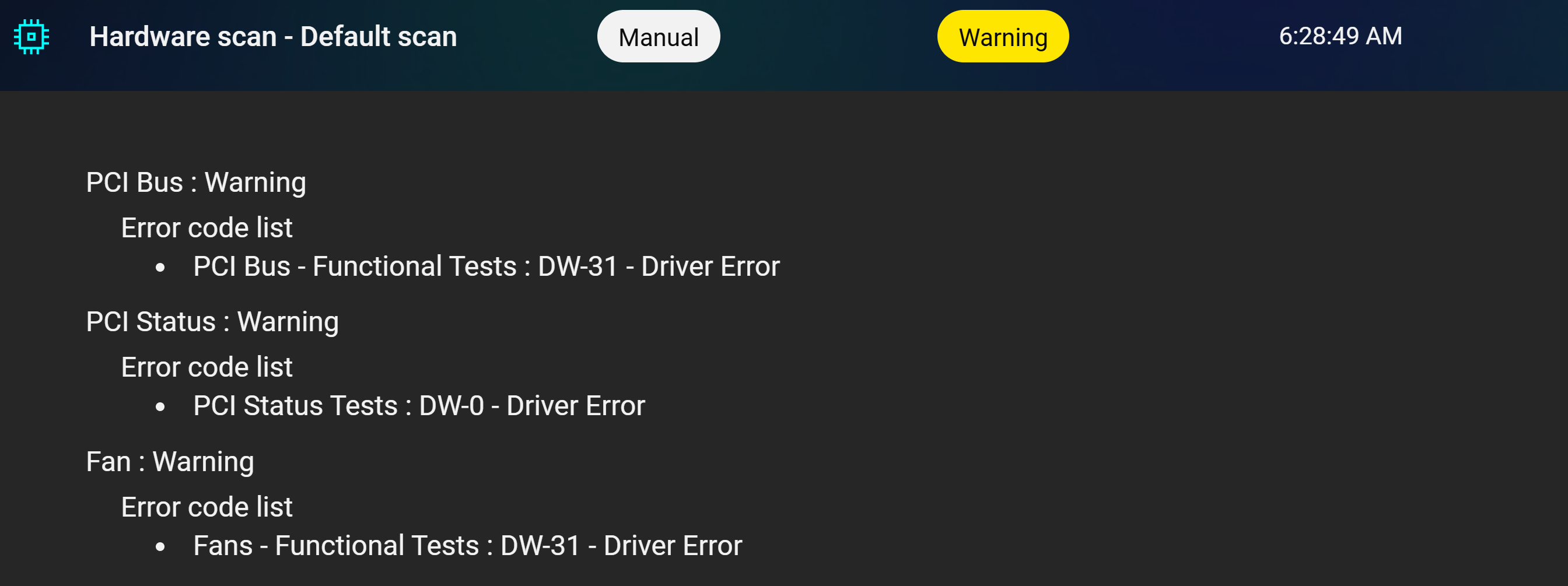
Just got my PC back from dell for a bad Ethernet. Now as soon as I opened up the PC from the box I ran updates and Hardware scan, Behold also have same problem. They fixed one problem only to give me another. They will be fixing this one. This pc been to Dell a few times. I bought 11 Alienware PC's and this is the worse one so far.
1
0
Posted August 23rd, 2026 00:04
Here is 2nd picture.

0
0
Posted August 23rd, 2026 13:02
Just got my PC back from dell for a bad Ethernet. Now as soon as I opened up the PC from the box I ran updates and Hardware scan, Behold also have same problem.
Hi ribbit69er1:
What is your Alienware computer model, Windows version and OS build number [open a Run dialog box (Windows key + R) and enter winver], and current BIOS version (open a Run dialog box, enter msinfo32 to open your System Information, and look for the field named "BIOS Version / Date" in the summary).
Regarding your first image of the WD-xx warnings for your PCI bus and fan, was that hardware diagnostic generated by SupportAssist v5.5.1 or some other program/version? If you run an ePSA (enhanced Pre-boot System Assessment) Quick Test and advanced scans for your PCIe bus and fan as instructed in my 22-Apr-2025 post <above> do any of those ePSA hardware diagnostics generate an error code?
Regarding your second image about the yellow exclamation error in Device Manager for one of your DellInstrumentation Devices, the answer <here> from Google's Gemini AI chat bot states in part that:"The DellInstrumentation device in your Device Manager is a software-defined virtual driver used by Dell management tools like SupportAssist, Alienware Command Center, Dell Optimizer and Dell TechHub. It monitors system health hardware components such as fan speeds, temperatures, and power states, applies hardware configurations, and helps manage updates. It is not a physical computer chip."
Dell TechHub is a shared service used by SupportAssist (and possibly other apps like Alienware Command Center???) to run hardware diagnostics. Dell TechHub also comes bundled with newer Dell/Alienware Update v5.5.x apps (including Dell Command | Update, Alienware Update for Windows Universal, etc.), which seems odd to me since these smaller update utilities cannot run a hardware diagnostic. See my 05-Apr-2025 Dell Update v5.5.0 (rel. 01-Apr-2025) Installs Unnecessary Bloat for more information.
I don't know if your DellInstrumentation Device error in Device Manager is related in any way to SupportAssist (e.g., a corrupted SA installation, a known bug in SA v5.5.1, a lack of compatibility with hardware components in your specific Alienware computer model) but you might want to read my comments about the DellInstrumentation Device in my 12-Jan-2024 post in Nani04's Fails SupportAssist, PCI SubSystem failure?. At the time I wrote that post all SupportAssist-related software had been uninstalled from my Inspiron 5584 and I was using Dell Update for Windows Universal v5.1.0 to check for available updates, but I uninstalled the bloated Dell Update for Windows Universal v5.5.0 in April 2025 and DellInstrumentation Device is no longer listed in my Device Manager.
-----------
Dell Inspiron 15 5584 * 64-bit Win 10 Pro v22H2 build 19045.7663 * Firefox v154.0.0 * Microsoft Defender v4.18.26070.9-1.1.26070.7 * Malwarebytes Premium v5.6.5.306-163.0.5714 * Macrium Reflect Free v8.0.7783 * My Dell v2.2.6.0(edited)

lmacri
6 Operator
•
1873 Posts
•
7974 Points
0
1
Posted April 22nd, 2025 11:45
Hi KeokiXPS:
See my 12-Jul-2022 post in mike2084's Fail Support Assists PCI Bus - Functional Tests - D0701. I suspect your DW-31 error is just another one of these harmless "for information only" Dxxxx and Wxxxx analytical notations that Dell keeps promising to remove in a future version of SupportAssist. These notations usually occur when a hardware driver is updated and creates a registry entry that is "not as per industry standard", which is subsequently flagged during a SupportAssist hardware scan.
As Dell employee DELL_Chris M stated <here> in mike2084's topic, if your ePSA (enhanced Pre-boot System Assessment) diagnostic Quick Test (and in your case, an advanced diagnostic test of your fan and PCIe bus) doesn't detect any issues it's likely safe to ignore this SupportAssist notation. The support article How to Run Dell Preboot Diagnostics and Hardware Tests on Your Dell Computer and companion video at https://www.youtube.com/watch?v=inYLxW2_xKo explain how to start your ePSA diagnostics (i.e., restart your computer, repeatedly tap the F12 key as soon as the Dell logo appears, and choose Diagnostics from the boot menu screen). If this doesn't display your boot menu then restart your computer and try again, quickly tapping the F12 key about 2 times every second.
If you require further assistance post back and let us know your Dell computer model, your Windows operating system [open a Run dialog box (Windows key + R) and enter winver to find the version and OS build number] and BIOS version. To find your current BIOS version open a Run dialog box, enter msinfo32 to open your System Information, and look for the field named "BIOS Version / Date" in the summary. It would also be helpful to know if your Dell service warranty has expired yet.
-----------
Dell Inspiron 15 5584 * 64-bit Win 10 Pro v22H2 build 19045.5737 * Firefox v137.0.2 * Microsoft Defender v4.18.25030.2-1.1.25030.1 * Malwarebytes Premium v5.2.11.183-131.0.5227 * Macrium Reflect Free v8.0.7783 * My Dell v2.2.6.0 * Fusion Service 2.2.14.0