
Solved!
Go to Solution
XPS 13 9315, Bluetooth issues
Hello all,
I recently got a new computer from my employer: a Dell XPS 13 9315 (Windows 11 Pro 22H2, 16GB RAM, 512GB SSD). From day one I am experiencing some issues with the bluetooth functionalities. This will be an extensive post since I want to mention every step I already took. Screenshots are in Dutch: my apologies. Description of symptoms:
1) When I disable bluetooth in the system tray for any reason (e.g. poor connection), I am no longer able to re-enable it. The icon is greyed-out, and it seems like there is no more recognizable bluetooth adapter. Also in device manager, it says that, for àll my bluetooth speakers and headsets, there is no driver installed:


Rebooting te system temporarily solves the issue, but rebooting only works when physically pressing the power button for like 10 seconds (shutdown screens stays present forever).
When bluetooth is no longer available to me, system informs me of an unknown bluetooth device:

2) Bluetooth slow to respond to changes and poor performance. I mean two things by this:
- when I am playing audio through onboard speakers, and want to switch to a bluetooth headset or speaker, it connects to the computer without a problem (although the speaker takes a few seconds to appear in system tray), but audio does not automatically switch to that speaker. In system tray I have to switch manually to onboard speakers and back to bluetooth speaker (with a few seconds in between) to make the switch.
I already had contact with Dell EMEA Support via Whatsapp and threw a bunch of possible solutions at me, which I all tried, but didn't have any effect:
a) Using files to update drivers, instead of online update function of Dell website (according to Dell, throug website it will not correct bugs when drivers are already up-to-date). Prior to update, I disconnected and removed all bluetooth devices. The list of updates includes drivers for Killer AX211 1675 (bluetooth) ànd BIOS, along with some others
b) Command SFC /scannow (in administrator instance of CMD): this resulted in a 'errors fixed' message, but sadly no improvement on the bluetooth

c) Using Dell Pair: didn't work either, in on or off position. (I honestly don't see the added value of this plugin...)
d) Windows services:
3 services containing 'bluetooth' were set to be started 'manually'. I set these to 'automatic': no difference
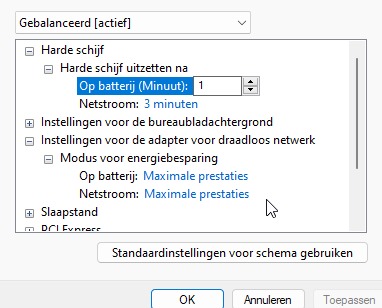
e) Wireless adapter settings in energy management
I have set these settings to max power in both battery and plugged-in mode (in the sole available power plan). It took me a while (and a register edit) to figure out how to add this 'hidden' setting. No effect.
f) Device management - power savings
Setting 'power saving' of 'Intel Wireless Bluetooth' to 'off': no effect
g) Windows problem solver
Running throug bluetooth problem solver results in a message like 'bluetooth radio problem solved', but sadly no effect

h) Resetting BIOS-settings to default: no effect
i) Physically disconnecting the battery to perform a 'hard' power cycle'. Dell employee insures me that guarantee will not be lost, but still... I am not in the mood to perform surgery on my new laptop... So I SKIPPED THIS STEP
Some staps I did myself:
a) Installing earlier versions of Dell drivers for wifi and bluetooth (from dell website, after uninstalling the current ones): no effect
b) Installing drivers for wifi and bluetooth via the Intel Driver & Support Assistant program. This installed 2 drivers (wifi and bluetooth) that are newer than the ones mentioned by dell. But problem remains, so I reverted to the ones from Dell. This update/revert process however did solve another audio issue that I had: my screen recording software (OBS) constantly interfered with any audio, in the sense that every 5 or so seconds, the audio would mute like half a second...
c) Diagnostics via Dell website: it says that all tests passed...
d) Update ALL drivers (from Dell and Windows Update):

I searched different discussion platforms, and I found an older thread on Reddit with a similar problem description.
The Dell employee also suggested me with the 'nuclear option', that is resetting reinstalling windows. I will try this next, but I can't do this myself since our companies system administrators have to install their things first in order for me to get full access to the company network.
To wrap up: anyone else seeing this issue on a Dell laptop with Windows 11?
Kind regards,
F1Timmie
(edited)
