


Unsolved
1 Rookie
•
59 Posts
0
53
December 4th, 2025 12:35
Alarm "CMM is in retrying state error"
Hello!
Please explain what this alarm status could mean?
Thank you
No Events found!
Unsolved
1 Rookie
•
59 Posts
0
53
December 4th, 2025 12:35
Hello!
Please explain what this alarm status could mean?
Thank you
Top
DELL-Charles R
Moderator
•
4.7K Posts
0
December 4th, 2025 19:05
Hello,
Can you let us know the Storage model and firmware version you are on?
Am I correct to assume this is not live data as the volume name is Test?
From the
What this alarm means when the message says “Retrying”, it indicates:
Common Causes
In the mean time you may find this helpful to review:
Storage Center Replications and Live Volumes
Page 501
https://dl.dell.com/content/manual53442829-dell-storage-manager-2020-r1-administrator-s-guide.pdf?language=en-us
Dell EMC SC Series: Synchronous Replication and Live Volume
https://dl.dell.com/manuals/common/dell-emc-sc-series-sync-replication-live-volume.pdf
Serge_1980
1 Rookie
•
59 Posts
0
December 8th, 2025 05:31
@DELL-Charles R
Hello!
Device is SC5020, firmware version is 7.4.21.4
DELL-Joey C
Moderator
•
4.1K Posts
0
December 8th, 2025 07:46
Hi,
I assuming you're doing Replication? Here's an article for connectivity troubleshooting, I notice Primary status is down: https://www.dell.com/support/kbdoc/en-us/000119663/storage-center-alert-troubleshooting-storage-center-iscsi-replication-connectivity-issues#:~:text=If%20a%20port%20is%20down,configured%20for%20use%20in%20replication.
There is also an older post about having the same error: https://www.dell.com/community/en/conversations/compellent/migrate-error/647f9765f4ccf8a8dea59455 which involves Migration. Some snapshot are having issues that caused not able to migrate.
Serge_1980
1 Rookie
•
59 Posts
0
December 9th, 2025 12:00
@DELL-Joey C
Thank you!
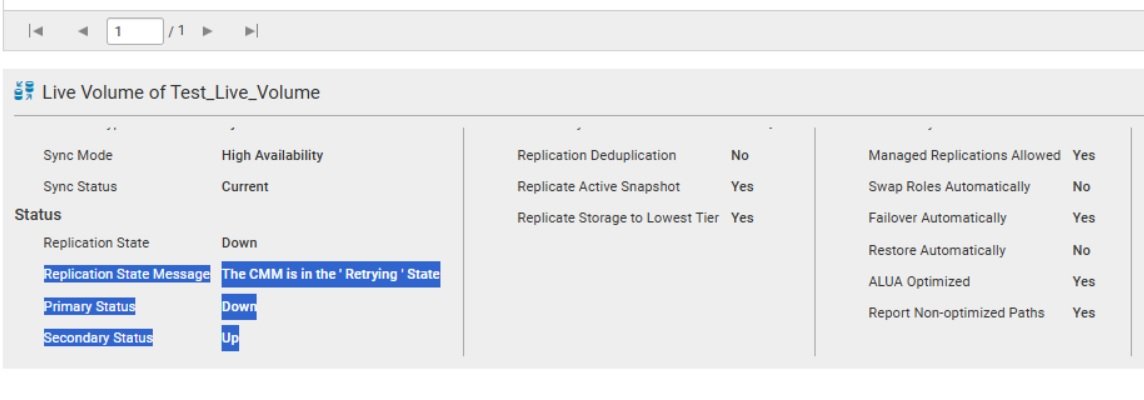
Here the full situation during testing when this issue occured. We have two SC5020 - N001 and N002 and performed a disaster scenario on N001 by removing the power cables. This did not interrupt services to the VM MONTOOLS001—the VM continued running, and we observed that the active paths automatically switched to N002 successfully from N001,However, after powering N001 back on, the replication between N001 and N002 for the VM MONTOOLS001 associated volume 'Test_Live_Volume' did not re-establish as expected refer images. All other two volumes in the live replication group, which do not contain active data, were able to sync successfully, but this specific volume did not resume replication Still is in “auto failed over state”
DELL-Marco B
Moderator
•
4K Posts
0
December 9th, 2025 13:36
Hello, the live volume stayed in auto failover because the replication link didn't automatically restore after N001 came back online.
To fix this, in DSM go to replications - live volumes, select test-live-volume and either restore live volume, or you can swap roles to make again replication.
Thanks
Serge_1980
1 Rookie
•
59 Posts
0
December 11th, 2025 09:01
@DELL-Marco B Thank you! We'll try
Serge_1980
1 Rookie
•
59 Posts
0
December 16th, 2025 12:39
@DELL-Marco B
One more remark - in this point primary test volume/paths is not visible to server
DELL-Marco B
Moderator
•
4K Posts
0
December 16th, 2025 13:41
Can you use Restore Live Volume (top right) to re create replication? Or Swap Roles if restore is not available?
Thanks