

Unsolved
4 Posts
0
654
January 18th, 2023 04:00
RAM UPGRADE
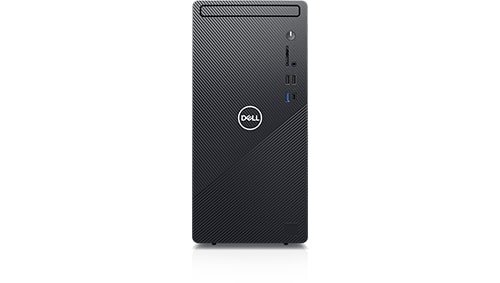
Inspiron 3881
Hello.
I have Dell Inspiron 3881 MT (i7-10700/8GB/512GB/GeForce GTX 1650 Super/W10 Pro). I wanted to upgrade the ram to 16GB, so after your suggestions in the community, I bought RAM CRUCIAL CT8G4DFRA32A 8GB DDR4 3200MHZ UDIMM.
The problem is when I open the PC , I get a message memory management error, and the computer shuts off.
I tried the crucial ram alone, again the same message.
What is the problem? The ram of dell is 2.933 MHz.
Thank you.
No Events found!
redxps630
11 Legend
•
16K Posts
•
82K Points
0
January 18th, 2023 05:00
user validated benchmark of 16gb mixed ram in 3881 include
HMA81GU6DJR8N-XN+CT8G4DFRA32A
the first ram is
Hynix 8 GB PC4-3200 DDR4-25600Hmz UDIMM HMA81GU6DJR8N-XN
maybe mixing dell 2933 w crucial 3200 is the problem.
Sandra1004
4 Posts
0
January 18th, 2023 13:00
RoHe
12 Elder
•
45.2K Posts
•
172.6K Points
0
January 19th, 2023 16:00
Version of BIOS and Windows?
What CPU do you have?
Did you try the Crucial module, with/without the Dell OEM module, in both slots?
Will the PC still boot if you only have the Dell OEM module installed in its original slot?
Did you try clearing BIOS after installing the Crucial RAM, with/without the Dell OEM RAM installed?
Sandra1004
4 Posts
0
January 23rd, 2023 01:00
Windows 10 Home 64bit Greek, BIOS 1.16.0
10th Gen Intel(R) Core(TM) i7-10700 processor (8-Core, 16M Cache, 2.9GHz to 4.8GHz)
I tried the Crucial module, with and without the Dell OEM module, in both slots
The PC boots, I get a message that the amount of system memory has changed to 16 Gb, I confirm, everything its ok. But after about 5 minutes, I get a blue screen, memory management error and reboots repeatedly.
I 've done the steps you told me, the same problem again.
The only thing, I don't Know how to clear BIOS
RoHe
12 Elder
•
45.2K Posts
•
172.6K Points
0
January 23rd, 2023 11:00
@Sandra1004 I gave you step-by-step instructions to clear BIOS in my post on 1-19-23. And you may want to install a fresh battery at step 8.
Sandra1004
4 Posts
0
January 23rd, 2023 11:00
Sorry, I didn't realize that these steps clear BIOS. Anyway, I did all steps and the problem remains, as I describe above.
Thank you.
RoHe
12 Elder
•
45.2K Posts
•
172.6K Points
0
January 23rd, 2023 12:00
Try this: