
UNSOLVED
U
user_0a9d61
1 Rookie
•
3 Posts
•
2 Points
0
80
October 8th, 2025 07:19
Screen replacement!
Help! So I just recently purchased a new screen replacement for my laptop Dell G15 5511. When putting things back together, I saw that I had none of the cables that are supposedly connected to the internet card. I’m fairly new at this.. I’ve fixed screens before but I’ve ran into this problem with the new screen that I had purchased. Help!!
0
0
Posted October 11th, 2025 00:30
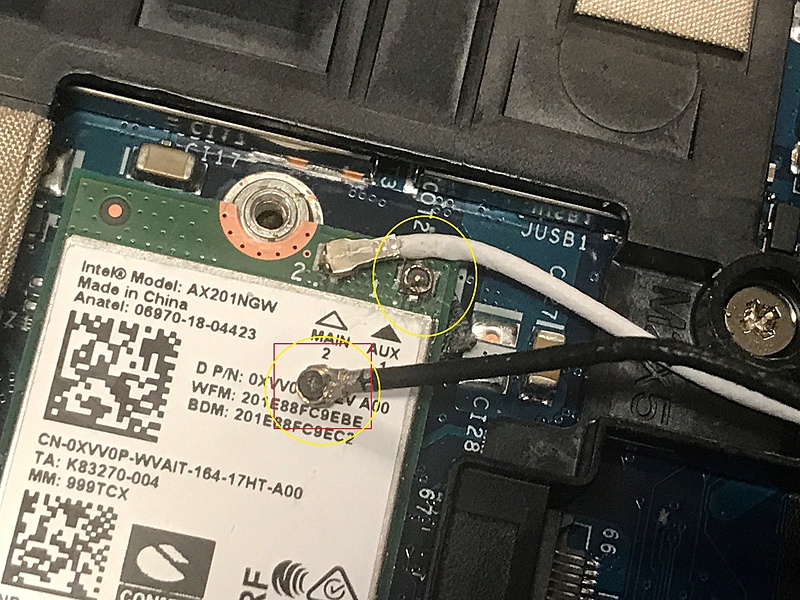
(not my photo, my cables are able to be taken out easily without soldering)
The wires looks ike this. When replacing my whole screen, I couldn't find those two circled cables coming out from the replacement screen. The only cable that came out from the replacement was connected to something called "eDP" I believe. I'm only a beginner, BTW. Sorry for the confusion
I replaced the entire display assembly. I powered up my laptop, and it currently works, but I have to use a USB Wi-Fi adapter. I'm okay with this fix, but was wondering if there was something more I could do.
0
0
Posted October 11th, 2025 00:31
Oh I guess in this picture it doesn't need to be soldered, I was just guessing people do that, I couldn't really see it at first.

ejn63
12 Elder
•
31440 Posts
•
155047 Points
0
0
Posted October 8th, 2025 18:38
What "internet card"? Wifi or WWAN? And what is the issue? The antennas that were connected before won't connect now?
Did you replace the screen only, or the entire display assembly?