
Unsolved
1 Rookie
•
4 Posts
0
1975
December 12th, 2023 21:23
Boot Sequence - File System not found - No bootable devices found
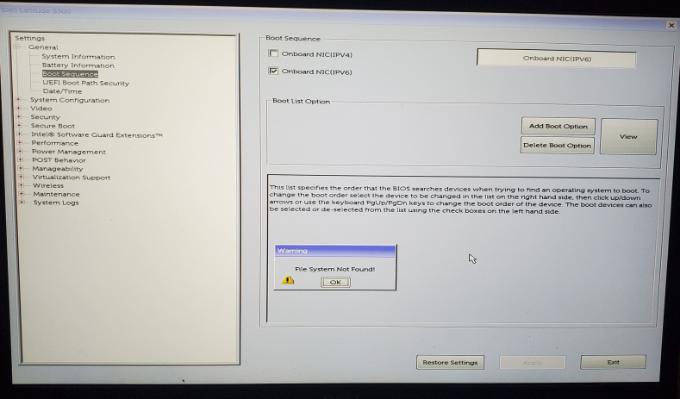
Hi,
I have laptop Dell Latitude 5300, with BIOS ver: 1.6.0.
SSD M.2 Disk has been replaced and now i now i have only this blank disk which is recognized and visible in Bios Device Information. In Bios\Boot Sequence\ i see only Onboard NIC, when trying to ADD BOOT OPTION i get: FILE SYSTEM NOT FOUND ! How can I add USB to boot sequence ? In BIOS 1.6.0 there is no Advanced Boot Option and choice between Legacy and UEFI. Onboard diagnosis is sucessful.
Checking media presence : No bootable devices found
Please advise next steps
No Events found!


Chino de Oro
9 Legend
•
8.1K Posts
0
December 12th, 2023 21:28
You will need to install an operating system on the device https://www.dell.com/support/kbdoc/en-us/000132963/how-to-install-your-operating-system-when-you-don-t-have-a-cd-or-dvd-drive-in-your-dell-pc#Hardware_Methods
explorer12
1 Rookie
•
4 Posts
0
December 12th, 2023 21:31
@Chino de Oro How can I instal operating system if USB or CD/DVD cannot be added to boot sequence ?
Chino de Oro
9 Legend
•
8.1K Posts
0
December 12th, 2023 21:36
With the installation media plugged in, you continuously tap F12 at the Dell boot logo to get one time boot menu. You will find the Windows boot drive listing for selection.
explorer12
1 Rookie
•
4 Posts
0
December 12th, 2023 21:54
that's what i get with F12, No USB, no CD/DVD only Onboard NIC (IPV4) x 2
explorer12
1 Rookie
•
4 Posts
0
December 12th, 2023 21:59
Chino de Oro
9 Legend
•
8.1K Posts
0
December 12th, 2023 22:16
You must have a Windows bootable drive plugs in to the machine prior to tapping F12.
Have you review the linked article from previous post?
If you do not know to make one. You can go to Microsoft site here and download Windows Creation Tool. You run it on a working computer and allow it to creating an installation USB drive, using at least 8 GB drive.
Now, use the drive while booting with F12 and see if the drive will show up.
(edited)
