

Unsolved
1 Rookie
•
21 Posts
•
2 Points
0
1002
August 28th, 2024 04:57
Laptop benchmark
One of latitude in my list is Latitude 5500 . i ask for benchmark testing this machine from the seller.according to his replies he doesn't have any experience regarding hardware benchmarks.
so i explained him to quoting this over internet.
here is some benchmark testing.
"Stress tests are programs that put your PC under heavy load and simulate extreme scenarios. They can help you identify any potential problems with your PC stability, performance, or cooling. Some popular stress tests are Prime95 for CPU, FurMark for GPU, and MemTest86 for RAM. You can run these tests individually or together, depending on what you want to test. You should run the stress tests for at least an hour, and monitor the temperatures, frequencies, and voltages of your PC components. If your PC passes the stress tests without errors, crashes, or overheating, it means that it is stable and can handle high workloads."
i am not asking for MemTest89 for RAM it takes more than hour to finish.if you allow to do other two tests ,Prime95 for CPU and FurMark for GPU let me know.
He replied Ok . At first glance he is okay with benchmark testing.
Then i asked for confirmation about his permission to do so.Here is his response ..
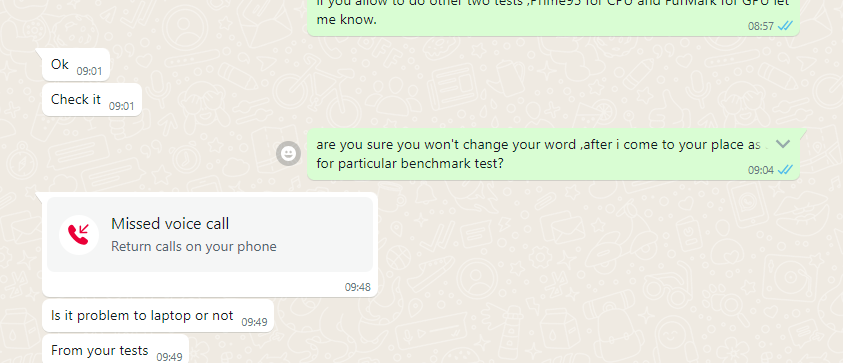
looks like he is worrying about machine health after these benchmark testing.
what i want to know is there any risk laptop won't work after benchmark testing.or can it cause to damage hardware like CPU or..
please give me an advice should i go for these testing? any proper answer for the seller.
Allan_potts
1 Rookie
•
2 Posts
•
2 Points
1
August 28th, 2024 05:19
Running stress tests like Prime95 for the CPU and Furmark for the GPU is generally safe and effective for identifying stability issues. However, it's important to recognize that Furmark, in particular, is known for pushing GPUs to their absolute limits, which can cause unnecessary strain on components like the voltage regulator modules (VRMs). In rare cases, this could lead to overheating or hardware degradation, especially if the cooling system isn't adequate.
We’ve encountered a similar situation when benchmarking a laptop for our graphic design team while rendering an Arm Blaster product video for a client. There were no issues in our case, but overheating can pose a risk if the laptop’s cooling system isn’t up to par. If you proceed, ensure the cooling system is well maintained, and consider monitoring the GPU temperature using tools like MSI Afterburner to keep an eye on potential overheating
Harshalulzsec
1 Rookie
•
21 Posts
•
2 Points
1
August 28th, 2024 05:30
@Allan_potts actually i don't have any technical knowledge about these testings or experience.
actually this machine doesn't have dGPU . is it safe to do Furmark testing on laptop with iGPU(intel UHD Graphics 620)?
Allan_potts
1 Rookie
•
2 Posts
•
2 Points
0
August 28th, 2024 07:07
@Harshalulzsec
Before running any tests, it’s important to clarify the purpose of buying the laptop. Are you planning to use it for graphics designing and rendering work, or just for normal, everyday use? Generally, the Furmark test is designed to check the performance of dedicated GPUs like those from NVIDIA or AMD, not integrated graphics like the Intel UHD Graphics 620. Integrated GPUs are typically meant for lighter tasks and might not handle stress tests well. For example, the laptop we bought for rendering the Arm Blaster product video for a client has an external GPU, which is better suited for such graphics-intensive tasks. If your intended use is similar, then a dedicated GPU would be more appropriate. If you let me know how you plan to use the laptop, I can guide you further on what to check before making a purchase.
(edited)
niko_ke
6 Operator
•
813 Posts
•
26 Points
0
August 28th, 2024 07:56
Stress testing or performance testing is generally used for high-performance notebooks. Business notebooks generally do not need to undergo this test.
Stress testing may cause irreversible damage to the hardware, so it is obviously not necessary.
Harshalulzsec
1 Rookie
•
21 Posts
•
2 Points
0
August 29th, 2024 02:10
@Allan_potts plan to use up to 1080p video editing.
digital art.
2d animation
also web base apps.. canva ,wick editor,pixilart
unfortunately so far two sellers refuse to allow to run benchmark/stress test on their latitude.
so i can not use any third party app for those testings .
is there any inbuilt feature similar to stress/benchmark testing? if there are any,seller can not refuse to use them,because they are in built features.
(edited)
Harshalulzsec
1 Rookie
•
21 Posts
•
2 Points
0
August 29th, 2024 02:13
@niko_ke in-built diagnostic tool has cpu testing.. even i should not run this test too?
niko_ke
6 Operator
•
813 Posts
•
26 Points
0
August 30th, 2024 00:42
@Harshalulzsec If the machine is abnormal, the detection tool is definitely necessary. Do you want to know what is wrong with the machine?
Harshalulzsec
1 Rookie
•
21 Posts
•
2 Points
0
August 30th, 2024 03:02
@niko_ke i want to know to if it withstand under heavy load. it's cooling system can or can not control heat that machine generate during heavy task like video editing. i mean light video editing.
niko_ke
6 Operator
•
813 Posts
•
26 Points
0
August 30th, 2024 04:28
@Harshalulzsec need to, you can try it. If overheating and shutdown occur, don't try it. You can consider cleaning the dust and other operations.
Harshalulzsec
1 Rookie
•
21 Posts
•
2 Points
0
August 30th, 2024 07:57
@niko_ke unfortunately two sellers refused.they said no stress test before buying.