

Unsolved
1 Rookie
•
2 Posts
•
2 Points
2
754
October 11th, 2024 12:34
Latitude 7440 static screen at start-up
We've had three devices 7440 reported and static screen at start-up. Latest Bios update was applied, 1.16.0.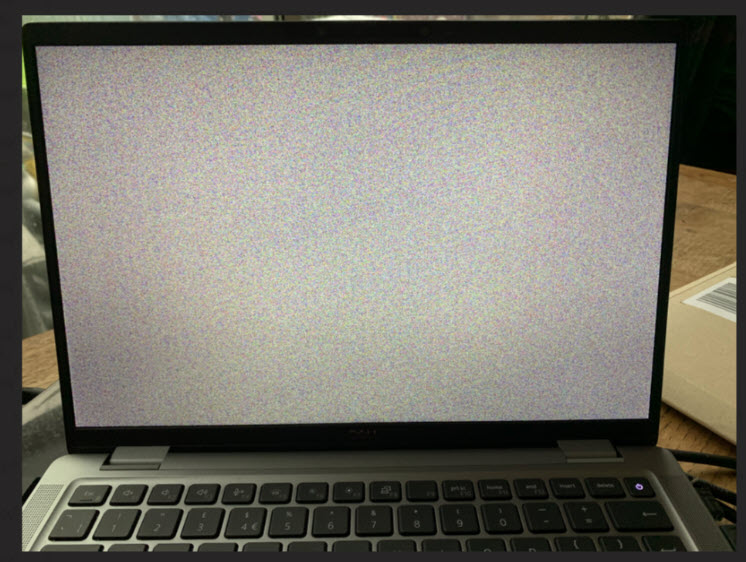
No Events found!
Unsolved
1 Rookie
•
2 Posts
•
2 Points
2
754
October 11th, 2024 12:34
We've had three devices 7440 reported and static screen at start-up. Latest Bios update was applied, 1.16.0.
Top
ejn63
12 Elder
•
31.4K Posts
•
154.9K Points
0
October 11th, 2024 12:43
Start by shutting down, removing the AC adapter plug and base cover. Disconnect the mainboard from the battery and hold the power button for 30 sec.
Reassemble and try again.
If the same fault arises, hold the D key through the next powerup. Does the self test of the screen initiate and run correctly?
sam55todd
2 Intern
•
243 Posts
0
October 12th, 2024 01:09
I'm on 7640 having recently updated firmware to 1.16.. , since then haven't noticed any problems over last month or so (although I'm also hardly using laptop).
Shearsie
1 Rookie
•
2 Posts
•
2 Points
1
October 16th, 2024 15:54
Thanks for coming back Elder.
Another device and static screen today, not sure if its all devices though. Will need to run a report.
As for opening and disconnecting the mainboard from the battery, would that void the warranty?
Current workaround
Enter bit locker pin blind, wait...,
external displays Windows login,
Dell website & download 1.14.1, install,
Device restart, static screen...wait,
Device auto restarts, dell logo now displays and laptop working.
DCookTech
1 Rookie
•
39 Posts
0
October 23rd, 2024 23:36
I've seen this on a few of our 7430s. Same symptoms. Static on boot, you can clear it up by connecting an enternal monitor then unplugging it. It's the exact same static pattern on them all. There's also a period when the right most 2 inches of the screen has vertical lines while the rest is static. BIOS 1.26.0 doesn't seem to clear up the issue.
(edited)
WVIS_ph
1 Rookie
•
1 Message
•
2 Points
0
May 23rd, 2025 18:12
Happened for me after a BIOS update done through Windows Update today. Same symptoms, same model. Maybe one of the craziest BIOS-related bugs I've seen. Just look at it! Surprised it has survived well into 2025.
Connecting to an external monitor and disconnecting it did not resolve it for us, but notably you can still see fine on an external monitor. We used that to try to roll back the BIOS to 1.14.1, but unfortunately for whatever reason that seems to have failed, and we could not see the failure reason since the screen on the laptop (which didn't work) was the only one that displayed the BIOS update progress screen. We similarly could not see the system BIOS for the same reason.
Fortunately, holding D at boot like @ejn63 said seems to have fixed it, though it remains to be seen if that is a temporary fix or a permanent one.
(edited)
TCSO-Plaufer
1 Rookie
•
7 Posts
0
June 13th, 2025 23:47
We're on BIOS Version 1.22.0 and it has happened to 3 of our laptops in the last month. Pops up somewhat randomly, and occasionally corrects itself when plugging or unplugging a device (dock or charger) into a USB-C port.