

Unsolved
This post is more than 5 years old
4 Posts
0
41343
February 10th, 2014 11:00
M14x R2 Optimus Nvidia GPU issue
Hi,
I upgraded my laptop to windows 8.1 and NVidia stopped working. That was understandable as there was no driver support from Dell to work with optimus technology. Did all sort of driver download from Nvidia site and Dell support , I was not able to get the optimus tech to work. It only could detect the Intel HD4000 display and NVidia 650M always showed - The device has stopped working with code 43 error.
Then I gave up and took out my Recovery CD and did a factory restore on the machine to Win 7 pro OS.
Now I have a clean copy of Windows 7 Professional and still can''t get the NVidia 650M to work.
I did all sort of driver installation from Nvidia site and as well as Dell support site.
NO luck.
On Device manager , I see exclamination mark on NVidia 650M and on Status - same message - "The device has stopped working with code 43 error."
As , My laptop is out of warranty there is no support to fix the issue.
LOOKS LIKE THE CAUSE OF THIS ISSUE IS UPDATING BIOS FROM THE DELL DRIVER SITE
The diagnosis run on the hardware returns all Ok.
Does anyone have similar issue and have a fix?
Really appreciate any help.
Thanks.
Milena M458
6 Operator
•
2.7K Posts
0
February 10th, 2014 11:00
Hello Ssizzzzz!
You can try to fix the problem following the instructions on this article.
Let us know how it goes.
ssizzzzz
4 Posts
0
February 10th, 2014 17:00
Didn't work,
The issue still persist. I was able to remove the device that was listed and reinstall the intel and nvidia driver.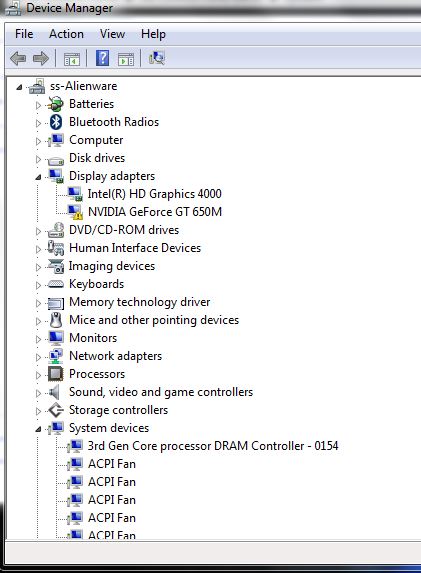
ssizzzzz
4 Posts
0
February 12th, 2014 08:00
Yes, I tried with version Nvidia 331.65.
Now I see there is Nvidia 307.17,A01 also.
I will try with NVidia 307.17 tonight and let you know.
Thanks.
Alienware-L_Por
842 Posts
0
February 12th, 2014 08:00
Did you use the DELL stock drivers for the installation.
ssizzzzz
4 Posts
0
February 13th, 2014 07:00
Still have the issue with stock drivers..
Even reinstalled intel drivers and then nvidia driver.
Please help.
TheUnseenHand
1 Message
0
April 5th, 2015 00:00
Sooooo...I'm having this same exact issue...I have tried EVERYTHING including flashing and reflashing to different oem bios, uninstalling and sweeping graphics drivers for both the intel and NVidia cards, along with fully updating windows 8...and I have nothing...and from the looks of it you surpassed the alienware experts paygrade by clicking the driver download on their support site...that is troublesome indeed lol.
Before anyone asks me to take any steps...this is what I've done.
Fresh factory image
reinstalled all drivers from support site using analysis tool
Uninstalled all graphical devices
used driver sweeper to remove any remnant registry entries for fresh installs each time
installed all possible NVidia 650m drivers up to and including 347.88
performed the clean and install on all drivers again as administrator
flashed the bios through all available version I could find up to A14
retried to the driver installation process for each available driver on each available bios.
So...now then...I'd like to talk to someone who can actually fix this issue...don't mean to be rude, but it appears A LOT of people are having an issue with this particular laptop and the error code 43 on the NVidia 650m, I'd like to believe that between all the great minds at dell and alienware someone can come up with a solid solution here.
Zinichevich
1 Message
0
April 7th, 2015 01:00
I dont have same issues with that GPU, but i faced with the problem of performance on Win 8.1/
So, i remove Nvidia GPU driver with DDU (Display Driver Uninstaller) v.14.1.0.0, then intall Dell Driver Video_Driver_390DM_WN_9.18.13.3165_A02 (from support center), driver ver. 331.65 and disable auto-update - all work fine
aizat de la roc
1 Message
0
August 21st, 2015 05:00
pliz help. i'm also suffering this code 43 problem.my nvdia 760 not working right after updating the driver.
sumavskej
4 Posts
0
August 29th, 2015 01:00
Same here - I have this issue unresolved for years, bought this laptop three years ago brand new, but cant even remember when Nvidia worked last time...
Quite a *** laptop for the money, when main GPU doesnt work.