

Unsolved
1 Rookie
•
1 Message
•
2 Points
0
124
October 10th, 2024 12:59
Black Border on Display, data not in Nvidia Control Panel?
None of these features exist in Nvidia Control Panel anymore. This guide is outdated.
No Events found!
Unsolved
1 Rookie
•
1 Message
•
2 Points
0
124
October 10th, 2024 12:59
None of these features exist in Nvidia Control Panel anymore. This guide is outdated.
Top
ispalten
7 Practitioner
•
2.6K Posts
•
9.6K Points
0
October 10th, 2024 11:06
@scanisarchaic
@scanisarchaic
I assume you have an Nvidia card and a black border around the desktop?
If so, yes, you can use the Nvidia Control Panel to fix it.
The instructions are probably for an OLD version of the CP, but basically, this should work:
NVIDIA
* Right click the desktop
* Click NVIDIA Control Panel <---- does not show the CP, so SEARCH for it and run it.
* Under Display, click Adjust desktop size and position
* Choose from the choices
Use NVIDIA scaling - stretches to fully fit screen
Use NVIDIA Scaling with fixed-aspect ratio - fills screen without distorting proportions (i.e. you'll see black bars at top/bottom or sides)
Use my display's built-in scaling - relies on your monitor, which probably stretches to full screen
Do not scale - no scaling, so images smaller than 1920x1080 will be centered on the screen, with a black border around it
* Click Apply and or OK
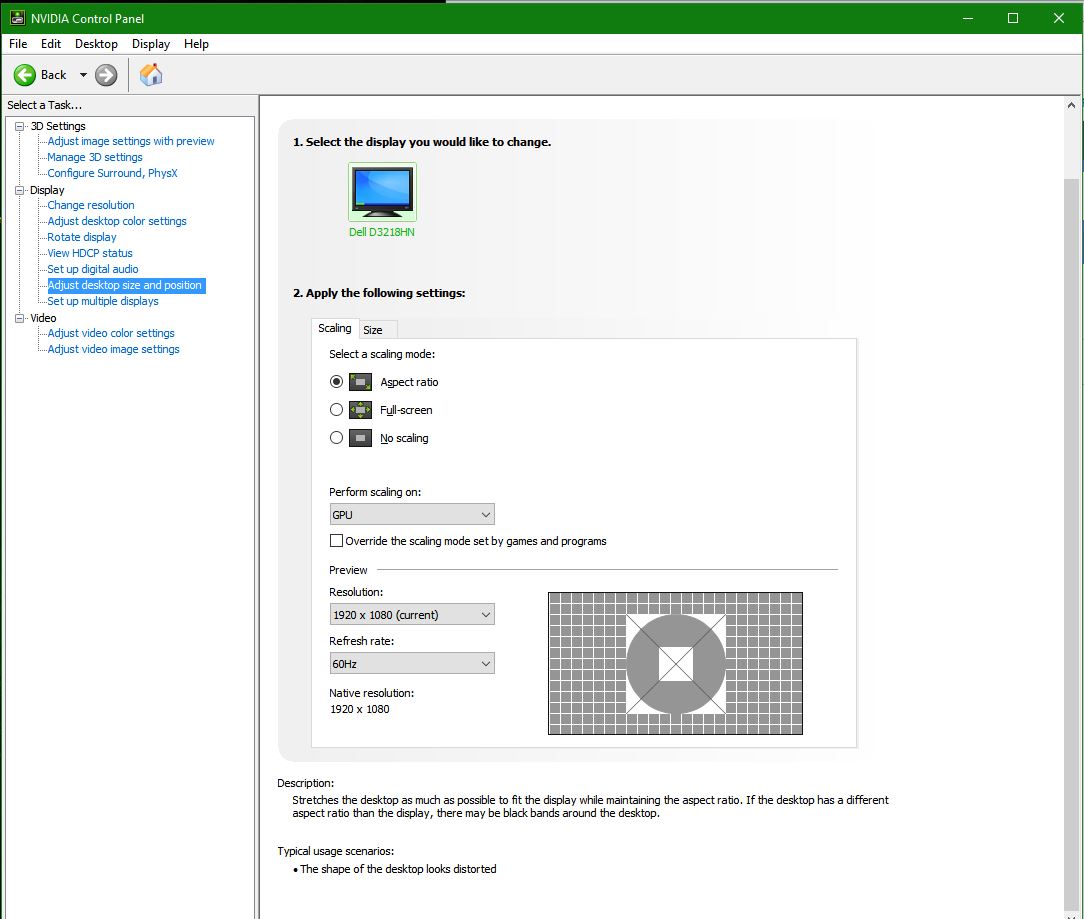
This is what I see for my monitor that I set it to:
You might have to play with the options though to match your particular problem on the monitor.
DELL-Chris M
Community Manager
•
56.9K Posts
•
232.1K Points
0
October 10th, 2024 15:22
ispalten,
I moved over to the Area-51 R2 with Nvidia GeForce GTX Titan X to check the current Nvidia Control Panel.
* Right click the desktop
* Click NVIDIA Control Panel (Yes, I had that option)
* Under Display, click Adjust desktop size and position
I do not see a reference to NVIDIA scaling. I chose, "Perform scaling on GPU". Then Aspect ratio.
ispalten
7 Practitioner
•
2.6K Posts
•
9.6K Points
0
October 10th, 2024 17:03
@DELL-Chris M
This is a problem with the Control Panel...
Depending on which CARD you have, there are differences. I have an RTX2060 6GB, My default Power Setting in the Manage 3D Settings is OPTIMAL, other cards do have a different default.