
UNSOLVED
Closed
DC
DELL-Chris M
Community Manager
•
56891 Posts
•
232143 Points
0
11673
December 31st, 2017 11:00
Pixel Policy
* Turn the room lights ON. Dell monitors are not validated in a full dark room. Dell Consumer monitors are inspected at 150 lux ambient lighting (similar to typical office lighting). Dell UltraSharp monitors are inspected with a tighter criteria of 70 lux ambient lighting (dimly lit room but not completely dark)
* We must see pictures of the subpixel defects when running the monitor stand alone BID (Built in diagnostics)
Bright subpixel defect =
* Change the windows desktop background to all black background
* If you see a stuck pixel that is white, red, green, or blue, that means it is a Bright subpixel defect
* The picture below shows the Bright subpixel defect on all black background. Note, this monitor would have passed our uniformity policy but failed the Bright subpixel defect policy =
Dark subpixel defect =
* Change the windows desktop background to an all white background
* If you see a pixel that is black or colored, it is called a Dark subpixel defect
* The picture below shows the Dark subpixel defect on a full white background. Note, this monitor would have passed our uniformity policy
How many pixel defects warrant a Monitor exchange?
Policy = Once past the first 30 days from the Dell invoice date, any replacement monitor from Dell will be refurbished/used. The refurbished/used replacement monitor could have cosmetic blemishes and dark dot pixel defects (see chart below) but would be considered acceptable to Dell policy standards. There are no exceptions to this policy. Go here to see exchange instructions. If not purchased directly from Dell, read this, "Ownership Transfer and Dell Product Registration Guides".
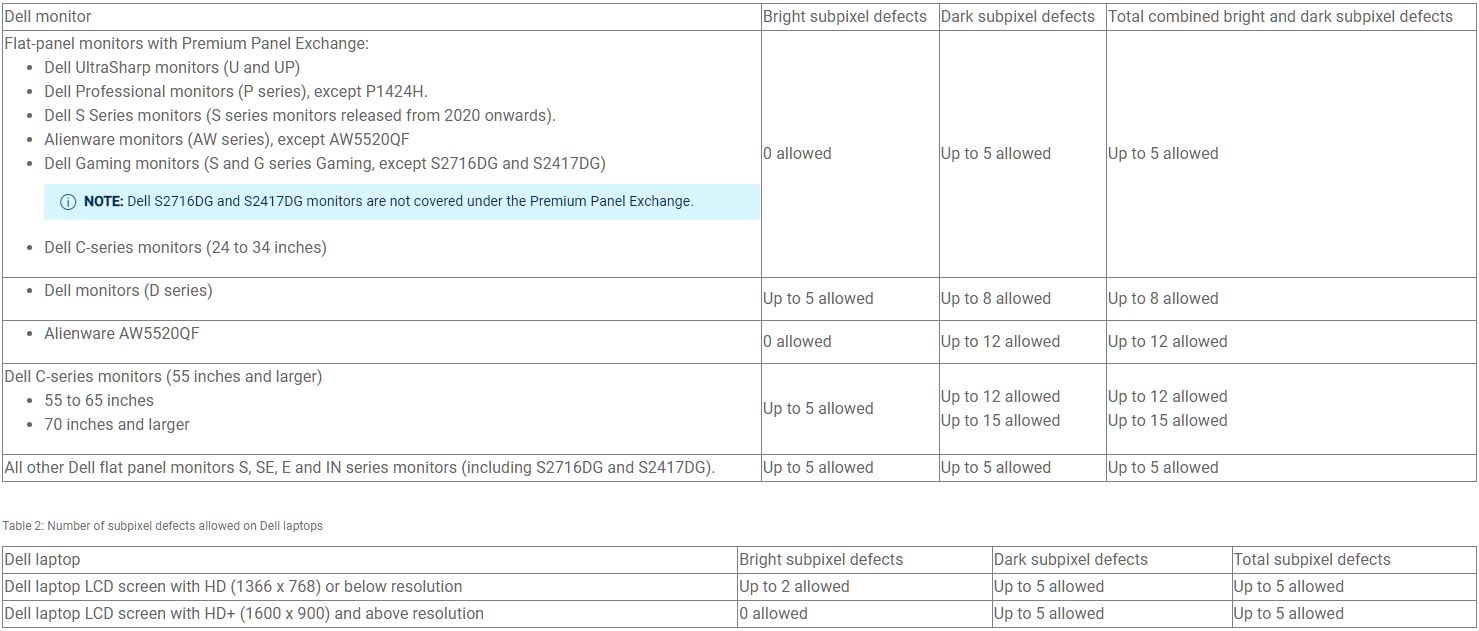
(edited)
DELL-Chris M (old account)
#IWork4Dell
