

Unsolved
1 Rookie
•
12 Posts
0
5039
February 19th, 2024 11:27
Dell 3050 SFF CPU cooler upgrade

OptiPlex 3050 Small Form Factor
Hi
I'm using my 3050 SFF as a little gaming machine and I'm looking for a CPU cooler upgrade.
Currently I'm using stock cooler on the photo below:
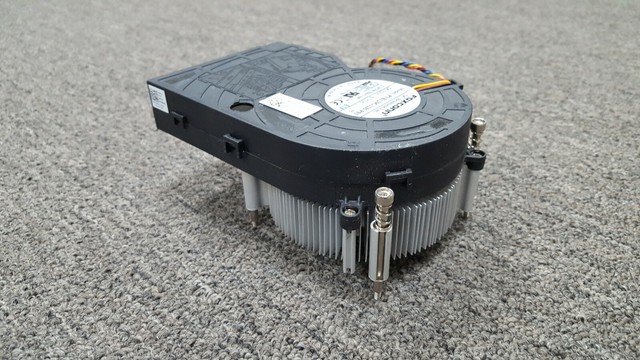
Are there any better stock options to improve cooling? Or maybe you can recommend some aftermarket coolers that will fit into this case?
I was thinking about Thermalright AXP90 - X36 but I don't know if It's going to fit becouse there is no possiblity to change motherboard backplate in stock case.
Have you tried any aftermarket coolers?
No Events found!
redxps630
11 Legend
•
16.3K Posts
•
82.7K Points
0
February 19th, 2024 13:11
The case is too small to allow for good cool air in flow. And there is only one small 80 mm intake fan in front of psu that does not blow air directly towards cpu cooler.
if you are ok w leaving case top cover off, can try the XPS 8910 tower cooler and adding a 120mm chassis USB fan next to cooler that blows air towards cooler. All the LGA115# Dell oem cooler are compatible with M3 backplate and are plug n play as long as the fan uses 4 pin connector.
https://www.ebay.com/itm/235239994850?
Tailor93
1 Rookie
•
12 Posts
0
February 22nd, 2024 14:35
I would like to keep the case with top cover. I'm thinking about some low profile coolers, not the tower ones. Many coolers are attached by using push pins but I can replace it with regular screws. The thing is I'm looking for something that will fit into case and will not be very tall, to have some space for fan to catch some air. Is someone here who have aftermarket cooler in this sff series?
redxps630
11 Legend
•
16.3K Posts
•
82.7K Points
0
February 22nd, 2024 14:55
You can just upgrade the Dell heatsink fan and add more chassis fans like this user did
(edited)
redxps630
11 Legend
•
16.3K Posts
•
82.7K Points
0
February 22nd, 2024 15:01
A Dell SFF user upgrade experience:
“The stock cooler has a blower-style exhaust fan that can spin at 15000 rpm. There are very limited upgrade options because Dell decided to mount their stock cooler onto the side panel, essentially banning us from using any coolers that require a backplate. Though Cooler Master i70 has a backplate, it works great because it has 4 m3 screws that match the holes of the OEM cooler. This is the only cooler I found that doesn't require any adapters, shims, or mods to mount on the motherboard. The fan shroud of i70 interferes slightly with the HDD cage. I had to cut half an inch of shroud to make it fit (see the picture). Dell also cut the corner by not including an 80mm intake fan, which was included in earlier Optiplex machines. I added a Noctua Redux for more intake airflow.”
bradthetechnut
9 Technologist
•
9.6K Posts
•
40.7K Points
0
May 20th, 2024 00:06
(edited)
Jorojored
1 Rookie
•
1 Message
•
2 Points
0
August 28th, 2024 13:21
@redxps630 what about a 7010 sff
redxps630
11 Legend
•
16.3K Posts
•
82.7K Points
0
August 28th, 2024 15:21
7010 sff cooler is not blower type. it has an air shroud. this may need a separate discussion thread if you want to upgrade 7010 sff stock cpu cooler.