

Unsolved
1 Rookie
•
9 Posts
•
2 Points
0
124
January 17th, 2025 04:34
Optiplex 9020 MT Ethernet problem on Win 7 Pro
After a successful updating BIOS, I thought that this ethernet problem will be gone. It is NOT.
So every time I shut down this Optiplex 9020 MT, when I turn it on and starting Windows 7 Pro (all normal), the LAN connection icon has a red cross as below :
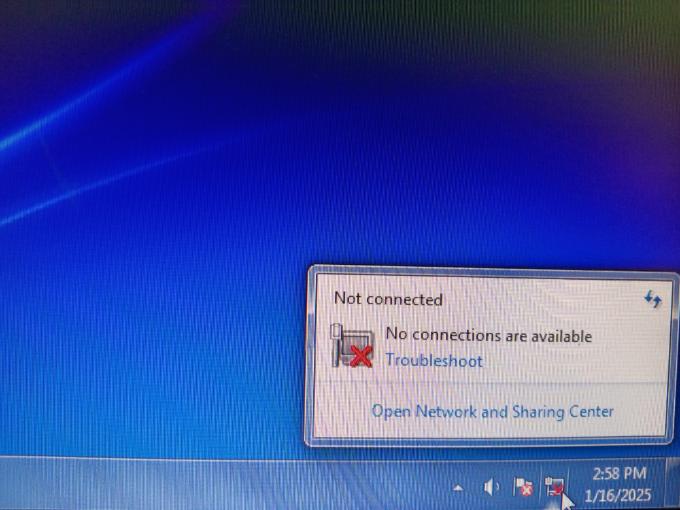
So I run the driver file from Dell again, I got this message :

And this is the driver that I install :

So I thought maybe this Dell driver package has bug, then I try to install INTEL latest version :

But the problem always come up every time I turn on the 9020MT. I noticed there is a different (newer) driver version from Intel from this message :

So I am stuck to get the Ethernet port working normally every time I turn on this Optiplex.
Any clue on this weird problem?
redxps630
11 Legend
•
16K Posts
•
82.1K Points
0
January 17th, 2025 05:21
are you running Win 7 64 bit Pro? Did you do a clean install using genuine Dell disc or genuine Win 7 64 disc?
if it is 64 bit, and you are having the task bar issue, try let Win 7 automatically find and download device driver including Ethernet for your pc, and not to manually DL and install any Dell or Intel driver yourself. Despite seemingly rational logic, manual install often runs into conflict with OS AI which gives error msg,
(edited)
hendra8
1 Rookie
•
9 Posts
•
2 Points
0
January 17th, 2025 06:18
@redxps630 Yes I run the installation using Dell Recovery Tools for this Windows 7 Pro X64. The Win 7 installation does not recognize the Intel ETH chipset so I have to install the driver from Dell in order to get the Windows update running.
hendra8
1 Rookie
•
9 Posts
•
2 Points
0
January 17th, 2025 06:42
@redxps630 Yes I did install from Dell OS Recovery and it does not recognize the Intel chipsets including ETH. So I install the one from Dell to get Windows update running. But this error come everytime I start the windows from the offline CPU. So I did the driver install again and ETH works just fine, but not if I turn it on from offline again. This keep bothering me because I have to re-install the LAN driver everytime I start it up.
hendra8
1 Rookie
•
9 Posts
•
2 Points
0
January 17th, 2025 06:43
Sorry, it is Windows 7 Pro X64 from Dell Recovery Tools
ann_droid
2 Intern
•
508 Posts
0
January 17th, 2025 11:08
Hi
Daft idea.... Either the RUN or RUNONCE registry key.
reg add "HKLM\SOFTWARE\Microsoft\Windows\CurrentVersion\RunOnce" /v "InstallSoftwareName" /t REG_SZ /d "C:\software\installer.exe /silent" /f
~~~~~~~~~~~~~~~~~~~~~~~~~~~~~~~~~~~~~
HKEY_LOCAL_MACHINE\SOFTWARE\Microsoft\Windows\CurrentVersion\RunOnce
"C:\Path\To\Your\Program.exe" [arguments]
The command will run once when the next user logs in, and then the entry will be automatically deleted
.
Important considerations:
Remember that using RunOnce means the command will execute only once after the next system restart or user logon, depending on the key location used
hendra8
1 Rookie
•
9 Posts
•
2 Points
0
January 17th, 2025 15:59
@ann_droid Thank you for sharing this... it could be my last hope to solve this...
redxps630
11 Legend
•
16K Posts
•
82.1K Points
0
January 17th, 2025 16:10
Re: run the installation using Dell Recovery Tools for this Windows 7 Pro X64. The Win 7 installation does not recognize the Intel ETH chipset
If you use a genuine Win 7 Pro disc and not a Dell recovery tool disc, and do a clean OS install by going into custom mode deleting all old partition on hdd, Win 7 will automatically install Intel gigabit Ethernet driver. That is the recommended standard way. I installed Win 7 on older Dell many times never had issue with Win 7 Ethernet driver. It is always installed correctly. The driver is included in the standard iso package. If you don’t have the disc download iso of genuine disc from Internet and burn a DVD.
https://archive.org/download/win-7-pro-sp1-english/Win7_Pro_SP1_English_x64.iso
(edited)
redxps630
11 Legend
•
16K Posts
•
82.1K Points
0
January 18th, 2025 16:08
example of Dell Win 7 64 bit disc
(edited)