

Unsolved
This post is more than 5 years old
5 Journeyman
•
5.8K Posts
•
17.3K Points
0
1840
August 10th, 2009 15:00
OutPost Pro Firewall 2009 (v6.7) reviewed
I was fortunate to receive a gift of this latest version of OP Pro (including lifetime updates!) and have been using it for about a week.
Having been very pleased with OP Free as a user-friendly firewall, I thought a brief review of my experience with OP Pro by comparison might be interesting. I haven't reviewed any paid security products before (mostly because I find the free alternatives sufficient, and I am cheap) but I wasn't going to look this gift horse in the face, and not report what I saw!
Much as I like OP Free, I see in it a few notable shortcomings:
- the need to upgrade to new Free versions manually is a bit of a nuisance
- my perception that not a lot of work is being invested in developing OP Free (only 2 versions to date, unlike the early competitive development of OA Free and Comodo a year or 2 ago).
- While there is excellent help in the OP forums, most questions and discussions seem focussed on the paid version.
------------------------------------------------------
Supported platforms for OP Pro:
32- and 64-bit Windows (Vista, WIndows XP, Windows Server 2003, 2008), Windows 2000 (SP3 and above), Windows 7 (beta support).
My system:
- WinXP/sp3, currently running only NOD32 v4 and Windows Defender in real time, behind a NAT router hardware firewall. Fast cable connection, IE8, and a 4 year old Dell Dimension 9100 desktop.
Download/Installation:
- A 27 MB download (compared to 17 MB for OP Free, or 13 MB for OA Free)
- No bundled toolbars or other unnecessary junk
- Installation was a snap, with very few options to choose from. I chose the defaults, including the "normal" rather than "advanced" option. Elected to allow feed-back to agnitum. Reboot required.
- I instructed it to stay in auto-learning mode for a day, realising this effectively allows any program to access the internet. (Avoided any web surfing during this period).
- Whole process, including registration of license, took about an hour, without any problems.
- One minor glitch: after fully installing and rebooting, my Windows Security Center stubbornly insisted I had no firewall installed at all! Having seen this before after installing other firewalls, I ignored it. After a few subsequent reboots, WSC finally gave in, and admitted that OP Pro FW was indeed installed.
User Interface:
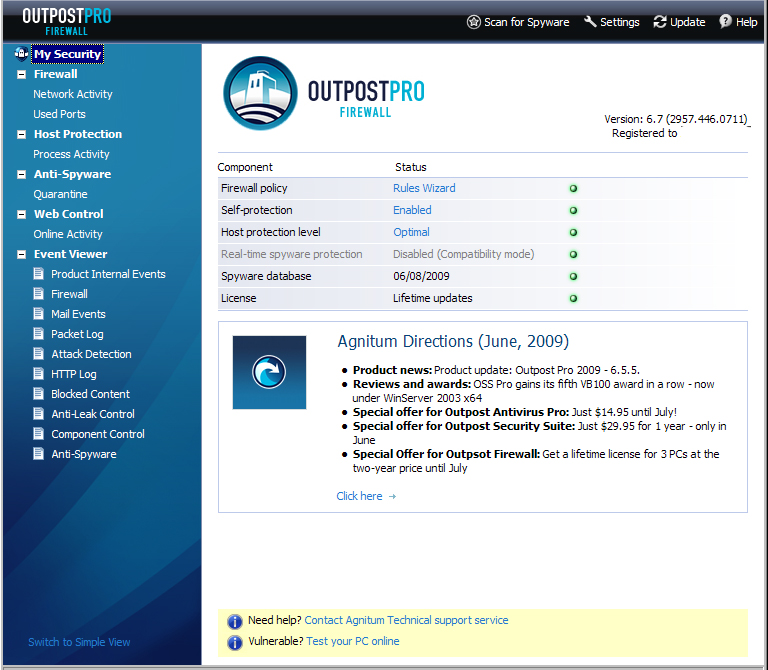
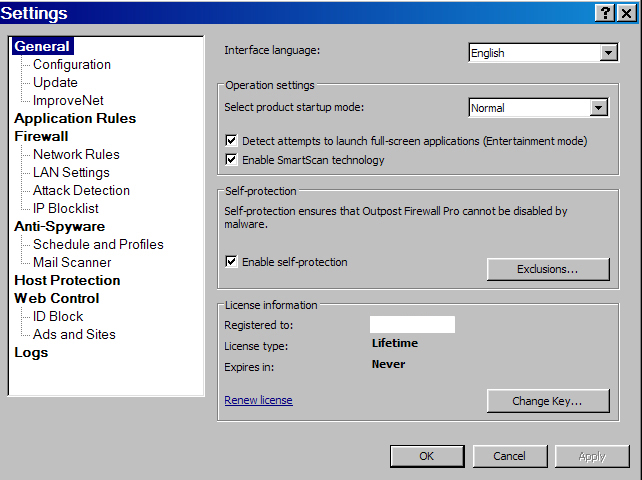
- Similar to OP Free but with more options; clean and easy to navigate.
- Available in Simple or Expert View (the latter for those that like to "tweak" the firewall a bit more)
- Includes a small but somewhat annoying "News" panel, which updates periodically on latest OP products/offers. There is a workaround to disable this which I haven't yet bothered to try.
- When I tried the Anti-Spyware module (a feature not found in the free version) I found its real-time protection was grayed out- ie disabled. Turns out that during installation, OP Pro detected my AV which already has considerable integrated real-time anti-spyware; running both in real-time might lead to conflicts. So OP correctly concluded I would not likely disable my AV just to have OP's real-time AS, and therefor disabled its own. (I can still run it as an on-demand scan). I suspect this would be true for users of other AVs with significant anti-spyware detection. It's a nice touch!)
Conflicts/Problems:
- None of any significance that I could find. All my browsers, applications, and especially all my resident defenses and on-demand scanners, worked normally with OP Pro running, with no slowdown seen.
- One minor conflict was that the on-demand Anti-Spyware scanner detected several entries in my MVPS hosts file. Since none of my other AS scanners detected this, I told OP Pro to exclude my hosts file from future scans.
Efficacy in outbound protection:
- Difficult for me to assess; I will leave this to matousec.com et. al.
- This current version of OP Pro (6.7.x) has yet to be evaluated at motousec, but previous versions got top marks there in 2008 (from 89-99% in leak-testing). Then again, so does the free version.
Configuring OP Pro:
- As an average user, I couldn't begin to address this topic in a brief review. Suffice it to say that the default configuration is a good place to start, and to tweak from there (if desired) as one becomes more knowledgable.
Screenshots:
(Potential) Advantages over the Free version:
- Highly configurable, for those that like to do that
- Paid tech support, for those that need to do that
- More "bells and whistles" without any apparent performance hit in CPU/memory:
Antispyware
Personal data safe storage (ID block)
Unsafe websites restrictions (URL blacklist)
Banner, ads, pop-up and referrer block
Automatic network rules
Automatic HIPS policies
- Ability to upgrade internally, rather than manually
---------------------------------------------------
Summary and Comments:
1) Like the free version, OP Pro is a quality product. Based on my previous experiences with other paid firewall trials, I was concerned about added bloat, complexity, and potential for conflicts. I see none of that so far with OP Pro, and will continue to use it.
2) This FW can be as simple or as complex as you want to configure/tweak it. Most members here I think want simplicity, with as few alerts as possible. Like the Free version, if you give it a brief leaning period, then let its "Rules Wizard" decide for you, you will be happy with it.
3) I remain unconvinced that the paid version adds enough value to justify the cost for many. Would I buy it? I must confess I was ready to trial it, and that lifetime license offer was very tempting. I was however very satisfied with the free version.
4) That said, for those for whom cost is not an issue, and have average computer skills, I would recomend this as one of the best third party FWs I have tried (paid or free), in terms of ease of use, simplicity, and potentially useful features.
-----------------------------------------------
Notes on pricing:
- OP Pro currently costs $39.95 for a license for 3 computers; a free trial is available.
- For a limited time, one can purchase a single lifetime license for the same price.
- Download site: http://www.agnitum.com/products/outpost/download.php
- As always, "caveat emptor"!
Disclaimer: I have no affiliation with Agnitum or OutPost products.
dalem29
2 Intern
•
2.2K Posts
0
August 10th, 2009 17:00
Thanks for the review Joe:
I have been using OP Free for about a month or so on my XP computer. It asks for approval now and then on some things, but is not a bit intrusive. It is even quieter than OA which I use on the Vista machine. Both FW's seem to go about their business quietly and efficiently. Sure is an improvement over Comodo where in some cases it seemed like you had to OK countless sub files to get the job done.
ky331
5 Journeyman
•
15.6K Posts
•
45K Points
0
August 10th, 2009 18:00
Joe,
Another superb effort on your part... methinks YOU should go PRO as a reviewer :emotion-1:
joe53
5 Journeyman
•
5.8K Posts
•
17.3K Points
0
August 12th, 2009 10:00
Thanks for the comments.
I'm actually not all that comfortable reviewing paid products, given my preference for the free alternatives available (in most cases). And when it comes to firewalls, I'm still not sure that the combo of a hardware firewall and Windows free FW isn't all most will need.