

Unsolved
2 Posts
0
340
July 7th, 2023 08:00
Vostro 3405, disable UEFI, install Slackware?
I bought a Vostro 3405, which has an AMD processor, and has Ubuntu installed. I am not interested in installing Windows. So why can't I change the operating system to Slackware if I want to? (and disable UEFI if I want to?)
No Events found!
Chino de Oro
11 Legend
•
8.4K Posts
•
46.4K Points
0
July 7th, 2023 11:00
I learnt that the person you are trying to reach has not been assisting community for quite a while.
What the issue at hand is your personal preference. If you can't build a computer, buy a prebuilt one that will work for you. It is not that hard or difficult. Hence the reason many posts from folks asking questions before and after purchasing theirs.
DELL-Cares
Moderator
•
27.8K Posts
•
466 Points
0
July 28th, 2023 23:00
Thank you! We have received the required details. We will work towards a resolution. In the meantime, you may also receive assistance or suggestions from the community members.
JohnCMC
2 Posts
0
July 28th, 2023 23:00
Boot options for (working) Slackware64 install, and pen drive don't show
I successfully installed Slackware64 on the machine. Have been working to get everything working, and now, suddenly instead of booting into Slackware's elilo, I get 'grub' (which I suppose is Ubuntu's).
After rebooting into the BIOS I can only select 2 disk options: HDD1-ubuntu, and HDD2-Linux firmware updater - no sign of the Slackware partition: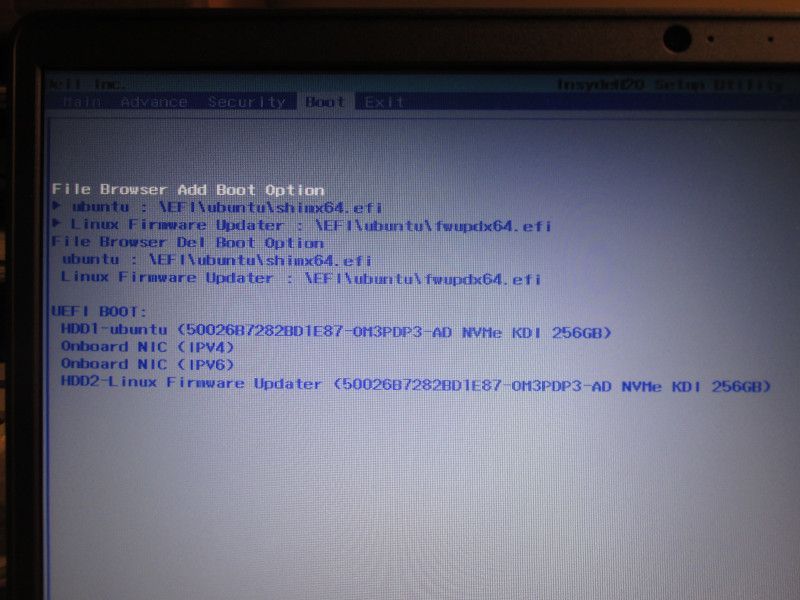
I've been using Slackware for over 20 years - never had a partition disappear on me! What can I do to recover the partition? I need the laptop for teaching next week!
ejn63
12 Elder
•
31.2K Posts
•
154.5K Points
0
July 30th, 2023 05:00
You can install Slackware on a UEFI-only system (this system does not allow for legacy/CSM boot, an option that has been gone from new PCs for some time). However, it will require alterations to the way you've installed it in the past.
https://docs.slackware.com/howtos:slackware_admin:installing_on_uefi_hardware