
1 Rookie

 • 

1 Message

 • 

2 Points

45

April 16th, 2026 12:53

WMS - ERR CONNECTION REFUSED/TIMEOUT

Dear Community,

Each time we perform an update or reboot of our WMS server, the WMS application becomes unavailable after the reboot, even though all related services appear to be running.
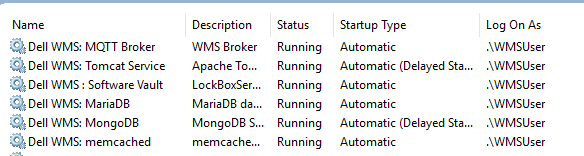
Could you please share the recommended troubleshooting process (log locations, checks to perform, etc.) to identify and resolve this issue?

PS: No SCCM installed on the server


Thanks.

Moderator

 • 

972 Posts

 • 

5 Points

April 17th, 2026 11:42

What version of WMS is current?

I know you say there is no SCCM Client installed, but have you run netstat -ano |more and reviewed ports based on previous known port conflicts?

For Wyse Management Suite (WMS), the key log locations depend on what you’re trying to troubleshoot: installation, server/app issues, or device behavior.

1. WMS server installation log (on-prem)

Used to diagnose server installation/upgrade failures.

  • Path: %temp%\WMSInstall.log on the Windows server where you ran the WMS installer.

2. Tomcat / application logs (on-prem)

Used for portal / web UI / API / console issues.

  • Typical path (v1.x–2.x examples):
    C:\Program Files\DELL\WMS\Tomcat-8\stratus.log (Tomcat service log for app-level issues).
  • In later versions, the Tomcat folder version (e.g. Tomcat-9) may differ, but the pattern is:
    C:\Program Files\DELL\WMS\Tomcat-<version>\

3. Hotfix / upgrade logs (on-prem)

Used for WMS hotfix application troubleshooting (3.x).

  • Path: C:\ProgramData\DELL\WMS\Hostfix\
    Files named WMS_Hostfix-<Date&Time>.log.

0 events found

No Events found!

Top