
Solved!
Go to Solution13235
0
Posted September 20th, 2018 04:00
Is the 2470v2 supported? It isn't on your list but it is a 2400v2 series processor?
13226
0
Posted September 20th, 2018 05:00
The 2470v2 is on that list; it is the first one in the list.
8707
0
Posted June 17th, 2020 03:00
I know this is an old thread but where did the CPU compatibility list come from? I cant find an updated one anywhere for the T420 or in the support docs/manuals etc.
With the latest BIOS upgrades for 2020 I was just told by a Dell customer service rep that the V3 are now supported on the T420 as well as possibly other variants. Looking to purchase the most powerful CPUs compatible since the customer cannot migrate yet.
I always like to confirm things in writing.....Can someone post a link to the updated list?
Thank you
8667
0
Posted June 17th, 2020 13:00
Mvincent2k,
There isn't a publicly facing list that is updated, other than parts listed for the server on the Dell page. The list that was supplied was an internal list.
Regarding the V3 processors, I am not seeing anything showing they're supported, regardless of BIOS level. I am also not showing there any listed parts for them beyond V2's. It appears the 2.4Ghz 25MB E5-2470V2 (part # RR182) is the fastest listed.
Let me know if this helps.
DELL-Chris H
Social Media and Communities Professional
Dell Technologies | Enterprise Support Services
#IWork4Dell
Did I answer your query? Please click on ‘Mark as Accepted Answer’. ‘Thumbs up’ the posts you like!8651
1
Posted June 18th, 2020 06:00
Mvincent2k,
That is correct, that Hynix is the fastest quad ranked, it's part # JGGRT. There is another quad ranked 32GB dimm, but it is a low voltage 1333Mhz version, compared to JGGRT 1866Mhz.
Let me know if this helps.
DELL-Chris H
Social Media and Communities Professional
Dell Technologies | Enterprise Support Services
#IWork4Dell
Did I answer your query? Please click on ‘Mark as Accepted Answer’. ‘Thumbs up’ the posts you like!8652
0
Posted June 18th, 2020 06:00
Thanks Chris, That confirms what I was seeing as well. Can you confirm the memory on the internal Dell list? I was also told that the following is the fastest compatible memory and is quad ranked: Hynix HMT84GL7AMR4C-RD 32GB 4Rx4 PC3-14900L Thanks0
0
Posted June 26th, 2025 05:21
DELL-Chris H : I just upgrade (CPU: CPU1=E5-2470V2 and CPU2=E5-2470V2) and (RAM A=16GBx6=96GB and B=16GBx6=96GB) for my PowerEdge T420.
But in the system setting find only CPU-1 and RAM-A.
Help to recommend How can I do for My PowerEdge T420 can work with 2 CPU and 192 GB of RAM.
0
0
Posted June 26th, 2025 05:57
@KASIPHAT I dont understand which is the problem, I have two T420, one with two E5-2470V2 and 192GB of RAM 16GB x12 modules and the other T420 using two E5-2450V2 also with 192GB of RAM 16GB x12 modules, both T420 therefore working fine with two CPU
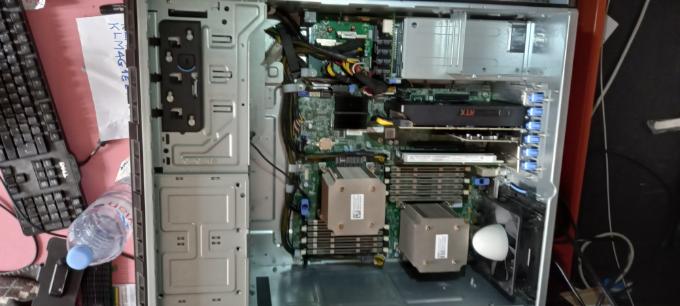
(edited)
0
0
Posted August 31st, 2025 19:41
@DELL-Chris H What I was looking for!

Dell-Martin S
Moderator
•
3791 Posts
•
25534 Points
0
0
Posted June 26th, 2025 13:14
Hi, to ensure your PowerEdge T420 recognizes both CPUs and the full 192GB of RAM, follow these steps:
1. Verify Hardware Installation
CPUs:
RAM:
2. BIOS Settings
Access the BIOS:
F2during boot to enter the BIOS setup.Enable Multi-CPU Support:
Processor Settingsand ensure both CPUs are detected and enabled.Memory Configuration:
Memory Settingsand verify that all RAM modules are recognized.Optimizer Mode(or similar) for optimal performance.Update BIOS:
3. Operating System (OS) Check
Windows:
Task Manager>Performancetab. Check if both CPUs and the total RAM are listed.Linux:
lscputo check CPU detection andfree -horcat /proc/meminfofor RAM.OS Limitations:
4. Additional Troubleshooting
Reseat Components:
Test Individual Components:
Check Dell Diagnostics:
with kind regards Martin/ Liebe Grüße Martin
Did I answer your query? Please click on ‘Mark as Accepted Answer’. ‘Thumbs up’ the posts you like!
DELL-Martin S
Social Media and Communities Professional
Dell Technologies | Enterprise Support Services
#IWork4Dell