
UNSOLVED
ST
Shilpa Test Account6
1 Rookie
•
6 Posts
•
23 Points
0
152
August 27th, 2026 09:54
Test post
Test post - Dell Community Forum
6
1
Posted August 27th, 2026 12:14
"link to display is not showing up" ?
#IWork4Dell

1
0
Posted August 27th, 2026 12:17
@DELL-ChrisM2 Yes.. when you insert a link you get the option for the TEXT to display - sorry not link to display - that is not working

This is from the prev comment:

(edited)
2
0
Posted August 27th, 2026 12:28
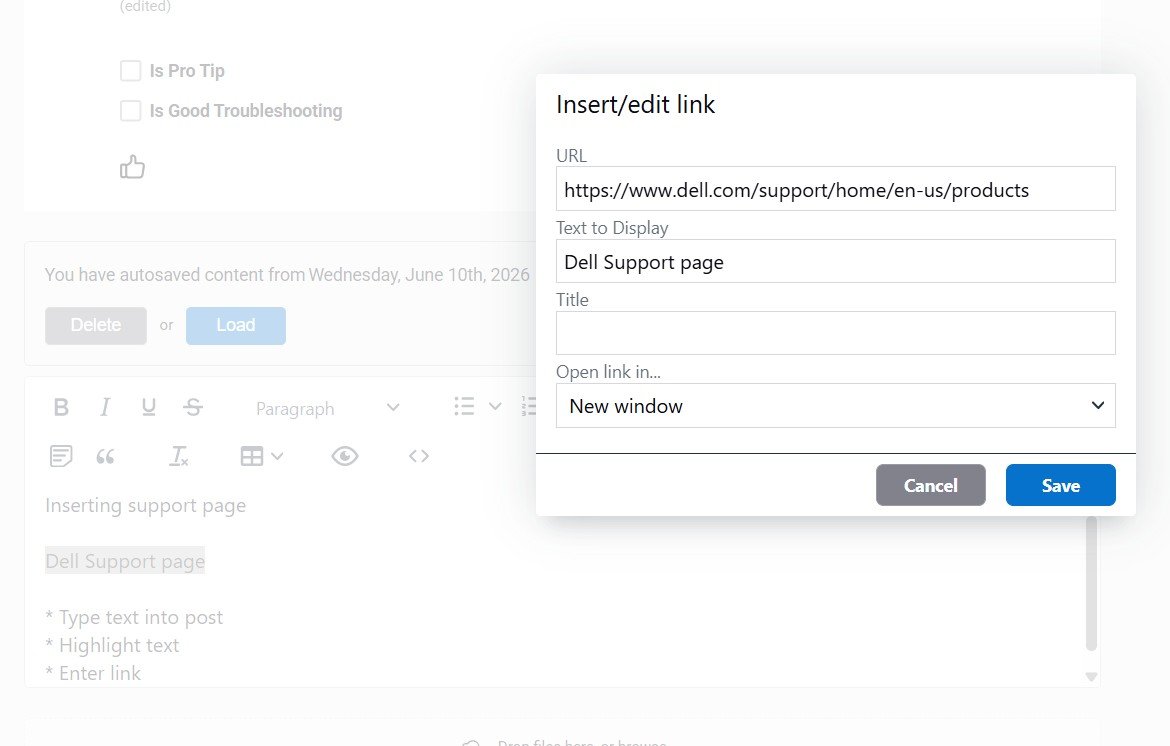
Inserting support page
* Type text into post that you want to hyperlink
* Highlight text
* That then appears under "Text to Display"
* Enter link
* Click Save
#IWork4Dell

Shilpa Test Account6
1 Rookie
•
6 Posts
•
23 Points
1
0
Posted August 27th, 2026 11:58
Testing reply on the Community(Left)
Testing reply on the Community (mid)
Testing reply on the Community (Right)
https://www.dell.com/community/en/categories/dell-community (text to display is not showing up)
(edited)