
UNSOLVED
Dell Optiplex 3060m BIOS problem
Hi everyone,
I'm having an issue where my SSD isn't showing up in the boot order in BIOS/UEFI settings, but it showed in drive info. Interestingly, the system will only proceed with the boot process if my USB Windows installer is inserted. Without the USB drive, it doesn't seem to recognize the SSD at all.
I had some trouble shooting, and these are as follows:
1. I replaced two known-good SSDs.
2. Cleaned and reseated RAM modules.
3. Replaced the CMOS battery.
4. Reset the BIOS/UEFI to default settings.
5. I performed Dell's diagnostic test, and everything was fine.
Has anyone encountered this situation before? Any advice on how to get the SSD to be recognized in the boot order without relying on the USB installer would be greatly appreciated.
Thanks for your assistance!
0
0
Posted August 16th, 2024 01:58
in UEFI the ssd does not show up in boot order within BIOS. only Windows boot manager shows. if we assume you want the ssd to be the boot drive, then like chino said you need to install a OS on the ssd first, before Windows boot manager can show up in BIOS. Windows boot manager basically is a link to the UEFI boot file on the ssd after you complete the OS install.
(edited)
0
0
Posted August 16th, 2024 02:07
@Chino de Oro Thank you for the reply.
I deleted all partitions via diskpart command. The installation went smootly but the only problem is that when I boot my PC after installation it will not boot normally WITHOUT the USB installation and will go directly to Dell's diagnostic test. My SSD does not appear in boot order in BIOS

0
0
Posted August 16th, 2024 02:12
Boot partition was not being created properly. Also, change your boot mode to UEFI. Then reinstall OS again. This time, you can delete all existing partitions then click next to allow Windows installation to install proper boot partitions.
0
0
Posted August 16th, 2024 02:56
assuming OP is installing Windows via a MS installation media USB, there are two ways to do it:
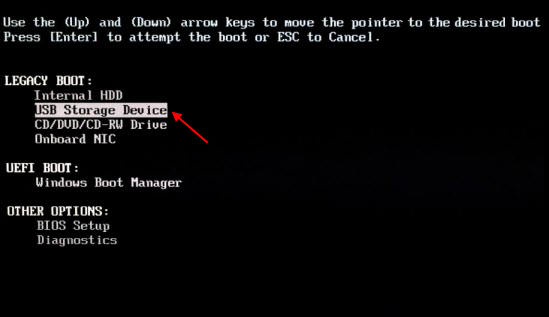
(1) power on pc press F2 enter bios
choose UEFI in boot list option, save, exit bios
press F12, choose > UEFI: USB storage device, proceed to delete all partitions and then clean install like chino said
or (2) press F2 enter bios, choose legacy in boot list option, save, exit bios
press F12, choose >legacy: USB storage device, delete all old partitions and then clean install
BIOS list option choice and F12 boot mode from USB need to be consistent to be successful

(edited)
0
0
Posted August 16th, 2024 04:32
@redxps630 Thank you for your time.
I already did that several times using UEFI/LEGACY boot option same thing happened. Windows installation went smoothly once the USB installation is inserted. Once I remove the USB when booting it go immediately to diagnostic test.


(edited)
0
0
Posted August 16th, 2024 05:03
On a working PC, did you make the bootable flash drive from here? - Download Windows 10 Disc Image (ISO File) (Microsoft site)
When loading, BIOS should be set to UEFI and Secure Boot on.
You didn't say which OS you're trying to load. So, if it's Win11 - Download Win11 (Microsoft site)
0
0
Posted August 16th, 2024 05:09
I've seen that type of issue before, the EFI partition was missing from the boot drive and hence, would boot with EFI from USB installer. You can check Disk Management to see the partition structures being installed on the boot drive.
The OptiPlex xx60 is compatible with Windows 11. Therefore, you would want to set boot mode to UEFI, Secure Boot on, TPM on, and set SATA operation to AHCI Taking advantage of optimal system security available and making system ready for Win 11 transition.
Create the installer using MS Creation Tool. By default, the installer would installed 4 different partitions on your boot drive. If the machine has more than one drive connected, remove all but the intended boot drive.
0
0
Posted August 16th, 2024 06:57
@bradthetechnut Thank you for your time.
Yes, I downloaded windows 10 from microsoft website. I will try secure boot is on.
0
0
Posted August 16th, 2024 06:59
@Chino de Oro Again, thank you.
I will try your suggestions and I will get back to you


Chino de Oro
11 Legend
•
8458 Posts
•
46451 Points
0
0
Posted August 16th, 2024 01:43
If you go ahead and installing Windows to the SSD and then check again. Remember to delete all partitions on the SSD during the boot drive settings of installation process.