
Image Assist provides two options for naming computers.
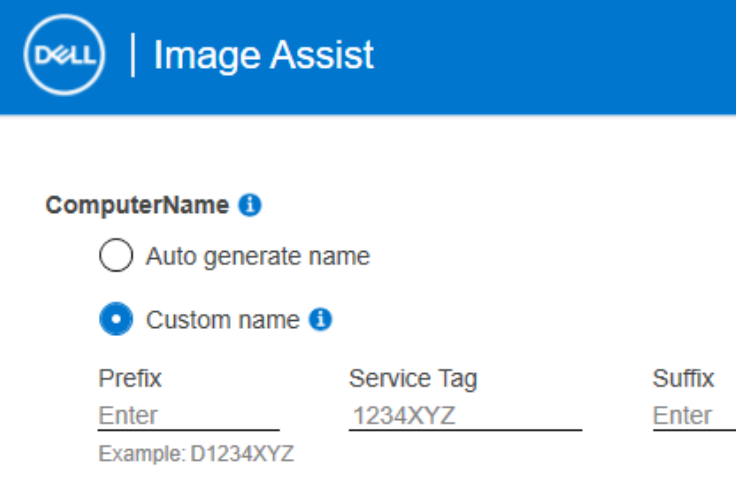
Auto generate name: This uses Windows default auto-naming. e.g. DESKTOP-ILJECHA
Custom Name: Here, you can add a prefix or suffix to the Dell service tag, with a max of 15 characters. Note: If a prefix or suffix is not added, a “D” will be prepended to the service tag to prevent all-numeric service tags from breaking Windows, which does not support all numeric computer names.
Additional customization: Dell Deployment Services offers more naming options during factory imaging. Contact your Dell sales rep to learn more or join our weekly live webinar. www.dell.com/imagingwebinar
The computer naming issue arises from the captured image being booted or restored in a VM and then recaptured with the previously processed unattend.xml. This is because during OOBE, the ‘Service_Tag’ variable in the unattend.xml is replaced with 1234XYZ when the source machine is a VM. This prevents Windows setup from crashing due to long VM serial numbers.
2 fixes:
Revert to the snapshot/checkpoint before capturing the image and recapture with a clean unattend.xml.
Alternatively, mount your image using DISM.exe and update the unattend.xml, replacing 1234XYZ with Service_Tag.
this is first time I am using Dell ImageAssist, I am impressed with the available tools and I have a problem getting the custom computer name.
At one point I was getting the prefix WS in front of the Service Tag, but something happened and I am only getting that generic WS1234XYZ.
The unattend.xml has: WSService_Tag
I copy the unatted.xml from C:\Windows\Panther.
To give you the complete picture, after I get my Dell_Captured_Image.wim I use the boot.wim generated by the ImageAssist installed with /deploy as I want to use the WDS.
After importing the boot.wim and the Dell_Captured_Image.wim, I use the unattend.xml together with the Dell_Captured_Image.wim
Two things stopped working, the Custom Computer Name and it doesn't join the domain anymore.
Thanks Tyler! Unfortunately I did not receive a notification for your reply.
You are right, at one point I restored the image into a VM. I created several captures since my post and the computer name got fixed.
I still cannot figure out why it fails the domain.
The service account and the OU I am using is working for our Lenovo fleet. The service account has right to create an object on that particular OU.
The driver packs for my 3 models are also saved on a shared network drive. This time I also copied them to C:\Out-of-Box Drivers.
I am capturing right now another image using Dell_IAX and let you know. I will still use the Dell PXE boot created with ver.8 as I don't have MDT or SCCM at this point.
One other bug I had was the boot sequence being modified. The SSD is pushed the last one on my boot sequence if I use Dell PXE boot. Since ver.10 doesn't have this option, I guess I have to wait for the new tools.
DELL-Tyler M
Moderator
•
350 Posts
•
3 Points
4340
1
Posted May 13th, 2020 13:00
Hi Robert,
The computer naming issue arises from the captured image being booted or restored in a VM and then recaptured with the previously processed unattend.xml. This is because during OOBE, the ‘Service_Tag’ variable in the unattend.xml is replaced with 1234XYZ when the source machine is a VM. This prevents Windows setup from crashing due to long VM serial numbers.
2 fixes:
Related: Troubleshooting domain join failures with Dell Image Assist
Thanks,
Tyler
(edited)
