
UNSOLVED
Closed
AW3423DW, move G-Sync module to AW3423DWF?
Backdrop
My brother has the AW3423DWF (DWF) freesync version, and I wasn't impressed with how it works on a Nvidia card - the refreshrate does not track close enough to the FPS. This results in slight stutter on certain games, stutter not visible on a G-Sync monitor
I wanted to get one myself, unfortunately, the G-Sync version of the monitor, the AW3423DW (DW), is now discontinued.
However, reading about the 2 monitors and noting how they use the same panel, it got me thinking about adding the G-Sync module to the DWF. I emailed Support, and he indicated that it could be done.
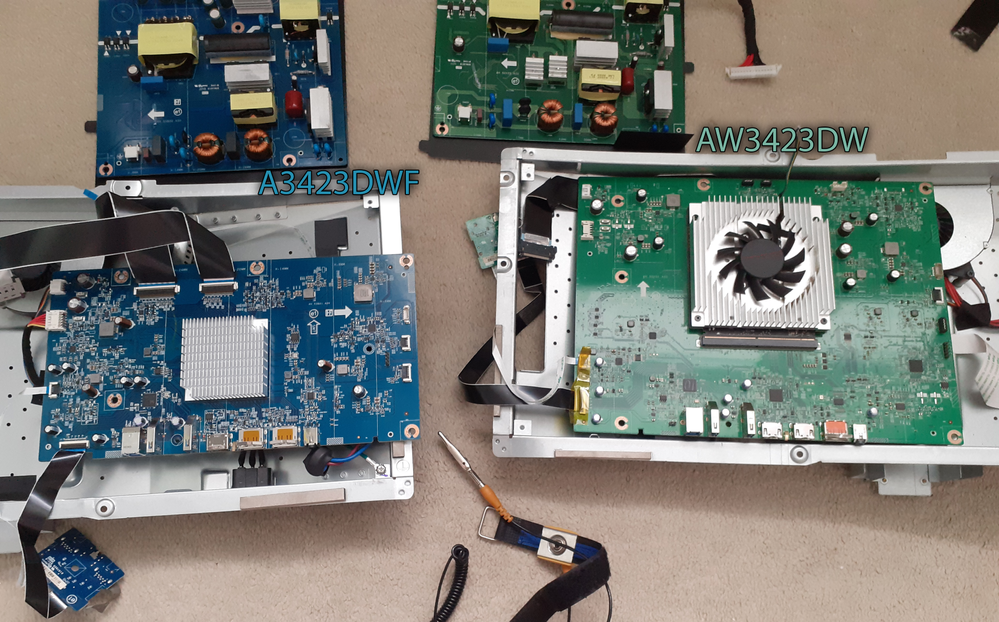
In order to test this out before taking the plunge on a new DWF, I got hold of 2 "for parts" monitors, 1 DW and 1 DWF, both working just with cracked panels.
I took them apart and because there was no space on the DWF pcb to attach only the G-Sync module, I figured I would just take the entire DW metal casing with the DW pcbs within and attach it to the DWF panel. I also used the plastic outer shell of the DW as it had 2 ribbon cables which connect to the main pcb whereas the DW plastic outer shell only has 1.
Images below
Spoiler
PCBs
Casing & Shell
This is where the fun begins (if fun = problems)
Despite the PC recognising this 'new' DWF-DW amalgam monitor (both windows and nvidia control panel detect it as the AW3423DW) and the fan of the monitor audibly working, plus the LEDs all working....
With both the Power and DisplayPort (or HDMI) cables connected:
- The entire screen automatically cycles through blue/red/white/green/black and does so continuously.
- The Joystick does not bring up the menu osd, it appears to do nothing at all
- Pressing the Power button does nothing and there is no light on the power button
With only the Power cable connected:
- Monitor cycles blue/red/white/green/black only a few times whilst the Power button lights up in a breathing purple/pink - the purple/pink light remains breathing after the cycling ends and the screen turns off
- Monitor turns on via Joystick button (clicked in any direction) rather than Power button
- Joystick does not bring up menu osd
Regardless of which cables are connected, at no point does the screen display any messages (such as "going into standby" etc.)
In terms of firmware,
DWF = M3 B102
DW = M0 B102
Questions:
- is there a way to Factory Reset the monitor if the OSD menu won't display? Some way to exit what appears to be a monitor stuck in test/diagnostic mode
- Is there some kind of firmware incompatibility by adding the A3423DWF screen to the A3423DW? If so, is there anything that can be done to fix this?
Any ideas/help would be appreciated.
