
UNSOLVED
Inspiron 620 Desktop Wireless
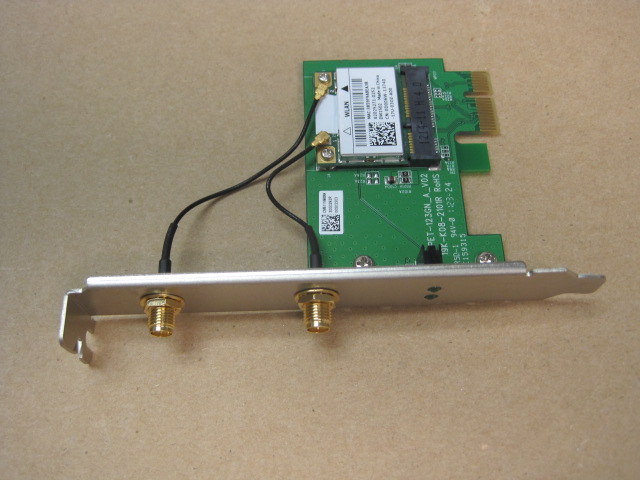
I bought a couple of the Inspiron 620 desktops from the outlet for my family and they came with the built in wireless cards. The antenna leads from the card go to the bulkhead SMA like connectors on the back of the PCIe slot. No antennas were provided in wither unit. Should there be antennas? It seems like there isn't one built in to the case, so an external one should be necessary.
917
0
Posted November 20th, 2011 14:00
7 HP
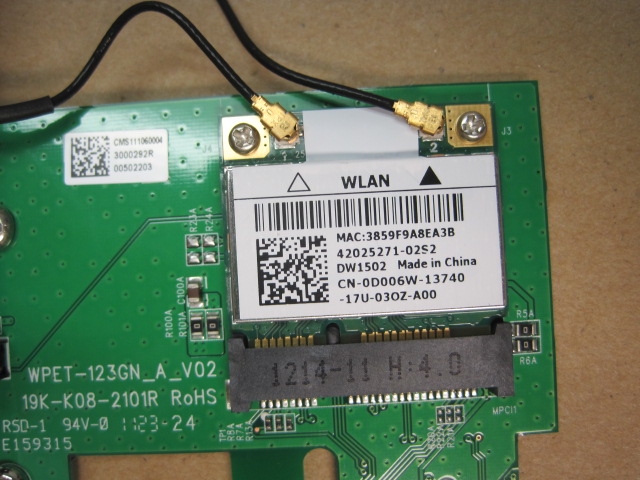
They shipped with Dell Wireless 1502 cards.
917
0
Posted November 20th, 2011 14:00
litsnsirn,
What operating system are on the desktops?
Rick
922
0
Posted November 20th, 2011 16:00
Hi Rick,
It seems to me that most of that info has to do with the operating system. Here is the test that has to do with the NIC's:
2 NIC(s) Installed.
[01]: Realtek PCIe GBE Family Controller
Connection Name: Local Area Connection
DHCP Enabled: Yes
DHCP Server: xxx.xxx.xxx.xxx
IP address(es)
[01]: xxx.xxx.xxx.xxx.xxx
[02]: xxxx:xxxx:xxxx:xxxx:xxxx
[02]: Dell Wireless 1502 802.11b/g/n
Connection Name: Wireless Network Connection
Status: Media disconnected
Jason
922
0
Posted November 21st, 2011 04:00
Jason,
The operating system would have been nice.
Places to look to see if your Connection is enabled
Try start, control panel, networking and sharing center. Click on your connection, properties. Look for TCP/IPv4 and TCP/IPv6, click on properties. Make your settings match mine.
Rick
922
0
Posted November 21st, 2011 05:00
Hi Rick,
Operating system is 7 w/sp1. My problem is not with a setting. My problem is that I think there should have been a couple of antennas in the box that attach to the back of the card, but neither of the identical 620 desktops that I bought came with them. After opening the case, I can see that the two SMA-rp connectors have pigtails that terminate at the 1502 wireless card. I have had a HP desktop that had antennas built into the case, I know how to recognize if they are there or not. Without the antenna, what is the radiating element? When I chatted with customer service they didn't seem to think so, but I am not convinced.
Thanks,
Jason
922
0
Posted November 22nd, 2011 02:00
Jason,
Sorry for the delay. Busy work week and Dell also made changes to their website. Had to take a different approach.
I do not see any antennas in the documents I have.
See if THIS ARTICLE will help.
Rick
922
0
Posted November 22nd, 2011 04:00
I don't see the wireless cards mentioned in that service document. I looked under parts, to see if the wireless card has its own manual and I didn't see one. The wireless card looks like this:
http://saraniya.wxyz123.com/HTML%20for%20store/Dell/DELL%20Inspiron%20620/wireless/IMG_3255.JPG
http://saraniya.wxyz123.com/HTML%20for%20store/Dell/DELL%20Inspiron%20620/wireless/IMG_3256.JPG
922
0
Posted November 22nd, 2011 17:00
litsnsirn,
Since they were recently purchased, I would contact Dell.
Rick
273
0
Posted December 18th, 2011 12:00
lintsnsirn - I have the same issue: I bought three Inspiron 620's from the Outlet a month ago, and only had a chance to open them today. None of them have antennas for the wireless cards. Did you get in touch with Dell? Did they send you any? Thanks.


PudgyOne
11 Legend
•
30315 Posts
•
106638 Points
922
0
Posted November 20th, 2011 14:00
litsnsirn,
On the first one, try running Finding System Information REMOVE YOUR PRODUCT ID and post the rest of the in formation back here.
Rick