
UNSOLVED
S
SheminSalam
1 Rookie
•
5 Posts
•
13 Points
0
97
September 28th, 2026 15:10
CPU 1 error (Error Code: CPU0704).
Dell PowerEdge R660 server is restarting due to a CPU 1 error (Error Code: CPU0704).
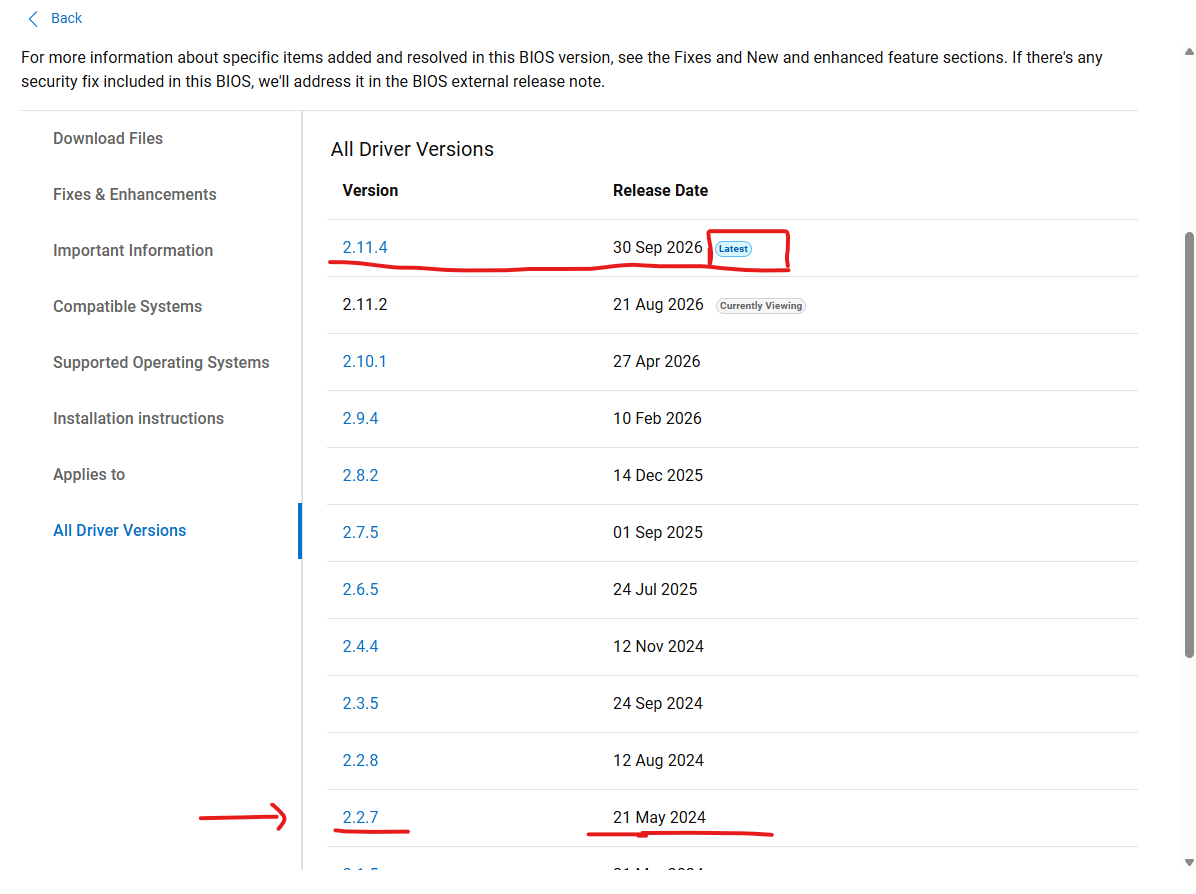
I Have 18 Dell R660 recording servers used for CCTV, and the CCTV network is standalone and not connected to the Internet. I checked all 18 servers, and they are running the same BIOS version (2.2.7).
The same issue also occurred on this particular server approximately six months ago.
If the issue is related to the BIOS or firmware version, shouldn’t we expect the same issue to occur on the other 17 servers as well? Currently, the issue is affecting only this one server.
Could you please advise whether this is more likely to be a hardware-related issue with CPU 1 or a BIOS/firmware-related issue?
1
0
Posted September 30th, 2026 13:58
Subsystem Status Details Battery 🟢 Healthy No issue detected Current 🟢 Healthy No issue detected Fan 🟢 Healthy No issue detected Intrusion 🟢 Healthy No chassis intrusion detected Memory 🟢 Healthy No memory fault reported PowerSupply 🟢 Healthy Power supply status normal Processor 🟢 Healthy Current subsystem health is normal SEL/Misc 🔴 Critical Issue detected in System Event Log / miscellaneous hardware events Storage 🟢 Healthy No storage fault detected Temperature 🟢 Healthy Temperature sensors normal Voltage 🟢 Healthy Voltage sensors normal This message appeared during the issue.
2
0
Posted September 30th, 2026 14:12
Hi,
To pinpoint exactly what triggered the restart, log directly into the server's iDRAC web interface and follow these steps:- Go to Maintenance > System Event Log.
- Look at the exact timestamp of the server restart and find the
CPU0704entry. - Read the lines immediately before and after that entry.
What to Look For:- The "Index Bug" Check: Look closely at the exact string of the error message. Does it mention a specific core (e.g., Core 4) or a specific socket? If your iDRAC firmware is older than v1.20.80.50, remember that a message stating "CPU 1" could actually mean "CPU 0".
- PCIe or Memory Bus Warnings: Even though Memory and Storage say "Healthy" right now, look to see if there was a "Correctable ECC error" or a "PCIe Train Error" logged a few seconds before the crash. A failing hardware bus can cause the CPU to throw a Machine Check Error and reboot.
- Three-Strike Rule: If the log shows nothing but a single, isolated
CPU0704line with no preceding errors, the issue is almost certainly a localized physical defect in either that specific CPU chip, its socket pins, or the motherboard voltage regulator.
with kind regards Martin/ Liebe Grüße Martin
Did I answer your query? Please click on ‘Mark as Accepted Answer’. ‘Thumbs up’ the posts you like!
DELL-Martin S
Social Media and Communities Professional
Dell Technologies | Enterprise Support Services
#IWork4Dell
1
0
Posted October 1st, 2026 05:32
@Dell-Martin S System logs shows :
Date Time Exact CPU Error 28 Sep 2026 09:08:40 CPU 1 machine check error detected. 28 Sep 2026 09:06:51 CPU 1 machine check error detected. 28 Sep 2026 02:12:41 CPU 1 machine check error detected. 28 Sep 2026 02:12:35 CPU 2 machine check error detected. 28 Sep 2026 02:12:33 CPU 1 machine check error detected. 28 Sep 2026 02:10:22 CPU 1 machine check error detected. 20 Sep 2026 16:58:36 CPU 1 machine check error detected. 20 Sep 2026 16:56:24 CPU 1 machine check error detected. 17 Apr 2026 22:04:25 CPU 1 machine check error detected. 17 Apr 2026 21:57:44 CPU 1 machine check error detected. 06 Apr 2025 04:45:01 CPU 1 machine check error detected. 12 Feb 2025 05:55:22 CPU 1 machine check error detected. Log Sequence Number:4431Detailed Description:System event log and OS logs may indicate that the exception is external to the processor.Recommended Action:1) Check system and operating system logs for exceptions.If no exceptions are found, continue to step 2. Otherwise, go to step 3.2) Update BIOS, if an update is available.3) If the issue persists, contact your technical support team.Refer to the product documentation to choose a convenient contact method.(edited)
1
0
Posted October 1st, 2026 05:47
HI SheminSalam
We would recommend you to update the Bios and iDRAC to the latest firmware versions for the cpu machine check errors first and then monitor if the errors come back.
Bios 2.11.4 https://dl.dell.com/FOLDER15031598M/1/BIOS_YJRVF_WN64_2.11.4.EXE
iDRAC 7.30.30.54 https://dl.dell.com/FOLDER14890481M/1/iDRAC-with-Lifecycle-Controller_Firmware_P3PPC_WN64_7.30.30.54_A00.EXE
Dell-ArunK
Social Media and Communities Professional
Dell Technologies | Enterprise Support Services
#IWork4Dell
Did I answer your query? Please click on ‘Mark as Accepted Answer’. ‘Thumbs up’ the posts you like!4
0
Posted October 1st, 2026 07:45
@Dell-ArunK Can we update only the affected server for now?
4
0
Posted October 1st, 2026 07:46
Dell-ArunK
Social Media and Communities Professional
Dell Technologies | Enterprise Support Services
#IWork4Dell
Did I answer your query? Please click on ‘Mark as Accepted Answer’. ‘Thumbs up’ the posts you like!

Dell-ArunK
Moderator
•
29 Posts
•
87 Points
2
0
Posted September 29th, 2026 01:07
Hi SheminSalam
Based on the information available, this appears to be more likely a server-specific BIOS/firmware-related issue rather than a confirmed CPU 1 hardware failure.
Although all 18 R660 servers are running the same BIOS version 2.2.7, only this particular server is reporting the CPU0704 error. If BIOS 2.2.7 itself had a general issue causing CPU0704, we would normally expect to see similar behavior on other servers running the same BIOS version.
However, since the issue has occurred previously on this same server, it is possible that there is a server-specific firmware condition or firmware interaction that is triggering the CPU machine-check event.
CPU0704 indicates that the processor detected a machine-check error, but it does not necessarily mean that the CPU itself is defective. The underlying condition can also be related to firmware or another hardware component interacting with the processor.
Therefore, before replacing CPU 1, we recommend reviewing the iDRAC Lifecycle Log/TSR for any associated CPU, memory, PCIe, power, or firmware events and verifying the BIOS and iDRAC firmware levels on this server.
At this stage, I would consider a firmware/BIOS-related issue on this particular server more likely than a generic BIOS issue affecting all 18 servers, while CPU or other hardware failure should remain as a possibility if the issue continues after the firmware is brought to the recommended level.
PowerEdge: CPU Machine Check Errors
https://www.dell.com/support/kbdoc/en-ed/000349127/poweredge-cpu-machine-check-errors?lang=en&utm_source
Dell-ArunK
Social Media and Communities Professional
Dell Technologies | Enterprise Support Services
#IWork4Dell
Did I answer your query? Please click on ‘Mark as Accepted Answer’. ‘Thumbs up’ the posts you like!