
UNSOLVED
R
rinconman285
1 Rookie
•
62 Posts
0
3428
August 13th, 2021 14:00
SupportAssist Questions
I received a Precision 7760 that came with SupportAssist preinstalled.
I am debating on uninstalling since I am not sure if there is a benefit to it. Command Update checks for the updates (or download from Dell Support Site) and I am not sure if the other features are useful.
A few questions on it.
1. It has a feature called System Repair (under settings) that looks to be similar to Windows System Restore. With this Dell system Repair on, the Windows Restore is off. One thing is I cannot manually make a restore point (Like Windows Restore) and it has not automatically created one. Is this better than Windows?
2. Is this windows Dell SupportAssist App different than the Bios SupportAssist OS Recovery?
3. When I open SupportAssist I would get a popup that’s asks the below in bold. Several times I hit remind me later, but the last time I hit the X at the top right to close the window (not dismiss button next to remind me later) and now it does not pop up asking this anymore. Anyone know what this download would do? Pro Support could not answer.
"Dell SupportAssist
Windows OS repair and restore features are available for download
If your PC has trouble starting, OS Recovery can help you diagnose hardware issues, repair your computer, back up important Windows OS files, or reset your device to its factory state. If you want this solution to run automatically when needed, select Let’s Go.
Once these features are enabled, your PC will automatically switch to recovery mode if your PC has issues booting up normally. In recovery mode, you'll be able to scan your PC for errors, restore your PC to a previous working state, or completely erase and reinstall windows to its original state.
If you choose to restore your PC to a previous state, it will come from a dedicated partition on your hard drive where OS Recovery will periodically save files needed for recovery. Done worry, you'll be able to see and track the setup and process."
Thanks
2113
0
Posted August 14th, 2021 11:00
If I turn off System Repair (which is not working) and turn off automatic scans, does does mean everything is turned off and I can just leave it installed (but not used)?
Once I turn off System Repair, can I enable System Restore?
2116
0
Posted August 14th, 2021 11:00
Also, i do not have this in the Control Panel that @lmacri noted.
"A program called Dell SupportAssist Remediation installed at Control Panel | Programs Programs an Features, as well as a service called Dell SupportAssist Remediation with a Startup type of "Automatic (Delayed Start)" that starts after boot-up (see Start | Windows Administrative Tools | Services)."
2090
0
Posted August 15th, 2021 03:00
Well, no responses from Dell yet. I did get some PMs, but the responses seem just like computer generator responses and not a live person.
Right now, SupportAssist is not generating any restore points with the Dell System Repair. I did try disabling and re-enabling but still no restore points.
Back to some basic questions and maybe Dell will Respond.
1. If I disable System Repair by just turning it off under SupportAssist Settings or in Control Panel under SupportAssist OS Recovery and if I turn off automatic scans, does that basically turn off SupportAssist features?
2. Once I disable System Repair, can I turn on Windows Protection System Restore?
3. Under Windows System Restore, I see the C drive and "Dell" is the "Dell" just because I have a recovery partition?
4. If I uninstall all three SupportAssist Programs, does it change the boot option of SupportAssist where I can use the recovery Partition to Factory reset the machine or use the Windows reset option? I do not need a restore point now and hope I do not need it, but want the option if ever needed.
5. Back to the original question, what does that OS Recovery Download do? Does it update the recovery partition or create a new one? I do not want to just do it and find I now have another recovery partition.
1401
0
Posted August 15th, 2021 08:00
Thanks. I did provide my tag via PM and have 5 years of pro support plus. Came here since Pro Support did not know what that download would do. I will try them again.
I think I might uninstall all three SupportAssist Apps. I am just concerned that will mess something up.
381
0
Posted August 15th, 2021 10:00
Thank you for your posts.
You noted:
... and these are all the partitions displayed in Disk Management (Control Panel | System and Security | Administrative Tools | Computer Management | Storage | Disk Management or just right-click the Start button and choose Disk Management). The 12.2 GB partition (Disk 0 Partition 5) might be the Dell recovery partition created at the factory for factory resets but I can't tell you what software created the other partitions on Disk 0 or what they're used for.
My partitions are:
- 190 MB EFI System
- OS (C:)
- 990MB Recovery Partition
- 1.3GB Recovery Partition
- 10 MB Unallocated
I have only two recovery partitions (990MB and one is 1.38GB). I do not have a third like your 12.1GB like yours. I am not sure if the order indicates anything. Maybe the 12.1GB is after the C drive and before your 1.22GB since it was created by the SupportAssist and the C Drive was resized.
My guess is this 12.1GB on yours is created for the System Repair (just a guess) and I do not have it since I have not said "Let's go" on the popup of "Windows OS repair and restore features are available for download" I noted in the first post.
My concern with all this is this just Dell Bloatware that they are trying to redo things that Windows already does such as System Restore and windows will do it better.
Also, if I choose to download these features, it will mess up my current drive by resizing the partitions.
1065
0
Posted August 15th, 2021 10:00
Moved to end
0
0
Posted August 28th, 2026 21:57
It is now 2026 and Dell SupportAssist is asking me the same question that rinconman285 was asking about at the beginning of this thread in 2021. I'm not going to rehash anything. I'm just going to poke at Dell for their hubris. And yes, I have many Dell computers in my service.
Here is a screen grab from SupportAssist, and yes my warranty has expired:
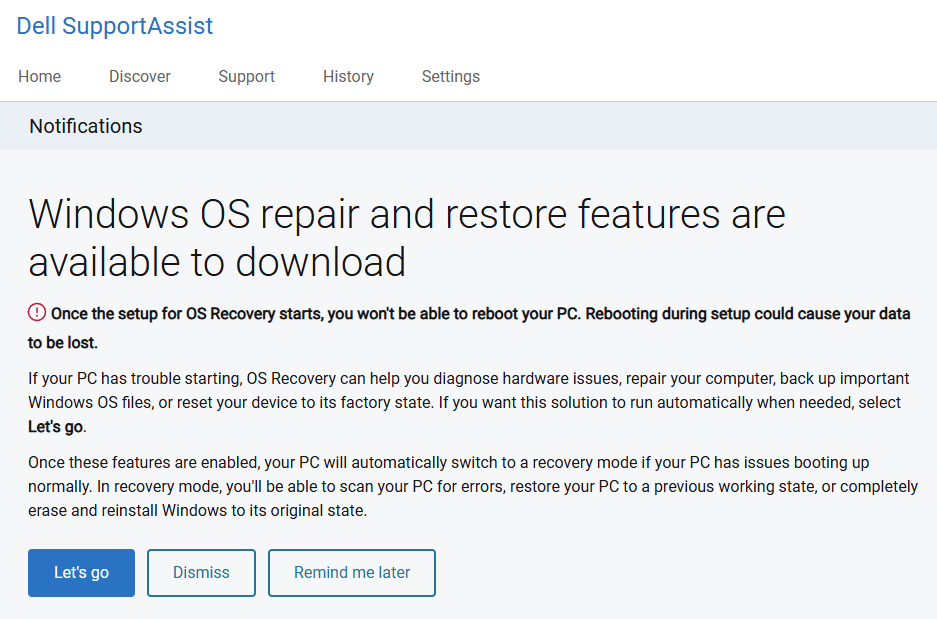
Based on the flow of comments above, @lmacri in 2021 had never seen the above and took a stab at proposing what it might be. This, my fellow owners, is the source of FUD, and is the reason I'm wasting my time typing this on a Friday night. I have been using personal computers since they were born and have seen the wonder and potential die on the vine.
This, in my mind, is an example of the problem with computer associated sales people pandering to the least common denominator, yet not providing sufficient information to the interested and educated user.
Is it reasonable that Dell supplies a piece of software that continues to offer me "free" updates (notice I did not say helpful), but provides no information to help me to determine whether or not I actually want to install their materials? Is it reasonable for them to not explain to me what this software actually is for and what it is going to do to my computer? Is it reasonable that they may not be referring to a specific piece of existing software by name for ANY reason? Why not provide information describing what this is for, what the benefits and drawbacks are, and why they are providing it to me?
Unfortunately, users in modern land (a mythical place where computers are actually useful and don't require you to spend countless hours fixing things because Microsoft, Dell, and the various hardware manufactures can't get together to standardize all of their interfaces so that they don't continually clobber someone else's steadfast belief or assumption?) seem to just roll over and take it, frustrated that there is no recourse or, worse yet in my view, that they just don't care: "it works good enough and I'll take the risk." Do they (Microsoft, Dell, and the various hardware manufactures) want us to move to a closed system like Apple's products (which have their own woes).
My issue is that rinconman285 asked a question and it seemed that Dell would not answer unless he proved his warranty status. That is truly scary because Dell doesn't consider actually supplying the information about what they want to install as a mandatory obligation to their customers. Makes me question why I have so many Dells.
I understand the "we need to make money" point, but do you want to make money being known as a large body part, or as a trusted and respected supplier who wants an informed user base whose time and interest they respect back?
Do I install this and risk a bad "interaction" between this unknown set of "features" that can disable my system and cost me literally money to hire Dell to fix the mess they created and left me with no power to predict, or, more likely, use my time trying to fix the problem with my own money while the whole event keeps me from enjoying my formerly free weekend time?
I am addressing this to a Dell forum. But my experience over the last few years has shown me that the current computer systems that we all rely on are so complex (by design or lack of design thought) that even the operating system vendor (MS) can't safely release an update because there is so little standardization (through their own hubris and constant ignorance of their own standards) that they have no real ability to predict what can happen and that even the hardware integrator (Dell) can't get their firmware correct.
If only I had enough time to fully flesh this out it would be so much better, but I've got to go play with the dolphins. Oh wait, I must have been channeling Dell.
(edited)
2125
0
Posted August 14th, 2021 09:00
Hi rincon285:
My Inspiron laptop has SupportAssist and Dell Update (not Command Update) but this might answer some of your questions.
SupportAssist is a utility that can be used to run update checks for Dell software and drivers, scan for hardware issue, optimize your system (e.g., clean the Windows registry and temporary folders, etc.) and submit support tickets (assuming your service warranty hasn't expired). I personally believe the system optimization scans can do more harm than good (see my 12-Jul-2021 post in ex-jedi's Prevent Automatic Recycle Bin Emptying) and I have turned off automatic scanning in SupportAssist [Options (gear icon) | Settings | Automate Scans and Optimizations | Scan Your System and Drivers | DISABLED] and only run manual update checks and the occasional hardware test from the Home tab. My service warranty has expired and the only benefit I can see to using SupportAssist (i.e., instead of Dell Update / Command Update) is that SupportAssist provides an easy way to run basic hardware scans (e.g., Home tab | Scan Hardware; Troubleshooting tab | I Want to Troubleshoot My PC | I Want to Scan My Entire PC) and keeps a log of your installed updates on the History tab.
SupportAssist OS Recovery is optional Dell software you can install that will create system repair points (snapshots) for emergency recovery. See the Dell SupportAssist OS Recovery User’s Guide and the support article Restore Your System Using Dell SupportAssist OS Recovery to learn more about this software. Note that the built-in Windows System Restore is now a legacy feature and disabled by default on Win 10 computers - see the Windows Central support article How to Use System Restore on Windows 10. The Laptop Magazine article How to Repair and Restore Windows 10 has a good overview of the advanced repair options in Win 10.
If you check for updates with SupportAssist or Dell Update / Command Update it may offer to install or update the SupportAssist OS Recovery Tools (I've never seen the message in your Question #3 but it's likely prompting you to install this update), and once the SupportAssist OS Recovery Tools are installed you should see:- A program called Dell SupportAssist Remediation installed at Control Panel | Programs Programs an Features, as well as a service called Dell SupportAssist Remediation with a Startup type of "Automatic (Delayed Start)" that starts after boot-up (see Start | Windows Administrative Tools | Services).
- A SupportAssist OS Recovery control panel (settings manager) at Control Panel | System and Security | SupportAssist OS Recovery.
- A new System Repair setting in SupportAssist at Options (gear icon) | Settings | System Repair where you can enable / disable System Repair and choose the max. amount of disk space your Dell system repair points will use. Note that the same settings can be controlled at Control Panel | System and Security | SupportAssist OS Recovery | Settings | System Repair.
- A hidden and protected folder created at C:\ProgramData\Dell\SARemediation\SystemRepair\ where system repair points (snapshots) should be automatically created daily. Note that you can view the contents of this folder if you change the folder settings in File Explorer to show hidden files (View | Hidden Items | ENABLED) and run the TreeSize Free utility with Administrator rights to browse to C:\ProgramData\Dell\SARemediation\SystemRepair\. My TreeSize image below was captured in May 2021 when System Repair was enabled and shows the \Snapshots subfolder using ~ 22 GB of disk space.
I have SupportAssist OS Recovery / SupportAssist Remediation v5.4.3.15135 installed on my Inspiron 5584 but it is currently turned off at Options (gear icon) | Settings | System Repair | System Repair is Turned On | DISABLED. This software has multiple bugs - for example, see my 03-Aug-2021 thread SupportAssist OS Recovery v5.4.3.15135 Not Creating System Repair Points about know issues where system repair points can exceed the max. allotted disk space and consume > 50 GB of disk space, where "Successful Application Reconfiguration" events are triggered by SupportAssist Remediation that flood the Event Viewer and Win 10 Reliability Monitor, etc.). Even worse, when my Inspiron 5584 would not boot up back in August 2020 I was unable to access the SupportAssist OS Recovery tools (my service warranty was still valid at the time but everything Dell phone support suggested wouldn't work) and I ended up having to perform a reset to factory condition. I now use Macrium Reflect Free to create the occasional full disk image (and created an emergency USB boot media with Macrium) just in case the system repair options built in to Win 10 don't help and I have to perform another emergency recovery. I've also enabled Windows System Restore per the Windows Central support article How to Use System Restore on Windows 10.
-----------
64-bit Win 10 Pro v20H2 build 19042.1110 * Firefox v91.0.0 * Microsoft Defender v4.18.2107.4 * MB Premium v4.4.4.126-1.0.1413 * Dell SupportAssist v3.10.1.23 * Dell SupportAssist Remediation v5.4.3.15135 * Dell Update for Windows 10 v4.3.0 * Macrium Reflect Free v7.3.5925 * TreeSize Free Portable v4.5.1.566
Dell Inspiron 15 5584, Intel i5-8265U CPU, 8 GB RAM, Toshiba KBG40ZNS256G 256 GB NVMe SSD, Intel UHD Graphics 6202121
0
Posted August 14th, 2021 10:00
I am hoping Dell can comment on what that download is that it is asking me to download. The popup did come back and this time I did select remind me later.
I already turned off Automatic Scans in the settings since I did not want it running things on its own. I do not like the ideal of items 3, 4, and 5 if I do not have an option to confirm any changes.
I see the following options:
- Get Drives & Downloads
- Scan Hardware
- Clean Files is says "Remove redundant files, temporary folders, and other inessential clutter from your PC." Does it give a list of what it will remove after running before removal?
- Tune Performance it says "Adjust Windows settings, including startup options, and clear unwanted registry files to maximize your processing speed." Not sure what this will do.
- Optimize network it says "Ensure connectivity and update device settings to keep your network efficient and reliable."
- Remove Viruses it says "Remove viruses and corrupted files to keep your system secure." I wonder if this just uses Windows Defender.
---------------
Under settings, Gear Icon, if I turn off System Repair, will it turn back on Windows System Restore and start making restore points?
If I uninstall it SupportAssist from Windows Programs and Features, will it effect the option under the bios for SupportAssist or is that a separate? Maybe I will just uncheck the System Repair like @lmacri noted above.
I actually have three SupportAssist programs listed:
- Dell SupportAssist 3.10.1.23
- Dell SupportAssist OS Recovery Plugin for Dell Update 5.4.1.14954
- Dell SupportAssist Remediation 5.4.3.15135
In the Bios I see:
SupportAssist OS Recovery
The SupportAssist OS Recovery option will enable or disable the boot flow for SupportAssist OS Recovery tool in the event of certain system errors. If the SupportAssist OS Recovery setup option is set to disabled then all automatic boot flow for SupportAssist OS Recovery tool will be disabled.I do have on my OEM drive a 990MB Recovery Partition and a 1.38GB Recovery Partition.

DELL-Cares
Moderator
•
27815 Posts
•
652 Points
2127
0
Posted August 14th, 2021 08:00
We tried reaching you on a private message asking for the Service Tag number to ascertain the warranty but did not receive a response. Please feel free to reply to the private message whenever you are available.
#IWork4Dell
For all non-technical issues that require your private data, we must communicate via a private Direct Message
Dell Partner GEM Program, Out of Warranty Support Options, BIS (Bureau of Indian Standards) certificate, Get a copy of your Dell invoice