VxRail: La habilitación de vSphere Lifecycle Manager falla debido a NON_COMPLIANT para Base_image
Resumen: Si el clúster de VxRail se actualizó de la versión 4.5.x a 7.0.240 o posterior, los usuarios deben actualizar a versiones más recientes y habilitar la administración del ciclo de vida de vSphere (vLCM). ...
Síntomas
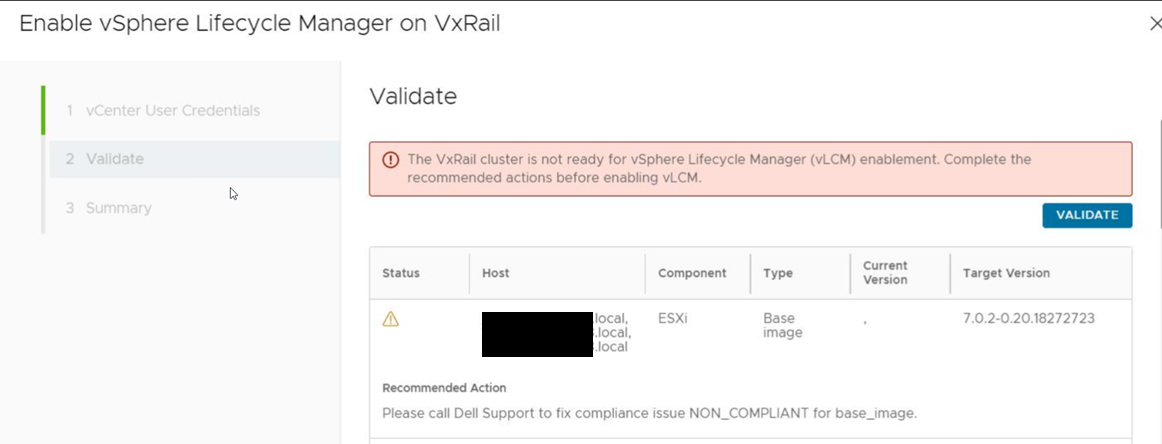
A partir de la versión 7.0.240 de VxRail, vSphere Lifecycle Manager (vLCM) es compatible con los clústeres de VxRail. Si el clúster de VxRail se actualiza desde 4.5.x y se realiza un intento de habilitar vLCM a través de la interfaz de usuario de VxRail o vCenter vLCM, los resultados del escaneo muestran que la imagen base de ESXi no es compatible y la validación de la habilitación de vLCM no se puede aprobar.
Los resultados del escaneo muestran que el clúster no está en cumplimiento, como se indica a continuación:
Causa
Según los comentarios de VMware: Problema conocido de ESXi cuando se actualiza de 6.5.x a 7.0.2 (VxRail 4.5.x a 7.0.240) y versiones posteriores cuando se utiliza la actualización de perfil, se recomienda el método de actualización aplicado.
Según la investigación de VxRail, el método de aplicación elimina del host los controladores de propiedad del cliente, lo que no se recomienda. Por lo tanto, cuando se habilita vLCM, los resultados del análisis muestran que la imagen base de ESXi no está en conformidad.
Si ESXi se actualiza directamente de 6.5.x a 7.0.2 o superior, se produce este problema. Si ESXi se actualiza de 6.5.x a 7.0.2 o posterior y, a continuación, se actualiza a 7.0.3, el problema no está presente y la habilitación de vLCM funciona.
Resolución
- Cancele el proceso de habilitación de vLCM en este momento.
- Continúe con una actualización de versión secundaria a una versión 7.0.x posterior.
- Vuelva a habilitar vLCM.