PowerVault ME5: Failed to add initiators to the host
Summary: Unable to map a new host initiator world-wide name (WWN) port to an existing mapped host using PowerVault Manager. Use the PowerVault ME command-line interface (CLI) to add the initiator instead. ...
Symptoms
One may encounter this situation when updating host mapping in PowerVault Manager for existing mapped hosts.
When trying to add the second initiator WWN or host to the existing mapped WWN or host, one may get a message indicating the new initiator cannot be added because it does not have the same volume mappings.
Reproduction steps for reference:
An administrator has a host with two or more initiator ports, however selects one initiator (e.g. Initiator0002) only and maps volume (s) to the host.
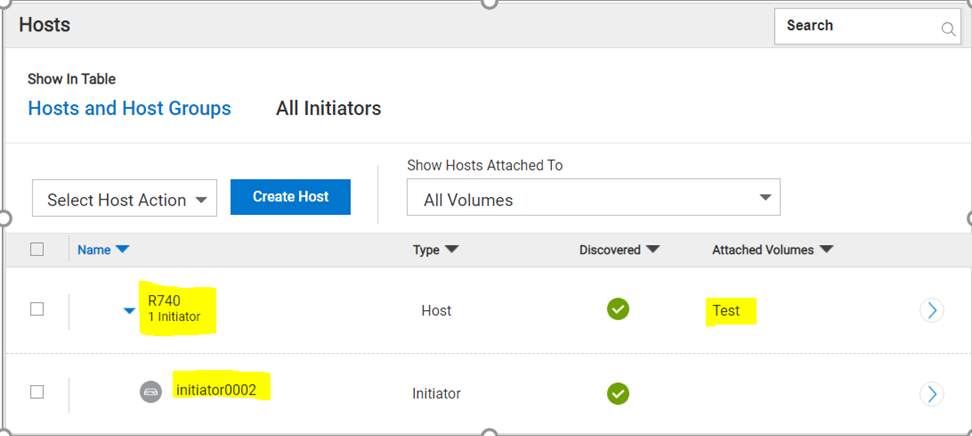
An attempt is made to add the send initiator (for example Initiator0001) to the existing host ( for example R740), and receives the following message "Failed to add initiators to the host. The mappings of the initiator are inconsistent with the mappings of the host. The initiator cannot be added to the host."


Cause
PowerVault Manager only permits mapping volumes to Hosts and Host Groups.
PowerVault Manager does not support mapping volumes to initiators.
This operation to "Map a volume to an initiator" is only available using the PowerVault ME command-line interface (CLI)
Resolution
Open an SSH session to either controller management IP address using a terminal application such as PuTTY. If you are unfamiliar with the command syntax type: help, help show initiator or help map and the syntax and parameters will be displayed.
Use the CLI command to "map volume" to add the second initiator WWN to the mapped host without any error.
# show initiators
Nickname       Discovered Mapped Profile  Host Type  ID
-----------------------------------------------------------------------
initiator0001  Yes        No     Standard SAS        54cd98f05a2fb900
initiator0002  Yes        Yes    Standard SAS        54cd98f05a2fb901
-----------------------------------------------------------------------
Success: Command completed successfully.
# map volume access read-write initiator initiator0001 lun 0 Test
Info: Mapping succeeded. Initiator 54cd98f05a2fb900 was mapped for volume Test with LUN 0. (Test)
Success: Command completed successfully. (Test) - Mapping succeeded. Initiator 54cd98f05a2fb900 was mapped for volume Test with LUN 0.
# show initiators
Nickname       Discovered Mapped Profile  Host Type  ID
-----------------------------------------------------------------------
initiator0001  Yes        Yes    Standard SAS        54cd98f05a2fb900
initiator0002  Yes        Yes    Standard SAS        54cd98f05a2fb901
-----------------------------------------------------------------------
Success: Command completed successfully.
Afterwards the changes are reflected in PowerVault Manager.

When creating a host for the first time in PowerVault Manager administrators should map both ports WWNs.