NVP vProxy : Échec de la FLR de la machine virtuelle Windows avec « Certains objets ou propriétés de sécurité n’ont pas pu être restaurés »
Résumé: Une restauration en mode fichier (FLR) est effectuée pour une machine virtuelle (VM) Windows à l’aide de l’appliance vProxy NetWorker VMware Protection (NVP). La FLR échoue avec le message « Some objects, or security properties could not be recovered ». Pour certains fichiers, ces mêmes fichiers ne peuvent pas être copiés manuellement à partir du point de montage FLR. Les machines virtuelles source et cible sont différentes. La machine virtuelle sélectionnée pour la restauration est configurée avec la fonctionnalité de déduplication des données du serveur de fichiers Windows activée. ...
Symptômes
- Une restauration en mode fichier (FLR) est effectuée pour une machine virtuelle Windows à l’aide de l’appliance vProxy NetWorker VMware Protection (NVP). La FLR échoue avec le message « Some objects, or security properties could not be recovered ».
YYYY-MM-DDTHH:mm:SS-TZ INFO:   [@(#) Build number: 35] Recovery: SOME_FILE
YYYY-MM-DDTHH:mm:SS-TZ ERROR:  [@(#) Build number: 35] Recovery: Cannot open 'C:\Program Files (x86)\EMC\vProxy FLR Agent\flr\mountpoints\FLR760973190\00-E$\SOME_DIRECTORY\SOME_FILE': open C:\Program Files (x86)\EMC\vProxy FLR Agent\flr\mountpoints\FLR760973190\00-E$\SOME_DIRECTORY\SOME_FILE: The file cannot be accessed by the system.
YYYY-MM-DDTHH:mm:SS-TZ INFO:   [@(#) Build number: 35] File copying completed.
YYYY-MM-DDTHH:mm:SS-TZ ERROR:  [@(#) Build number: 35] C:\Program Files (x86)\EMC\vProxy FLR Agent\bin\vflrcopy.exe: : Some objects or security properties could not be recovered.
- La machine virtuelle source et la machine virtuelle cible sont des machines virtuelles distinctes.
- Tentative de copie du fichier à partir du point de montage FLR sous
C:\Program Files (x86)\EMC\vProxy FLR Agent\flr\mountpointsÉchoue avec :Error 0x80070780
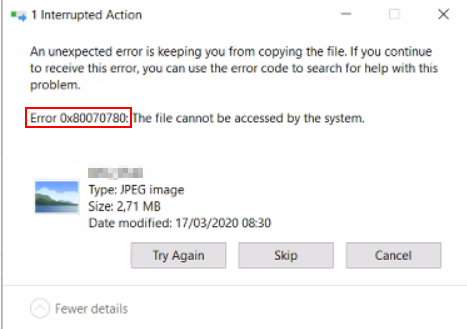
0x80070780.
Cause
La fonctionnalité de déduplication des données du serveur de fichiers est installée sur la machine virtuelle source. Ceci est déterminé par la commande PowerShell suivante sur la machine virtuelle source :
Get-WindowsFeature -Name FS-Data-Deduplication

La déduplication de volume est activée sur le volume à partir duquel vous tentez de restaurer des données. Cela peut être déterminé avec la commande PowerShell suivante sur la machine virtuelle source :
Get-DedupStatus -Volume "<DRIVE_LETTER>:"

Comportement attendu : le système de fichiers NTFS (Deduplicated New Technology File System) n’est pas pris en charge pour la FLR. Cela est décrit dans le Guide d’intégration de NetWorker VMware. Cette documentation est disponible sur la page produit NetWorker du support Dell
Résolution
Le NTFS dédupliqué est considéré comme non pris en charge par vProxy FLR. La configuration de volumes dédupliqués doit être évitée.
Contournement :
Utilisez l’une des options suivantes :
- Effectuez la FLR en restaurant les données sur la machine virtuelle d’origine.
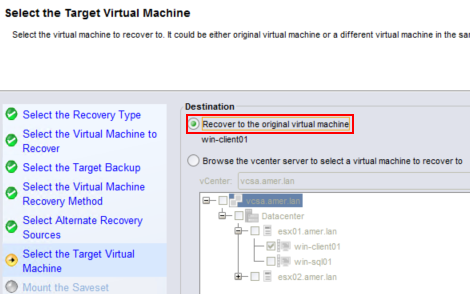
Graphique 4 : Sélection de la destination Restauration sur la machine virtuelle d’origine
- Sur la machine virtuelle cible, installez la fonctionnalité « Déduplication des données » à partir des rôles de serveur Windows.
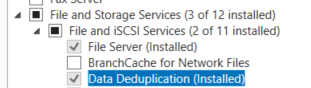
Graphique 5 : À partir de la machine virtuelle cible, installez la fonctionnalité « Déduplication des données » à partir des rôles de serveur Windows.
Une fois la fonctionnalité de déduplication des données installée, ne configurez aucun volume dédupliqué. Effectuez la FLR vers la machine virtuelle cible.
Informations supplémentaires
Des erreurs similaires peuvent s’afficher sur une machine virtuelle Windows lorsque le chemin long de Win32 est désactivé et que le chemin d’accès au fichier dépasse 260 caractères, comme indiqué dans l’article NVP vProxy : Échec de FLR sur la machine virtuelle Windows « La syntaxe du nom de fichier, du répertoire ou du libellé du volume est incorrecte »