ECS:無法在暫時網站服務中斷期間寫入容器
摘要: 應用程式無法在暫時網站中斷 (TSO) 期間寫入容器。
本文章適用於
本文章不適用於
本文無關於任何特定產品。
本文未識別所有產品版本。
症狀
- 寫入失敗
- 暫時站點中斷 (TSO)
原因
如果存儲桶已啟用 ADO,但在 TSO 期間為唯讀,則應用程式無法寫入存儲桶。這適用於所有通訊協定 (S3、CAS、Swift 或 ATMOS)。
解析度
- 如果在正在進行的 TSO 期間報告了寫入失敗,但讀取事務成功,請檢查存儲桶的中斷期間訪問 (ADO) 功能。
svc_tso summary
svc_tso v1.0.6 (svc_tools v2.9.0)                 Started 2023-11-23 03:25:24

Configured TSO Timeout: 15 minutes

                                              HB         HB         Last TSO
VDC Name             TSO Status               Success    Fail       Started              Ended

ecs-vdc           FAILOVER_STARTED         0          4          2023-11-22 16:31:08  -

Current Outages (TSO Active):
RG:      ecs-rg                      (urn:storageos:ReplicationGroupInfo:95e2102a-267b-496b-xxxx-703fe269ad79:global)
  VDC:   ecs-vdc                     (urn:storageos:VirtualDataCenterData:ff6f2b01-717b-4c5b-xxxx-0fe3e4cc8a66)
    TSO Active:          True
    TSO Status:          FAILOVER_STARTED
    TSO Started:         2023-11-22 16:31:08
    TSO Duration:        10h 54m 29s
    Heartbeat status:    Success 0 nodes     Failed 4 nodes

Task counts:
    MI_LISTING_REJOIN_TASK_KEY     0
    MI_REJOIN_ENTRY                0
    REJOIN_TASK_KEY                0

kpi.sh -s -cas
kpi.sh Version 2.6.9                                                           ecsn-01.src.local

Report start: 2023-11-23 02:32:36                Report end:   2023-11-23 03:32:36
Extracting RequestLog data:        DONE

                                   All Requests                                             -10005 Errors
                 READ      READ      WRITE     WRITE                         READ    READ    WRITE   WRITE
Node             CLIP      BLOB      CLIP      BLOB      DELETE   Total      CLIP    BLOB    CLIP    BLOB    DELETE  Total

10.101.xxx.108    0         1         0         40        0        41         0       0       0       40      0       40
10.101.xxx.109    1         0         0         42        0        43         0       0       0       42      0       42
10.101.xxx.110    0         0         0         41        0        41         0       0       0       41      0       41
10.101.xxx.111    0         0         0         42        0        42         0       0       0       42      0       42

Req Totals:      1         1         0         165       0        167        0       0       0       165     0       165
Req Error %:                                                                 0.00    0.00    0.00    100.00  0.00    98.80

Cleaning up temp files...DONE
使用者介面中的貯體詳細資料:
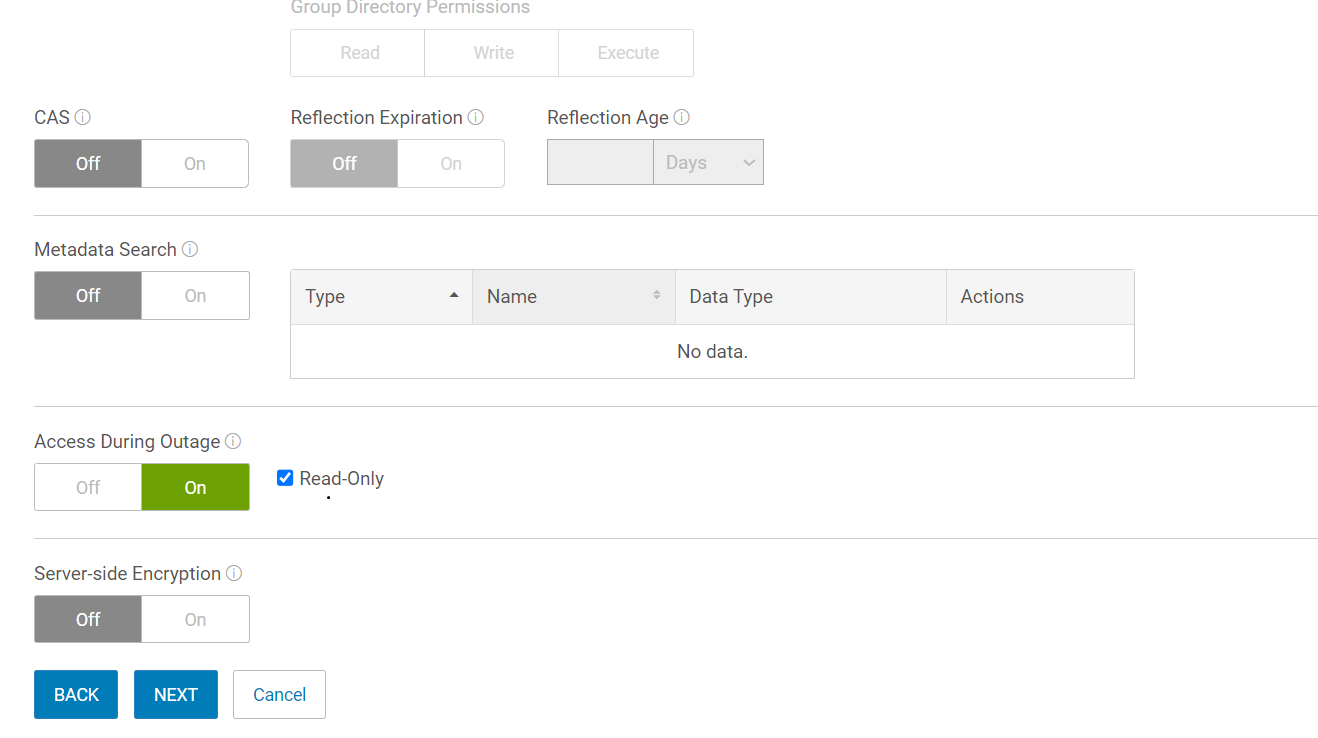
圖 1:使用者介面中的貯體詳細資料
- 確認儲存桶上的 ADO 是否已啟用,但使用唯讀選項。如果啟用了 ADO 唯讀選項,則預計存儲桶上的寫入事務將失敗,直到 TSO 完成。
svc_bucket info mybucket
svc_bucket v1.0.36 (svc_tools v2.9.0)                 Started 2023-11-23 03:30:20

Bucket ID                        mynamespace.mybucket

  Name                             mybucket
  Namespace                        mynamespace
  Owner User                       obuser
  Owner VDC Name                   ecs-vdc
  Owner zone/VDC ID                urn:storageos:VirtualDataCenterData:557fd7e5-a65d-4027-xxx-796595efa35e
  Keypool Hash ID                  fc7f0287854a7e701059664c6e90e87c1xxxxa346f865039267e80e42943b53
  Keypool Policy                   None
  Bucket ACL:
    Type       Affects    Name                                Access Rights
    user       file/dir   mybucket           FULL_CONTROL

  Replication Group (vpool) Name   ecs-rg
  Replication Group (vpool) ID     urn:storageos:ReplicationGroupInfo:95e2102a-267b-496b-xxxx-703fe269ad79:global
  Bucket Creation Date             2018-07-05 20:34:39 (1530822879729)
  Temp Failed (TSO)                True

  API Type                         CAS
  FS Access Enabled                False
  Encryption Enabled               True
  Versioning State                 Disabled
  ADO Enabled                      True
  ADO Read-Only                    True
  Object Lock Enabled              Not Supported
  Auto commit period (seconds)     None
  Reflection Expiration            False
  Reflection Age                   None

  Default FS Access permissions (for owner group):
    File                        Dir
    Read    Write   Exec       Read    Write   Exec
    Unk     Unk     Unk        Unk     Unk     Unk

  Object count                     34856497
  Total Object Size                26842.3382 GB
受影響的產品
ECS產品
ECS Appliance Hardware Gen3 EX5000, ECS Appliance, ECS Appliance Gen 1, ECS Appliance Gen 2, ECS Appliance Gen 3, ECS Appliance Hardware Gen3 EX300, ECS Appliance Hardware Gen3 EX3000, ECS Appliance Hardware Gen1 U-Series
, ECS Appliance Hardware Gen1 C-Series, ECS Appliance Hardware Gen2 C-Series, ECS Appliance Hardware Gen2 D-Series, ECS Appliance Hardware Gen2 U-Series, ECS Appliance Hardware Gen3 EX500, ECS Appliance Hardware Gen3 EXF900, ECS Appliance Hardware Series, ECS Appliance Software with Encryption, ECS Appliance Software without Encryption, ECS Software
...
文章屬性
文章編號: 000219870
文章類型: Solution
上次修改時間: 16 5月 2025
版本: 3
向其他 Dell 使用者尋求您問題的答案
支援服務
檢查您的裝置是否在支援服務的涵蓋範圍內。