Dell Unity:备份 Dell Unity 配置文件
Summary: 戴尔建议在每次重大配置更改后将 Dell Unity 系统配置文件保存到远程位置。
This article applies to
This article does not apply to
This article is not tied to any specific product.
Not all product versions are identified in this article.
Instructions
戴尔是否提供有关备份 Dell Unity 配置文件的任何建议或最佳实践?
是是。戴尔建议在每次重大配置更改后将 Unity 系统配置文件保存到远程位置。此做法有助于确保始终维护存储系统配置设置的最新副本,这对于系统恢复、故障排除或重建环境(如果需要)非常有用。
最佳做法
- 进行任何重大系统修改后保存配置文件,例如:
- 网络配置更改
- 存储池修改
- 用户或安全配置更新
- 复制或数据保护配置更改
- 硬件添加或更换
如何在 Unisphere 中保存配置文件
要创建和下载 Unity 配置文件的备份,请执行以下操作:
- 登录到 Unisphere。
- 转至服务。
- 选择 服务任务。
- 单击 Save Configuration。
- 选择 执行 以生成并下载配置文件。
- 作为定期备份和恢复过程的一部分,将文件存储在安全的远程位置。
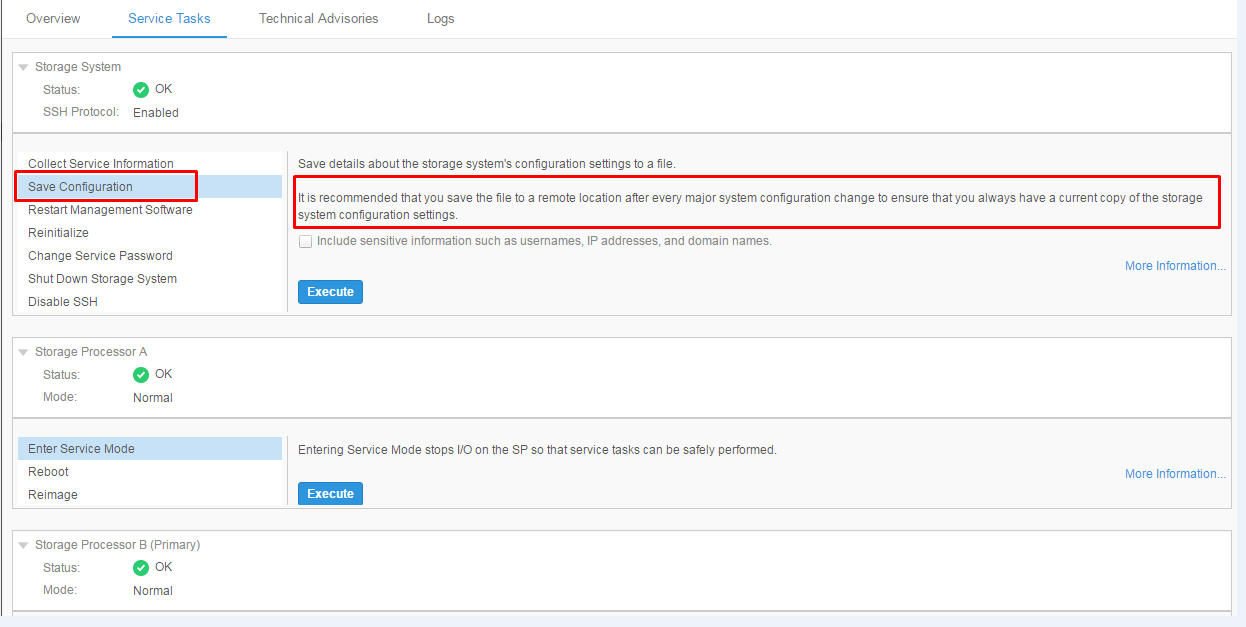
维护当前配置备份可确保在发生系统问题或恢复操作时可以快速还原或引用关键系统设置。
Additional Information
Affected Products
Dell EMC Unity FamilyProducts
Dell EMC Unity FamilyArticle Properties
Article Number: 000022810
Article Type: How To
Last Modified: 15 يوليو 2026
Version: 6
Find answers to your questions from other Dell users
Support Services
Check if your device is covered by Support Services.