Data Domain: Registry Key Config Primary Support Cyber Security Does Not Exist when Enabling CloudIQ
Summary: Data Domain running Operating System (OS) 8.3.x and later cannot enable "Share Data with CloudIQ." The graphical User Interface (UI) shows the error "Registry key config_master.support.cyber_security does not exist." Creating a new access key and disabling directFailoverEnabled fixes SupportAssist, but CloudIQ remains disabled (config_master.support.cloudiq_enabled=0). ...
This article applies to
This article does not apply to
This article is not tied to any specific product.
Not all product versions are identified in this article.
Symptoms
Issue Observed
Attempt to enable CloudIQ data sharing fails.
UI Error
The UI displays the following error when enabling CloudIQ:
Error: Registry key config_master.support.cyber_security doesn’t exist
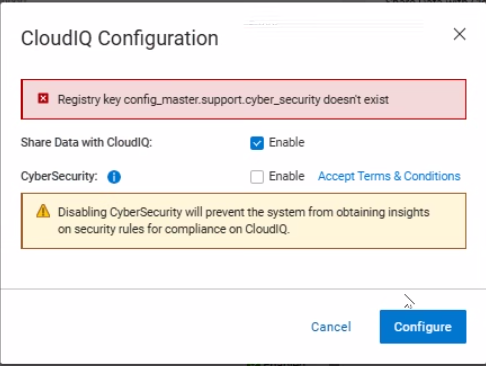
Registry Settings
config_master.support.cloudiq_enabled = 0 (CloudIQ disabled)- Missing registry key:
config_master.support.cyber_security
Telemetry Activity
No telemetry data is being sent to CloudIQ; the dd_telemetry_collector logs show no attempts to transmit data.
Cause
Missing Registry Key Preventing CloudIQ Enablement
The CloudIQ enable operation fails because the required registry key config_master.support.cyber_security does not exist in the system registry. The absence of this key cancels the registry transaction during the CloudIQ configuration step, resulting in the error message "Registry key config_master.support.cyber_security doesn’t exist."
09/29 12:53:42.050013 [14050fa0] sms_cloudiq_set_info_job:(ddr/sm/sms/sms_support.c:3393): Registry key config_master.support.cyber_security doesn't exist
09/29 12:53:42.050045 [14050fa0] ERROR: sms_cloudiq_set_info_job: Aborting registry trasaction
- The key is required for the CloudIQ and cyber‑security integration path.
- When the key is missing, the SMS service cancels the CloudIQ enable request.
Software issue Causing Registry Key Omission
During fresh installations and upgrades of DDOS 8.3.x, the installation scripts do not create the config_master.support.cyber_security registry entry.
Resolution
Enable CloudIQ Data Sharing on PowerProtect Data Domain.
Prerequisites
- Administrative access to the DD OS command line
- SupportAssist must be successfully configured and operational.
Step‑by‑Step Resolution (CLI or UI)
CLI
- Create the missing cyber‑security registry key. This key is required for the CloudIQ enable operation.
reg set config_master.support.cyber_security 0
Caution: Setting the value to
0 disables the cyber‑security telemetry flag, which is the default for most Data Domain deployments.
UI
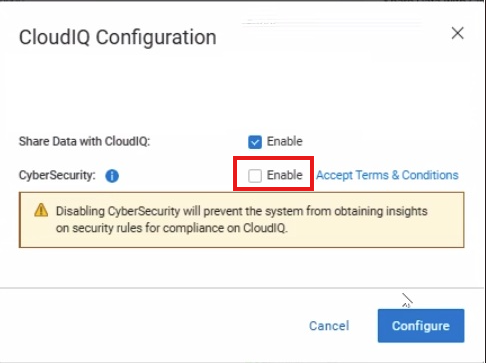
- During CloudIQ configuration, select Cyber-Security option to enable.
- Complete the configuration; this creates the registry entry.
- If needed, edit the configuration and clear Cyber-Security to disable.
Note: If the issue persists after completing the steps, contact Dell Support.
Affected Products
Data DomainArticle Properties
Article Number: 000420107
Article Type: Solution
Last Modified: 06 فبراير 2026
Version: 2
Find answers to your questions from other Dell users
Support Services
Check if your device is covered by Support Services.