NMC: Arabic characters are not displayed correctly in NMC recover
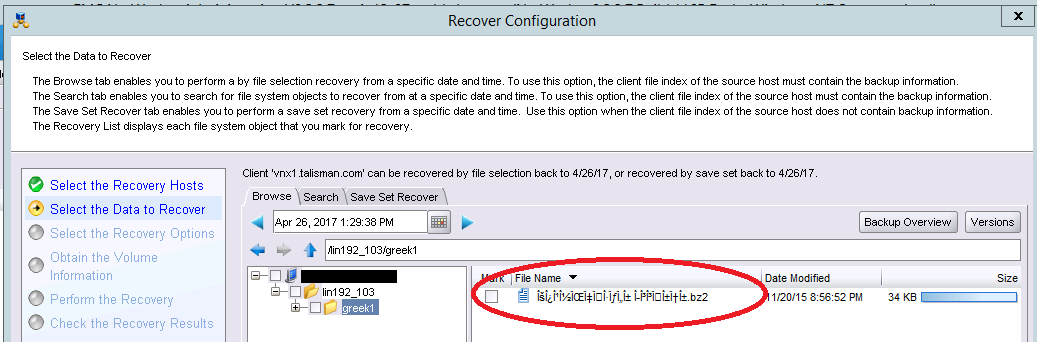
Summary: Arabic characters display correctly in the Windows User program but fail to render properly in NMC Recover.
This article applies to
This article does not apply to
This article is not tied to any specific product.
Not all product versions are identified in this article.
Symptoms
- Arabic characters are not displayed correctly in the NMC when displaying the file names in the Recover Configuration wizard.
- Arabic characters display correctly in the Windows User program.
- The Arabic language pack is installled on the NetWorker Server, NetWorker Management Console (NMC) server, and NMC client.
Cause
This is a known limitation in NetWorker.
Resolution
If the NMC server is not in US locale, perform the following steps:
- Stop the GST service on the NMC server.
- Take a backup copy of
gconsole.jnlp. On a Windows NMC server, this is located underC:\Program Files\EMC NetWorker\Management\GST\web). On a Linux NMC server, this is located under/opt/lgtonmc/web. - Edit the
gconsole.jnlpfile. Add the following two lines inside <application-desc> section towards the end.
<argument>-e</argument><argument>utf-8</argument>
- Start the GST services on NMC server host
- On the client machine where NMC GUI is to be launched, clear the java web cache and temp files.
- Launch the NMC GUI.
Affected Products
NetWorker, NetWorker Management ConsoleArticle Properties
Article Number: 000048756
Article Type: Solution
Last Modified: 10 رمضان 1447
Version: 6
Find answers to your questions from other Dell users
Support Services
Check if your device is covered by Support Services.