NetWroker Web UI (NWUI) stuck on the login credentials after entering credentials
Summary: NetWroker Web UI (NWUI) stuck on the login credentials after entering credentials
This article applies to
This article does not apply to
This article is not tied to any specific product.
Not all product versions are identified in this article.
Symptoms
The NetWorker Web User Interface (NWUI) log in screen appears to be stuck after entering credentials.
The browser returns Browser returns locale not supported error.
Cause
Only English is supported by NWUI.
Resolution
Change browser language setting to English.
Chrome:
1. In a new tab, enter:
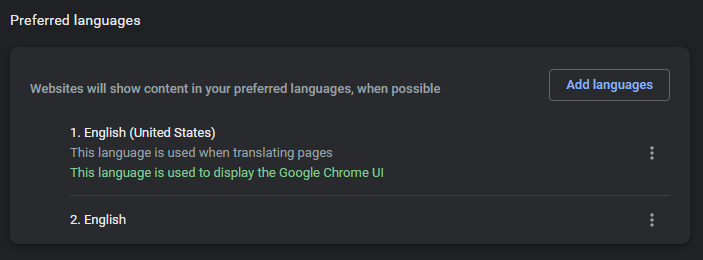
chrome://settings/languages
FireFox:
1. In a new tab, enter:
2. Search Languages
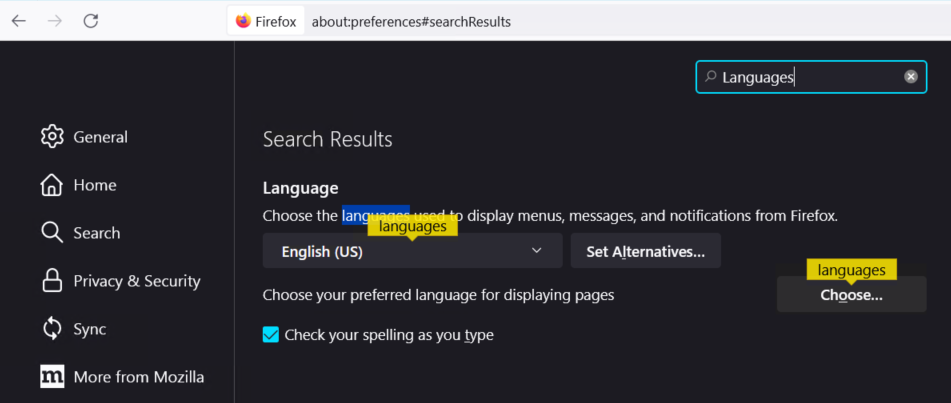
about:preferences
2. Search Languages
Edge:
1. In a new tab, enter:
2. Search Languages or select from the left menu.
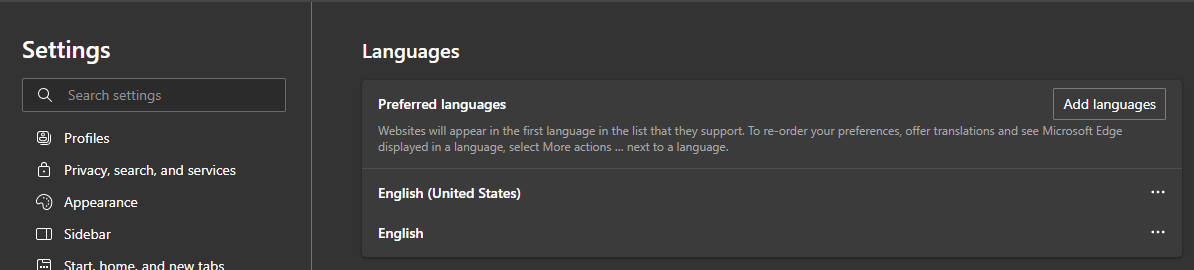
edge://settings/profiles
2. Search Languages or select from the left menu.
Affected Products
NetWorker Family, NetWorkerProducts
NetWorker FamilyArticle Properties
Article Number: 000200446
Article Type: Solution
Last Modified: 08 رمضان 1447
Version: 2
Find answers to your questions from other Dell users
Support Services
Check if your device is covered by Support Services.